前情提要: CppNote
在代码之前
预处理
可以使用参数-E生成预处理之后的文件,以i结尾,生成之后的文件还是一个文本文件(代码):
g++ -E helloworld.cpp -o helloworld.i编译
进行语法分析、词法分析、语义分析。
可以使用-S选项,生成汇编代码,以 s 结尾。
wanko@wanko:~/mycode$ g++ -S helloworld.i -o helloworld.s
wanko@wanko:~/mycode$ file helloworld.s
helloworld.s: assembler source, ASCII text
注意:linux 不以后缀名区分文件,上面仅仅是习惯。
汇编
使用汇编器将汇编代码生成为目标代码:
as helloworld.s -o helloworld.o查看生成了什么:
wanko@wanko:~/mycode$ ll
total 816
drwxrwxr-x  2 wanko wanko   4096  1月 10 22:26 ./
drwxr-x--- 23 wanko wanko   4096  1月 10 22:22 ../
-rwxrwxr-x  1 wanko wanko  16528  1月  8 01:48 a.out*
-rw-rw-r--  1 wanko wanko     64  1月 10 22:24 cppnote2tmp.md
-rw-rw-r--  1 wanko wanko   5769 12月 29 21:36 guoba.py
-rw-rw-r--  1 wanko wanko     87  1月  8 01:47 helloworld.cpp
-rw-rw-r--  1 wanko wanko 778417  1月  8 02:11 helloworld.i
-rw-rw-r--  1 wanko wanko   2752  1月 10 22:26 helloworld.o
-rw-rw-r--  1 wanko wanko   2254  1月  8 02:30 helloworld.s
wanko@wanko:~/mycode$ file helloworld.o
helloworld.o: ELF 64-bit LSB relocatable, x86-64, version 1 (SYSV), not stripped生成了二进制文件。使用nm命令查看:
wanko@wanko:~/mycode$ nm helloworld.o
                 U __cxa_atexit
                 U __dso_handle
                 U _GLOBAL_OFFSET_TABLE_
0000000000000090 t _GLOBAL__sub_I_main
0000000000000000 T main
000000000000003a t _Z41__static_initialization_and_destruction_0ii
                 U _ZNSolsEPFRSoS_E
                 U _ZNSt8ios_base4InitC1Ev
                 U _ZNSt8ios_base4InitD1Ev
                 U _ZSt4cout
                 U _ZSt4endlIcSt11char_traitsIcEERSt13basic_ostreamIT_T0_ES6_
0000000000000000 b _ZStL8__ioinit
                 U _ZStlsISt11char_traitsIcEERSt13basic_ostreamIcT_ES5_PKc
链接
将上一步生成的二进制文件与其他文件合在一起,生成可执行程序。
wanko@wanko:~/mycode$ g++ helloworld.o -o helloworld
wanko@wanko:~/mycode$ ls
a.out           guoba.py    helloworld.cpp  helloworld.o
cppnote2tmp.md  helloworld  helloworld.i    helloworld.s
wanko@wanko:~/mycode$ ll
total 836
drwxrwxr-x  2 wanko wanko   4096  1月 10 22:40 ./
drwxr-x--- 23 wanko wanko   4096  1月 10 22:31 ../
-rwxrwxr-x  1 wanko wanko  16528  1月  8 01:48 a.out*
-rw-rw-r--  1 wanko wanko   1501  1月 10 22:36 cppnote2tmp.md
-rw-rw-r--  1 wanko wanko   5769 12月 29 21:36 guoba.py
-rwxrwxr-x  1 wanko wanko  16528  1月 10 22:40 helloworld*
-rw-rw-r--  1 wanko wanko     87  1月  8 01:47 helloworld.cpp
-rw-rw-r--  1 wanko wanko 778417  1月  8 02:11 helloworld.i
-rw-rw-r--  1 wanko wanko   2752  1月 10 22:26 helloworld.o
-rw-rw-r--  1 wanko wanko   2254  1月  8 02:30 helloworld.s
执行:
wanko@wanko:~/mycode$ ./helloworld
hello world
查看文件的信息:
wanko@wanko:~/mycode$ file helloworld
helloworld: ELF 64-bit LSB pie executable, x86-64, version 1 (SYSV), dynamically linked, interpreter /lib64/ld-linux-x86-64.so.2, BuildID[sha1]=c372c07e5b06ebb28508a24d3eca177989deee49, for GNU/Linux 3.2.0, not stripped使用nm命令查看:
wanko@wanko:~/mycode$ nm helloworld
000000000000038c r __abi_tag
0000000000004010 B __bss_start
0000000000004150 b completed.0
                 U __cxa_atexit@GLIBC_2.2.5
                 w __cxa_finalize@GLIBC_2.2.5
0000000000004000 D __data_start
0000000000004000 W data_start
00000000000010f0 t deregister_tm_clones
0000000000001160 t __do_global_dtors_aux
0000000000003d88 d __do_global_dtors_aux_fini_array_entry
0000000000004008 D __dso_handle
0000000000003d90 d _DYNAMIC
0000000000004010 D _edata
0000000000004158 B _end
0000000000001254 T _fini
00000000000011a0 t frame_dummy
0000000000003d78 d __frame_dummy_init_array_entry
0000000000002140 r __FRAME_END__
0000000000003f90 d _GLOBAL_OFFSET_TABLE_
0000000000001239 t _GLOBAL__sub_I_main
                 w __gmon_start__
0000000000002010 r __GNU_EH_FRAME_HDR
0000000000001000 T _init
0000000000002000 R _IO_stdin_used
                 w _ITM_deregisterTMCloneTable
                 w _ITM_registerTMCloneTable
                 U __libc_start_main@GLIBC_2.34
00000000000011a9 T main
0000000000001120 t register_tm_clones
00000000000010c0 T _start
0000000000004010 D __TMC_END__
00000000000011e3 t _Z41__static_initialization_and_destruction_0ii
                 U _ZNSolsEPFRSoS_E@GLIBCXX_3.4
                 U _ZNSt8ios_base4InitC1Ev@GLIBCXX_3.4
                 U _ZNSt8ios_base4InitD1Ev@GLIBCXX_3.4
0000000000004040 B _ZSt4cout@GLIBCXX_3.4
                 U _ZSt4endlIcSt11char_traitsIcEERSt13basic_ostreamIT_T0_ES6_@GLIBCXX_3.4
0000000000004151 b _ZStL8__ioinit
U _ZStlsISt11char_traitsIcEERSt13basic_ostreamIcT_ES5_PKc@GLIBCXX_3.4注意:main的位置发生了变化。
- - - - - 说明 - - - - -
平时使用不需要上面这么复杂。
若不指定文件名,则会生成a.out:
g++ helloworld.cpp指定文件名的做法:
g++ helloworld.cpp -o nahida则会生存可执行文件nahida,执行方法:
./nahida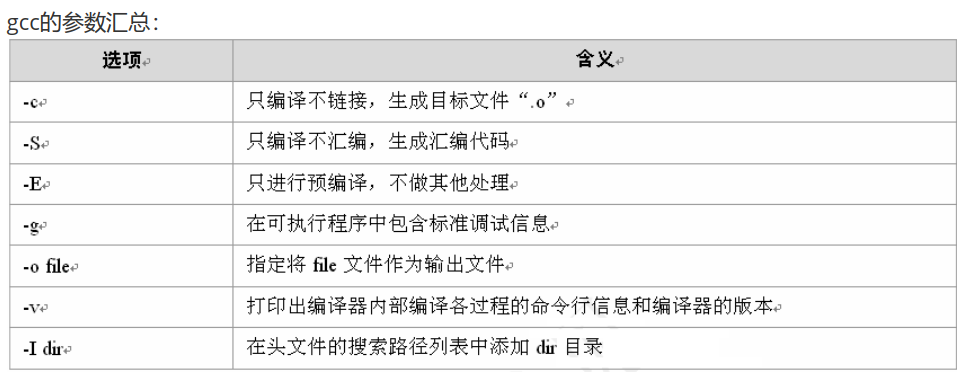
- - - - - END - - - - -
静态库、动态库
wanko@wanko:~/demo$ ls
add.c  main.c
wanko@wanko:~/demo$ cat add.c

int add(int x, int y){
	return x+y;
}
wanko@wanko:~/demo$ cat main.c
#include<stdio.h>

int add(int,int);

int main(int argc, char** argv){
	printf("add(3,4)=%d\n",add(3,4));
	return 0;
}
wanko@wanko:~/demo$ gcc main.c
/usr/bin/ld: /tmp/ccehSUXd.o: in function `main':
main.c:(.text+0x1e): undefined reference to `add'
collect2: error: ld returned 1 exit status正确的编译方式:
wanko@wanko:~/demo$ gcc main.c add.c -o main
wanko@wanko:~/demo$ ./main
add(3,4)=7
现在我们尝试将 add.c 制作为一个静态库。
静态库特点:在链接时拷贝库文件,打包进可执行程序(在编译的时候进行打包)。
文件名形式:**.a,一般以lib开头。eg:libadd.a
编译源码得到目标文件:
gcc -c add.c -o add.oar命令打包成库文件:
wanko@wanko:~/demo$ gcc -c add.c -o add.o
wanko@wanko:~/demo$ ar crsv libadd.a add.o
a - add.o
wanko@wanko:~/demo$ ll
total 24
drwxrwxr-x  2 wanko wanko 4096  1月 11 00:21 ./
drwxr-x--- 24 wanko wanko 4096  1月 11 00:13 ../
-rw-rw-r--  1 wanko wanko   39  1月 10 23:56 add.c
-rw-rw-r--  1 wanko wanko 1232  1月 11 00:16 add.o
-rw-rw-r--  1 wanko wanko 1372  1月 11 00:21 libadd.a
-rw-rw-r--  1 wanko wanko  119  1月 10 23:59 main.c
放入系统库文件路径:
wanko@wanko:~/demo$ sudo cp libadd.a /usr/lib在对应目录下可以找到如下文件:
wanko@wanko:~/demo$ cd /usr/lib
wanko@wanko:/usr/lib$ ll lib*.a
-rw-r--r-- 1 root root 1372  1月 11 00:24 libadd.a
为消除 demo 目录下的 libadd.a 的影响,改个名字:
wanko@wanko:~/demo$ ls
add.c  add.o  libadd.a  main.c
wanko@wanko:~/demo$ mv libadd.a libadd2.a
wanko@wanko:~/demo$ ll
total 24
drwxrwxr-x  2 wanko wanko 4096  1月 11 00:29 ./
drwxr-x--- 24 wanko wanko 4096  1月 11 00:13 ../
-rw-rw-r--  1 wanko wanko   39  1月 10 23:56 add.c
-rw-rw-r--  1 wanko wanko 1232  1月 11 00:16 add.o
-rw-rw-r--  1 wanko wanko 1372  1月 11 00:21 libadd2.a
-rw-rw-r--  1 wanko wanko  119  1月 10 23:59 main.c
链接的选项:
gcc main.c -o main -ladd即:
wanko@wanko:~/demo$ gcc main.c -o main -ladd
wanko@wanko:~/demo$ ll
total 40
drwxrwxr-x  2 wanko wanko  4096  1月 11 00:32 ./
drwxr-x--- 24 wanko wanko  4096  1月 11 00:13 ../
-rw-rw-r--  1 wanko wanko    39  1月 10 23:56 add.c
-rw-rw-r--  1 wanko wanko  1232  1月 11 00:16 add.o
-rw-rw-r--  1 wanko wanko  1372  1月 11 00:21 libadd2.a
-rwxrwxr-x  1 wanko wanko 16016  1月 11 00:32 main*
-rw-rw-r--  1 wanko wanko   119  1月 10 23:59 main.c
wanko@wanko:~/demo$ ./main
add(3,4)=7
现在将这个库删除:
sudo rm libadd.a此时 main 仍然可以执行。
现在我们尝试制作一个动态库。
动态库特点:在链接时,定位了库文件的位置,运行时加载。
文件名形式:**.so,一般以lib开头。eg:libadd.so
编译时加上-fpic选项,生成位置无关的目标代码:
gcc -c add.c -o add.o -fpic使用 gcc 生成动态库/共享库:
gcc -shared -o libadd.so add.o将动态库放入/usr/lib下面:
sudo cp libadd.so /usr/lib链接时加上选项-ladd:
gcc main.c -o main -laddwanko@wanko:~/dynamic$ ls
add.c add.o libadd2.so main.c
wanko@wanko:~/dynamic$ gcc main.c -o main -ladd
wanko@wanko:~/dynamic$ ./main
add(3,4)=7可以使用ldd命令查看依赖文件:
wanko@wanko:~/dynamic$ ldd main
	linux-vdso.so.1 (0x00007ffff85df000)
	libadd.so => /lib/libadd.so (0x00007fba42625000)
	libc.so.6 => /lib/x86_64-linux-gnu/libc.so.6 (0x00007fba42200000)
/lib64/ld-linux-x86-64.so.2 (0x00007fba4263f000)若删除libadd.so,再执行就会报错:
wanko@wanko:~/dynamic$ ./main
./main: error while loading shared libraries: libadd.so: cannot open shared object file: No such file or directory
静态库与动态库的比较:
- 动态库只在执行时才被链接使用,不是直接编译为可执行文件,并且一个动态库可以被多个程序使用,故可称为共享库。
- 静态库将会整合到程序中,在程序执行时不用加载静态库。
- 因此,静态库会使你的程序臃肿并且难以升级,但比较容易部署。而动态库会使你的程序轻便易于升级但难以部署。
命名空间
看一个例子:
#include<iostream>

int number = 10;

namespace wd
{
    //在命名空间中可以定义变量、函数、结构体、类,
    //统称为 实体
    int number = 1;
    void print(){
        std::cout << "void print()" << std::endl;
    }
}// end of namespace wd

int main(){
    std::cout << "outer number=" << number <<std::endl;
    std::cout << "inner number=" << wd::number <<std::endl;
    return 0;
}

/*
wanko@wanko:~$ cd "/home/wanko/mycode/" && g++ tmptst.cpp -o tmptst && "/home/wanko/mycode/"tmptst
outer number=10
inner number=1
*/
带命名空间的函数声明、命名空间是可以拓展的:
#include <iostream>

// 带命名空间的函数声明
namespace wd
{
    void print();
}

namespace wh
{
    int number = 30;
    void show(){
        std::cout << "void wh::show" << std::endl;
    }
    void display(){
        wd::print();
    }
}// namespace wh

namespace wd
{ // 命名空间是可以拓展的
    int number = 10;
    void print(){
        std::cout << "void print()" << std::endl;
        wh::show();
    }
} // namespace wd

int main(){
    wh::display();
    return 0;
}

/* 运行结果
wanko@wanko:~$ cd "/home/wanko/mycode/" && g++ tmptst.cpp -o tmptst && "/home/wanko/mycode/"tmptst
void print()
void wh::show
*/
甚至 std 也可以拓展:
namespace std
{
    struct Mystruct{
        int a;
        int b;
    };
} // namespace std
但是,尽量不要去拓展 std ,因为自己定义的实体有可能已经在 std 中,导致冲突。
命名空间可以嵌套:
#include <iostream>

// 命名空间可以嵌套
namespace wh{
    int number = 40;
    void display(){}
    namespace hb
    {
        int number = 1234;
    } // namespace hb
} // namespace wh

int main(){
    std::cout << wh::hb::number << std::endl;
    return 0;
}
/* 结果
1234
*/
new、delete
与malloc、free类似,用来申请、释放堆空间。
#include <stdlib.h>
#include <string.h>

int main(){
    int* p = (int*)malloc(sizeof(int));
    memset(p, 0, sizeof(int)); //初始化、清零
    *p = 70;
    // do something...
    free(p);
    return 0;
}
#include <iostream>
int main(){
// 申请堆空间,初始化,并赋值
int* p = new int(1);
std::cout << "*p = " << *p << std::endl;
delete p;
return 0;
}
/* 结果
*p = 1
*/申请数组:
#include <stdlib.h>
#include <string.h>
#include <stdio.h>

int main(){
    int a[10]; // 在栈上

    // 申请堆空间数组
    int* pArray = (int*) malloc(sizeof(int)*10);
    memset(pArray, 0, sizeof(int)*10);

    pArray[0] = 0;
    pArray[1] = 1;
    for(int i=0; i<10; i++)
        printf("%d ",pArray[i]);

    free(pArray);
    return 0;
}
/* 结果
0 1 0 0 0 0 0 0 0 0
*/
#include <iostream>
int main(){
int* pAarry = new int[10](); //小括号有初始化的含义
pAarry[0] = 0;
pAarry[1] = 1;
pAarry[2] = 2;
for(int i = 0; i < 10; i++)
std::cout << pAarry[i] << " ";
delete [] pAarry;
return 0;
}
/* 结果
0 1 2 0 0 0 0 0 0 0
*/malloc申请的堆空间是原始的、未初始化的,而new申请的是已初始化的。
解决内存泄露的例子:
int& getHeapData(){
    int* pInt = new int(200);
    return *pInt;
}

void test4(){
    int a = 1, b = 5;
    int c = a + getHeapData() + b; //内存泄露
    cout << "c = " << c << endl;

    int& ref = getHeapData();
    cout << "ref = " << ref << endl;
    delete &ref; //解决内存泄露
}
防止野指针:
void test(){
    int* pInt = static_cast<int*>(malloc(sizeof(int)));
    memset(pInt, 0, sizeof(int));
    // do something...
    free(pInt);
    pInt = nullptr; //否则会产生野指针
}
函数重载
函数重载的原理:使用同名函数的时候,根据形参类型、个数、顺序对函数名字进行改编,即“名字改编”。
wanko@wanko:~/mycode$ cat tsttmp.cpp
int add(int x,int y){
	return x+y;
}

int add(int x,double y){
	return x+y;
}
wanko@wanko:~/mycode$ nm tsttmp.o
0000000000000018 T _Z3addid
0000000000000000 T _Z3addii
注意: C 不支持函数重载。C++ 兼容 C ,会将 C 的函数按照 C 的方式编译,不会进行名字改编。
可以在 C++ 代码中将函数按照 C 的方式编译:
#ifdef __cplusplus // C++ 内置宏
extern "C"{
#endif

// some code

#ifdef __cplusplus
}// extern "C"
#endif
内联函数
内联函数不能分成头文件与实现文件的形式(不能将声明与定义分开)。
异常处理
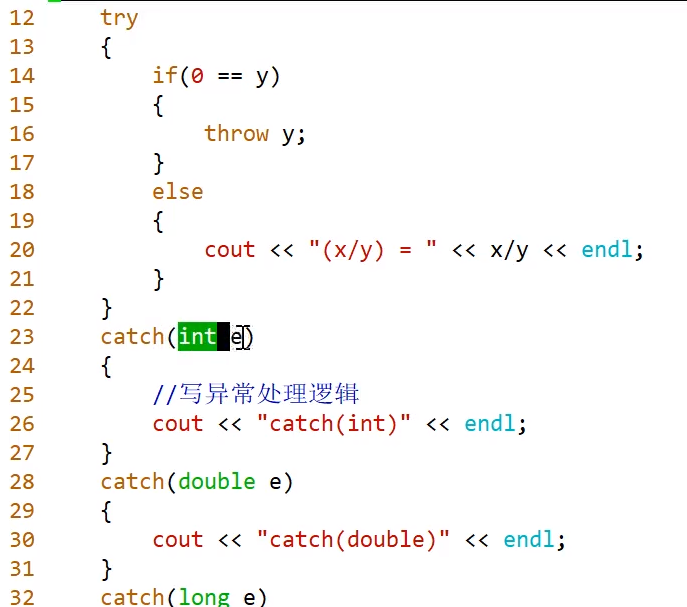
简单例子:
内存分配方式
相关知识和图片见: OS 强化 存储管理知识梳理
以 32 位机器为例。
0-3G:用户态的空间 3G-4G:内核态的空间
用户态空间:栈、堆、全局变量、静态变量、程序代码区、文字常量区。
栈区:存放的是局部变量、函数的参数。由操作系统负责。
堆区:即堆空间,malloc/calloc/new申请的都是堆空间,必须由程序员手动释放(free/delete)。
读写段:
全局变量
静态变量:static int c = 10;
只读段: 文字常量区:如字符串常量,“hello,world” 程序代码区:存放二进制代码
函数名是函数的入口地址:
#include <iostream>

int main(){
	printf("&main = %p\n", &main);
	printf("main = %p\n", main);
	return 0;
}
/* 结果
&main = 0x564630caf189
main = 0x564630caf189
*/
析构函数
销毁对象的时候,需要清理数据成员。使用析构函数完成此任务。
#include <iostream>

class point{
public:
	point(int x=0, int y=0):ix(x),iy(y){}
	void print(){
		std::cout << ix << " "
			      << iy << std::endl;
	}
	~point(){ //析构函数
	// destructor cannot have any parameters
	}

private:
	int ix;
	int iy;
};

int main(){
	point tmp;
	tmp.print();
	return 0;
}
/* 结果
0 0
*/
在上面的例子中,析构函数没有做任何事,因为该例中对象位于栈上,由操作系统负责回收。
对象在销毁的时候,会自动调用析构函数:
#include <iostream>

class point{
public:
	point(int x=0, int y=0):ix(x),iy(y){}
	void print(){
		std::cout << ix << " "
			      << iy << std::endl;
	}
	~point(){ //析构函数
	// destructor cannot have any parameters
		std::cout << "aha" << std::endl; // for test
	}

private:
	int ix;
	int iy;
};

int main(){
	point tmp;
	tmp.print();
	return 0;
}
/* 结果
0 0
aha
*/
默认情况下,编译器会自动生成析构函数。
析构函数可以显式调用(不建议这么做):
tmp.~point();构造函数调用的时候会创建对象:
#include <iostream>

class point{
public:
	point(int x=0, int y=0):ix(x),iy(y){}
	void print(){
		std::cout << ix << " "
			      << iy << std::endl;
	}
	~point(){ //析构函数
	// destructor cannot have any parameters
		std::cout << "aha" << std::endl; // for test
	}

private:
	int ix;
	int iy;
};

int main(){
	point tmp;
	tmp.print();
	std::cout << std::endl;
	point().print();
	std::cout << std::endl;
	return 0;
}
/* 结果
0 0

0 0
aha

aha
*/
有点小问题的代码:
// Computer.h
#ifndef _Computer_H_
#define _Computer_H_

#include <iostream>

using std::cout;
using std::endl;

class Computer{
public:
    Computer(const char* name, float price);
    void setBrand(const char* name);
    void setPrice(float price);
    void print();
    ~Computer();

private:
    char* _name;
    float _price;
};

#endif
// Computer.cc
#include "Computer.h"
#include <cstring>
Computer::Computer(const char* name, float price)
:_name(new char[strlen(name)+1]()),_price(price){
cout << "Computer(const char*, float)" << endl;
strcpy(_name, name);
}
void Computer::setBrand(const char* name){
strcpy(_name, name);
}
void Computer::setPrice(float price){
_price = price;
}
void Computer::print(){
cout << "name = " << _name << endl
<< "price = " << _price << endl;
}
Computer::~Computer(){
cout << "~Computer()" << endl;
}// testComputer.cc
#include "Computer.h"
#include <iostream>
using std::cout;
using std::endl;
void test(){
Computer com("lenovo", 5300);
com.print();
}
int main(){
test();
return 0;
}
/*
wanko@wanko:~/mycode$ g++ *.cc
wanko@wanko:~/mycode$ ./a.out
Computer(const char*, float)
name = lenovo
price = 5300
~Computer()
*/上面的代码没有delete,文件Computer.cc应该改为:
// Computer.cc
#include "Computer.h"
#include <cstring>

Computer::Computer(const char* name, float price)
                  :_name(new char[strlen(name)+1]()),_price(price){
    cout << "Computer(const char*, float)" << endl;
    strcpy(_name, name);
}

void Computer::setBrand(const char* name){
    strcpy(_name, name);
}

void Computer::setPrice(float price){
    _price = price;
}

void Computer::print(){
    cout << "name = " << _name << endl
         << "price = " << _price << endl;
}

Computer::~Computer(){
    cout << "~Computer()" << endl;
    if(_name){ // 等价于 if(_name != nullptr)
        cout << "1111" << endl; // for presentation
        delete [] _name;
        _name = nullptr;
    }
}
重新编译运行得到输出:
Computer(const char*, float)
name = lenovo
price = 5300
~Computer()
1111个人理解:在上面的代码中,Computer类型的对象包含两个数据成员:_name和_price,一个是指针类型,一个是浮点类型。创建对象时调用构造函数,指针_name指向堆上的空间。Computer对象在栈上,生命周期结束后由操作系统回收;_name指向的堆上空间需由析构函数释放。
下面给出两种情况的对比:
// testComputer.cc
#include "Computer.h"
#include <iostream>

using std::cout;
using std::endl;

Computer gcom("xiaomi", 7000);

void test(){
    gcom.print();
    cout << endl;

    Computer com("lenovo", 5300);
    com.print();
    cout << endl;

    Computer* pc = new Computer("huawei", 100000);
    pc->print();
}

int main(){
    cout << "enter main..." << endl;
    test();
    return 0;
}
/*
Computer(const char*, float)
enter main...
name = xiaomi
price = 7000

Computer(const char*, float)
name = lenovo
price = 5300

Computer(const char*, float)
name = huawei
price = 100000
~Computer()
1111
~Computer()
1111
*/
// testComputer.cc
#include "Computer.h"
#include <iostream>
using std::cout;
using std::endl;
Computer gcom("xiaomi", 7000);
void test(){
gcom.print();
cout << endl;
Computer com("lenovo", 5300);
com.print();
cout << endl;
Computer* pc = new Computer("huawei", 100000);
pc->print();
delete pc;
pc = nullptr;
}
int main(){
cout << "enter main..." << endl;
test();
return 0;
}
/*
Computer(const char*, float)
enter main...
name = xiaomi
price = 7000
Computer(const char*, float)
name = lenovo
price = 5300
Computer(const char*, float)
name = huawei
price = 100000
~Computer()
1111
~Computer()
1111
~Computer()
1111
*/拷贝构造函数
默认情况下,编译器会自动生成拷贝构造函数。
来看下面的例子:
// testComputer.cc
#include "Computer.h"
#include <iostream>

using std::cout;
using std::endl;

void test(){
    Computer com("lenovo", 5300);
    com.print();
    cout << endl;

    Computer com2 = com;
    com2.print();
    cout << endl;
}

int main(){
    test();
    return 0;
}
/*
Computer(const char*, float)
name = lenovo
price = 5300

name = lenovo
price = 5300

~Computer()
1111
~Computer()
1111
free(): double free detected in tcache 2
Aborted (core dumped)
*/在语句Computer com2 = com;中,调用了拷贝构造函数。程序报错的原因等会再讲。
拷贝构造函数的逻辑(以某个具体的类为例):
Point(const Point& rhs):_ix(rhs._ix),_iy(rhs._iy){}而上面的程序出错点在于:数据成员是指针类型,拷贝过来的指针指向了同一地址,因此销毁的时候对同一地址 free 了两次。
Computer.h文件部分代码:
class Computer{
public:
    Computer(const char* name, float price);
    void setBrand(const char* name);
    void setPrice(float price);
    void print();
    ~Computer();

private:
    char* _name;
    float _price;
};Computer.cc文件部分代码:
Computer::Computer(const char* name, float price)
                  :_name(new char[strlen(name)+1]()),_price(price){
    cout << "Computer(const char*, float)" << endl;
    strcpy(_name, name);
}

Computer::~Computer(){
    cout << "~Computer()" << endl;
    if(_name){ // 等价于 if(_name != nullptr)
        cout << "1111" << endl; // for presentation
        delete [] _name;
        _name = nullptr;
    }
}
可以改为:
// Computer.h
#ifndef _Computer_H_
#define _Computer_H_

#include <iostream>

using std::cout;
using std::endl;

class Computer{
public:
    Computer(const char* name, float price);
    void setBrand(const char* name);
    void setPrice(float price);
    void print();
    ~Computer();
    Computer(const Computer& rhs);
private:
    char* _name;
    float _price;
};

#endif
// Computer.cc
#include "Computer.h"
#include <cstring>
Computer::Computer(const char* name, float price)
:_name(new char[strlen(name)+1]()),_price(price){
cout << "Computer(const char*, float)" << endl;
strcpy(_name, name);
}
void Computer::setBrand(const char* name){
strcpy(_name, name);
}
void Computer::setPrice(float price){
_price = price;
}
void Computer::print(){
cout << "name = " << _name << endl
<< "price = " << _price << endl;
}
Computer::Computer(const Computer& rhs)
:_name(new char[strlen(rhs._name)+1]()), _price(rhs._price){
strcpy(_name, rhs._name);
}
Computer::~Computer(){
cout << "~Computer()" << endl;
if(_name){ // 等价于 if(_name != nullptr)
cout << "1111" << endl; // for presentation
delete [] _name;
_name = nullptr;
}
}// testComputer.cc
#include "Computer.h"
#include <iostream>
using std::cout;
using std::endl;
void test(){
Computer com("lenovo", 5300);
com.print();
cout << endl;
Computer com2 = com;
com2.print();
cout << endl;
}
int main(){
test();
return 0;
}运行结果:
Computer(const char*, float)
name = lenovo
price = 5300

name = lenovo
price = 5300

~Computer()
1111
~Computer()
1111注意:上面的代码不仅修改了实现文件,同时也修改了头文件。可能会遇到的问题的相关讨论:C++ error: definition of implicitly-declared
拷贝构造函数的调用时机:
- 用一个已存在的(类的)对象初始化另一个新对象时,会调用拷贝构造函数。
- 当实参和形参都是对象,进行实参和形参的结合时,会调用拷贝构造函数。
- 函数的返回值是对象,函数调用完成返回时,会调用拷贝构造函数。[注1]
- 总结:(即发生拷贝的时候。。。)
[注1] 编译器会自动做一个优化,会屏蔽一些过程:
#include <iostream>

class point{
public:
	explicit point(int x=0, int y=0):ix(x),iy(y){
		std::cout << "构造函数调用" << std::endl;
	}
	void print(){
		std::cout << ix << " "
			      << iy << std::endl;
	}
	~point(){ //析构函数
	// destructor cannot have any parameters
		std::cout << "~point()" << std::endl; // for test
	}
	point(const point& rhs):ix(rhs.ix), iy(rhs.iy){
		std::cout << "拷贝构造函数" << std::endl;
	}
private:
	int ix;
	int iy;
};

point func(){
	point pt(1,2);
	std::cout << "pt = ";
	pt.print();
	return pt;
}

void test(){
	point pt2 = func();
	std::cout << "pt2 = ";
	pt2.print();
}

int main(){
	test();
	return 0;
}
/* 结果
构造函数调用
pt = 1 2
pt2 = 1 2
~point()
*/
为查看完整过程,使用命令:
g++ tsttmp.cpp -fno-elide-constructors#include <iostream>
class point{
public:
explicit point(int x=0, int y=0):ix(x),iy(y){
std::cout << "构造函数调用" << std::endl;
}
void print(){
std::cout << ix << " "
<< iy << std::endl;
}
~point(){ //析构函数
// destructor cannot have any parameters
std::cout << "~point()" << std::endl; // for test
}
point(const point& rhs):ix(rhs.ix), iy(rhs.iy){
std::cout << "拷贝构造函数" << std::endl;
}
private:
int ix;
int iy;
};
point func(){
point pt(1,2);
std::cout << "pt = ";
pt.print();
return pt;
}
void test(){
point pt2 = func();
std::cout << "pt2 = ";
pt2.print();
}
int main(){
test();
return 0;
}
/* 结果
构造函数调用
pt = 1 2
拷贝构造函数
~point()
pt2 = 1 2
~point()
*/拷贝构造函数参数中的引用符号不能去掉。原因比较显然:若去掉则传参方式为拷贝,而此时拷贝行为尚未定义。
那么 const 能否去掉?
// 抱歉,不能
point(point& rhs):ix(rhs.ix), iy(rhs.iy){
	std::cout << "拷贝构造函数" << std::endl;
}
原因:
// 看一个更简单的例子
#include <iostream>
using namespace std;

int main(){
	int& kkk = 3;
	// 报错:
	// initial value of reference to non-const must be an lvalue

	// cannot bind non-const lvalue reference of type ‘int&’ to an rvalue of type ‘int’
	return 0;
}
更改为这样可以编译运行:
#include <iostream>
using namespace std;

int main(){
	const int& kkk = 3;
	cout << kkk << endl;
	return 0;
}
/* 结果
3
*/
赋值运算符函数
可由编译器自动生成。
例子:
#include <iostream>

class point{
public:
	explicit point(int x=0, int y=0):ix(x),iy(y){
		std::cout << "构造函数调用" << std::endl;
	}
	void print(){
		std::cout << ix << " "
			      << iy << std::endl;
	}
	~point(){ //析构函数
	// destructor cannot have any parameters
		std::cout << "~point()" << std::endl; // for test
	}
	point(const point& rhs):ix(rhs.ix), iy(rhs.iy){
		std::cout << "拷贝构造函数" << std::endl;
	}
private:
	int ix;
	int iy;
};

void test(){
	point pt(1,2);
	std::cout << "pt = ";
	pt.print();
	std::cout << std::endl;

	point pt2 = pt;
	std::cout << "pt2 = ";
	pt2.print();
	std::cout << std::endl;

	point pt3(3,4);
	std::cout << "pt3 = ";
	pt3.print();
	std::cout << std::endl;

	pt2.operator=(pt3); // 赋值运算符函数
	std::cout << "pt2_2 = ";
	pt2.print();
	std::cout << std::endl;
}

int main(){
	test();
	return 0;
}
/* 结果
构造函数调用
pt = 1 2

拷贝构造函数
pt2 = 1 2

构造函数调用
pt3 = 3 4

pt2_2 = 3 4

~point()
~point()
~point()
*/
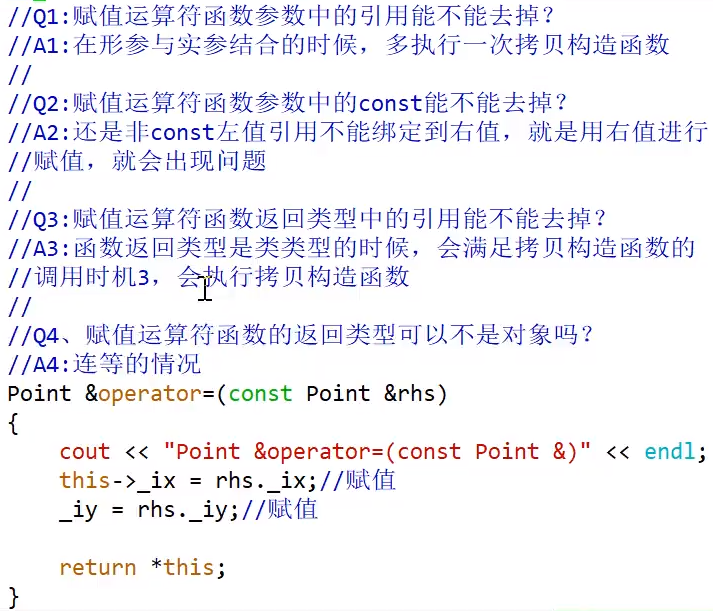
以上面代码为例,试写出逻辑:
point& operator=(const point& rhs){
    this->ix = rhs.ix;
    this->iy = rhs.iy;
    return *this;
}
涉及到指针的情形时,(编译器合成的版本)会遇到和拷贝构造函数类似的问题,需要注意,可考虑修改为:
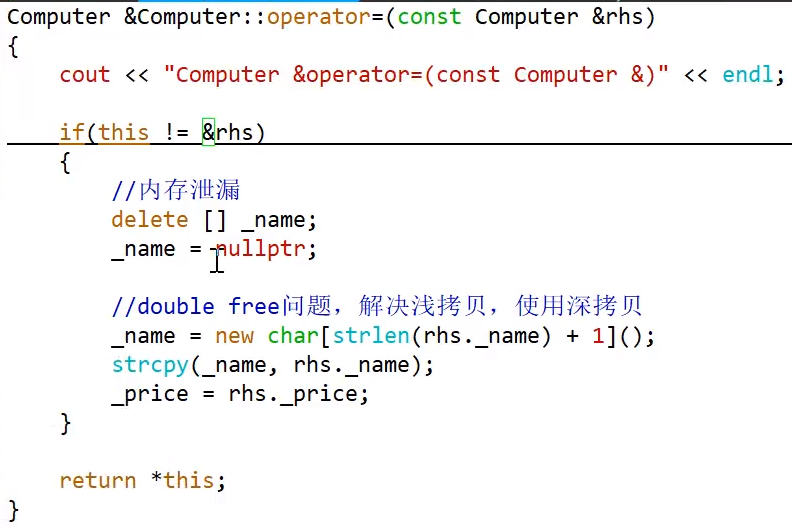
赋值运算符函数参数与返回值问题:
补充
空类为了区分不同的对象,会分配一个字节大小的空间:
#include <iostream>

using std::cout;
using std::endl;

class Empty{
	// 默认生成如下函数:
	// 合成的默认构造函数(synthesized default constructor)
	// 拷贝构造函数
	// 赋值运算符函数
	// 析构函数
};

int main(){
	cout << "sizeof(Empty) = " << sizeof(Empty) << endl;
	Empty e1;
	Empty e2;
	Empty e3;
	printf("&e1 = %p\n",&e1);
	printf("&e2 = %p\n",&e2);
	printf("&e3 = %p\n",&e3);
	return 0;
}
/* 结果
sizeof(Empty) = 1
&e1 = 0x7ffdb0bc2cc5
&e2 = 0x7ffdb0bc2cc6
&e3 = 0x7ffdb0bc2cc7
*/
对于类的静态数据成员,若采用头文件与实现文件分开的形式,应将静态数据成员在头文件中声明,实现文件中初始化。否则可能出现多次定义的问题。
逗号表达式,以最后一个逗号后面的值为准。
delete会调用析构函数。
单例模式
单例模式是 23 种 GoF 模式中最简单的设计模式之一。这个设计模式主要目的是想在整个系统中只能出现类的一个实例,即一个类只有一个对象。
其实现步骤大致有如下三步:
- 将构造函数私有化
- 在类中定义一个静态的指向本类型的指针变量
- 定义一个返回值为类指针的静态成员函数
// 单例模式
#include <iostream>

using std::cout;
using std::endl;

class A{
public:
	static A* myCreateObj(){
		if(_ptmp == nullptr){
			_ptmp = new A();
		}
		return _ptmp;
	}

	static void destroy(){
		if(_ptmp == nullptr) return;
		delete _ptmp;
		_ptmp = nullptr;
	}

private:
	~A(){
		cout << "这里是析构函数" << endl;
	}

	A(){ // 构造函数
		cout << "这里是构造函数" << endl;
	}
	static A* _ptmp;
};

A* A::_ptmp = nullptr;

int main(){
	A* ps1 = A::myCreateObj();
	A* ps2 = A::myCreateObj(); // just for test

	cout << "ps1 = " << ps1 << endl;
	cout << "ps2 = " << ps2 << endl;

	ps1->destroy();
	/*------just for test------*/
	ps2->destroy();
	ps1->destroy();

	A::destroy();
	/*-------------------------*/

	return 0;
}
// 该代码尚有其他问题,但目前不再讨论范围之内
/*
这里是构造函数
ps1 = 0x55f3f6288eb0
ps2 = 0x55f3f6288eb0
这里是析构函数
*/
用途:全局唯一的对象,如字典库、词典库、日志记录器等。
内存对齐
引入例子:
#include <iostream>

using std::cout;
using std::endl;

class mytst{
	char* _name;   // 8 个字节
	float _price;  // 4 个字节
};

int main(){
	cout << "sizeof(mytst) = " << sizeof(mytst) << endl;
	return 0;
}
/* 结果
sizeof(mytst) = 16
*/上面的 PDF 似乎非常抽象,看一个例子:
#include <iostream>

using std::cout;
using std::endl;

struct x
{             // byte
	char a;   //  1
	int b;    //  4
	short c;  //  2
	char d;   //  1
}MyStructX;   // 12

struct y
{             // byte
	int b;    //   4
	char a;   //   1
	char d;   //   1
	short c;  //   2
}MyStructY;   //   8

struct SS{
	int a;
	char b;
	short c;
	int d;
	struct FF{
		int a1;
		char b1;
		short c1;
		char d1;
	}MyStructFF;
	int e;
	double ww;
}MyStructSS;   //  40

struct SS2{
	int a;
	char b;
	short c;
	int d;
	struct FF{
		int a1;
		char b1;
		short c1;
		char d1;
	}MyStructFF;
	char e;
}MyStructSS2;  //  28

int main(){
	cout << sizeof(MyStructSS2);
	return 0;
}
/*
28
*/
解释:
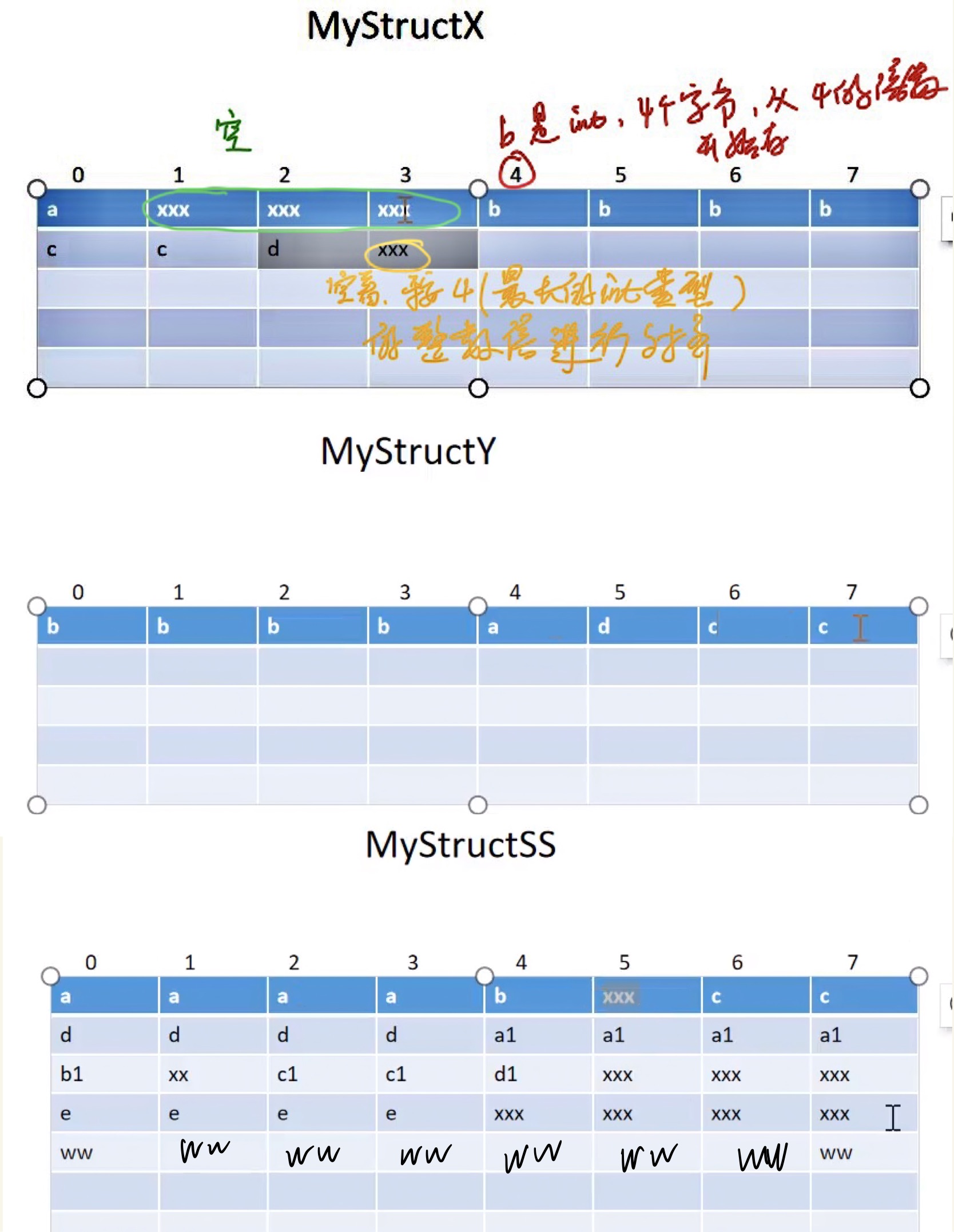
对于MyStructSS2:
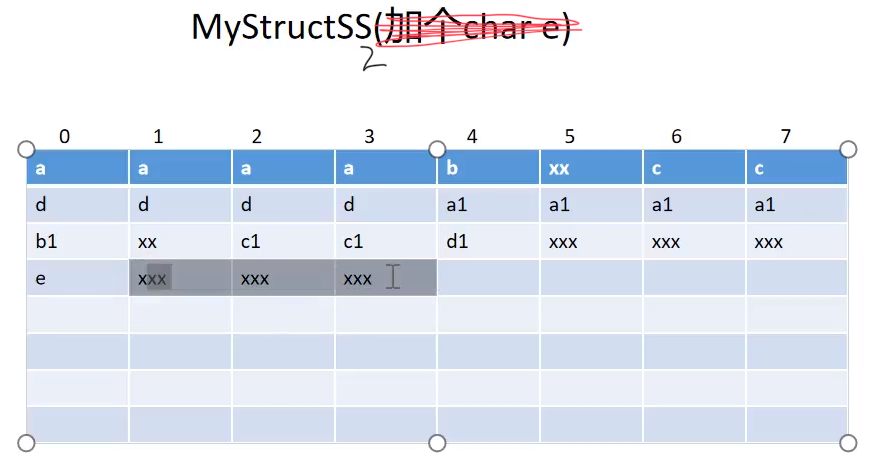
总结:
- 数据成员要对齐。
- 结构体要对齐,结构体的大小是其最大数据成员的整数倍。
- 结构体里还有结构体时,里结构体要对齐(按照最大数据成员的整数倍对齐)。
可使用如下方式进行某些调整,不细述:
#pragma pack(4)实现自己的 String
粗糙地实现自己的 String 类:
#include <string.h>
#include <iostream>

using std::cout;
using std::endl;

class String{
public:
    String():_pstr(nullptr) {
        cout << "String()" << endl;
    }

    String(const char* pstr):
    _pstr(new char[strlen(pstr)+1]())
    {
        cout << "String(const char*)" << endl;
        strcpy(_pstr, pstr);
    }

    String(const String& rhs):
    _pstr(new char[strlen(rhs._pstr)+1]())
    {
        cout << "String(const String&)" << endl;
        strcpy(_pstr, rhs._pstr);
    }

    String& operator= (const String& rhs){
        cout << "String& operator= (const String&)" << endl;
        if(this != &rhs){  //防止自复制
            if(_pstr){
                delete [] _pstr;
                _pstr = nullptr;
            }

            _pstr = new char[strlen(rhs._pstr)+1]();
            strcpy(_pstr, rhs._pstr);
        }
        return *this;
    }

    size_t length() const{
        size_t len = 0;
        if(_pstr){
            len = strlen(_pstr);
        }
        return len;
    }

    const char* c_str() const{
        if(_pstr){
            return _pstr;
        }
        else return nullptr;
    }

    ~String(){
        cout << "~String()" << endl;
        if(_pstr){
            delete [] _pstr;
            _pstr = nullptr;
        }
    }

    void print() const{
        if(_pstr){
            cout << "_pstr = " << _pstr << endl;
        }
    }

private:
    char* _pstr;
};

int main(int argc, char* argv[]){
    String str1;
    str1.print();

    cout << endl;
    String str2 = "hello world";
    String str3("Mizuho");

    cout << endl;
    str2.print();
    str3.print();

    cout << endl;
    String str4 = str3;
    str4.print();

    str4 = str2;
    str4.print();

    const char* pstr = str3.c_str();

    return 0;
}
运行结果:
String()

String(const char*)
String(const char*)

_pstr = hello world
_pstr = Mizuho

String(const String&)
_pstr = Mizuho
String& operator= (const String&)
_pstr = hello world
~String()
~String()
~String()
~String()
new、delete 的工作步骤
new 表达式工作步骤:
- 调用标准库函数
operator new,申请原始的未初始化的空间 - 在申请的空间上执行构造函数,初始化对象的数据成员
- 返回指向对象的指针
delete 表达式工作步骤:
- 调用析构函数,回收对象中数据成员所申请的资源
- 调用标准库函数
operator delete,回收对象本身所占用的资源
operator new和operator delete函数的重载版本:
// operator new 库函数
void* operator new(size_t);
void* operator new[](siez_t);

// operator delete 库函数
void operator delete(void*);
void operator delete[](void*);
下面通过例子来演示。
#include <iostream>
#include <stdlib.h>
#include <cstring>

using std::cout;
using std::endl;

class Student{
public:
    Student(int id, const char* name)
    : _id(id)
    , _name(new char[strlen(name)+1]())
    {
        cout << "Student(int, const char*)" << endl;
        strcpy(_name, name);
    }

    void* operator new(size_t sz) {
        cout << "void* operator new(size_t)" << endl;
        void* pret = malloc(sz);
        return pret;
    }

    void operator delete(void* pret) {
        cout << "void operator delete(void*)" << endl;
        free(pret);
    }

    void print() const {
        if(_name) {
            cout << "id = " << _id << endl
                 << "name = " << _name << endl;
        }
    }

    ~Student() {
        cout << "~Student()" << endl;
        if(_name) {
            delete [] _name;
            _name = nullptr;
        }
    }
private:
    int _id;
    char* _name;
};

int main(int argc, char* argv[]){
    Student* pstu = new Student(4231, "lili");
    pstu->print();

    delete pstu;
    pstu = nullptr;

    return 0;
}
/*
void* operator new(size_t)
Student(int, const char*)
id = 4231
name = lili
~Student()
void operator delete(void*)
*/
作为对比:
#include <iostream>
#include <stdlib.h>
#include <cstring>

using std::cout;
using std::endl;

void* operator new(size_t sz) {
    cout << "void* operator new(size_t)" << endl;
    void* pret = malloc(sz);
    return pret;
}

void operator delete(void* pret) {
    cout << "void operator delete(void*)" << endl;
    free(pret);
}

class Student{
public:
    Student(int id, const char* name)
    : _id(id)
    , _name(new char[strlen(name)+1]())
    {
        cout << "Student(int, const char*)" << endl;
        strcpy(_name, name);
    }

    void print() const {
        if(_name) {
            cout << "id = " << _id << endl
                 << "name = " << _name << endl;
        }
    }

    ~Student() {
        cout << "~Student()" << endl;
        if(_name) {
            delete [] _name;
            _name = nullptr;
        }
    }
private:
    int _id;
    char* _name;
};

int main(int argc, char* argv[]){
    Student* pstu = new Student(4231, "lili");
    pstu->print();

    delete pstu;
    pstu = nullptr;

    return 0;
}
/*
void* operator new(size_t)
void* operator new(size_t)
Student(int, const char*)
id = 4231
name = lili
~Student()
void operator delete(void*)
void operator delete(void*)
*/总结:当void* operator new(size_t sz)写在全局时,针对所有 new 表达式。
要求只能生成栈对象,不能生成堆对象:
#include <iostream>
#include <stdlib.h>
#include <cstring>

using std::cout;
using std::endl;

// 要求:只能生成栈对象,不能生成堆对象
class Student{
public:
    Student(int id, const char* name)
    : _id(id)
    , _name(new char[strlen(name)+1]())
    {
        cout << "Student(int, const char*)" << endl;
        strcpy(_name, name);
    }

    void print() const {
        if(_name) {
            cout << "id = " << _id << endl
                 << "name = " << _name << endl;
        }
    }

private:
    void* operator new(size_t sz) {
        cout << "void* operator new(size_t)" << endl;
        void* pret = malloc(sz);
        return pret;
    }

public:
    void operator delete(void* pret) {
        cout << "void operator delete(void*)" << endl;
        free(pret);
    }
    ~Student() {
        cout << "~Student()" << endl;
        if(_name) {
            delete [] _name;
            _name = nullptr;
        }
    }
private:
    int _id;
    char* _name;
};

int main(int argc, char* argv[]){
    Student stu(4202, "lucy");
    stu.print();

    // error, 会报错
    //Student* pstu = new Student(4231, "lili");
    //pstu->print();
    //delete pstu;
    //pstu = nullptr;

    return 0;
}
/*
Student(int, const char*)
id = 4202
name = lucy
~Student()
*/
在上面的代码中,为了成对出现,也可以将 delete 设为私有。
栈对象创建的条件:构造函数和析构函数都是 public .
要求,只能生成堆对象,不能生成栈对象:
#include <iostream>
#include <stdlib.h>
#include <cstring>

using std::cout;
using std::endl;

// 要求:只能生成堆对象,不能生成栈对象
class Student{
public:
    Student(int id, const char* name)
    : _id(id)
    , _name(new char[strlen(name)+1]())
    {
        cout << "Student(int, const char*)" << endl;
        strcpy(_name, name);
    }

    void print() const {
        if(_name) {
            cout << "id = " << _id << endl
                 << "name = " << _name << endl;
        }
    }

    void destory() {
        //不能直接执行析构函数,没有将对象本身占用的内存回收
        //this->~Student();
        delete this;
    }

    void* operator new(size_t sz) {
        cout << "void* operator new(size_t)" << endl;
        void* pret = malloc(sz);
        return pret;
    }

    void operator delete(void* pret) {
        cout << "void operator delete(void*)" << endl;
        free(pret);
    }

private:
    ~Student() {
        cout << "~Student()" << endl;
        if(_name) {
            delete [] _name;
            _name = nullptr;
        }
    }

private:
    int _id;
    char* _name;
};

int main(int argc, char* argv[]){
    //error, 会报错
    //Student stu(4202, "lucy");
    //stu.print();

    Student* pstu = new Student(4231, "lili");
    pstu->print();

    //error, 也会报错
    //delete pstu;
    //pstu = nullptr;
    //解决思路:写一个函数来执行此功能

    pstu->destory();
    return 0;
}
/*
void* operator new(size_t)
Student(int, const char*)
id = 4231
name = lili
~Student()
void operator delete(void*)
*/
输入输出流
来看一个例子:
#include <iostream>
#include <string>

using std::cout;
using std::endl;
using std::cin;
using std::string;

void printStreamStatus() {
    cout << "cin.badbit = " << cin.bad() << endl
         << "cin.failbit = " << cin.fail() << endl
         << "cin.eofbit = " << cin.eof() << endl
         << "cin.goodbit = " << cin.good() << endl;
    cout << endl;
}

void test() {
    int number = 0;
    printStreamStatus();
    cin >> number;
    printStreamStatus();

    cin.clear(); //重置流的状态
    printStreamStatus();

    cout << "number = " << number << endl;

    string line;
    cin >> line;
    cout << "line = " << line << endl;
}

int main(int argc, char* argv[]) {
    test();
    return 0;
}
/*  合法输入:
cin.badbit = 0
cin.failbit = 0
cin.eofbit = 0
cin.goodbit = 1

1
cin.badbit = 0
cin.failbit = 0
cin.eofbit = 0
cin.goodbit = 1

cin.badbit = 0
cin.failbit = 0
cin.eofbit = 0
cin.goodbit = 1

number = 1
hello
line = hello
*/

/* 非法输入:
cin.badbit = 0
cin.failbit = 0
cin.eofbit = 0
cin.goodbit = 1

hello
cin.badbit = 0
cin.failbit = 1
cin.eofbit = 0
cin.goodbit = 0

cin.badbit = 0
cin.failbit = 0
cin.eofbit = 0
cin.goodbit = 1

number = 0
line = hello
*/
可以发现,上例的非法输入结果中,line 直接接受了 “hello”, 而没有等待键盘输入。(因为数据仍在缓冲区中)
可使用cin.ignore(1024, '\n');清空缓冲区。更推荐的写法(需要包含头文件<limits>):
cin.ignore(std::numeric_limits<std::streamsize>::max(), '\n');缓冲区分为三种类型:全缓冲、行缓冲和不带缓冲。
- 全缓冲:填满标准 IO 缓存后才进行实际 IO 操作。典型代表是对磁盘文件的读写。
- 行缓冲:输入和输出中遇到换行符时,执行真正的 IO 操作。这时,输入的字符先放在缓冲区,按下回车换行时才进行实际的 IO 操作。典型代表是键盘输入数据。
- 不带缓冲:不进行缓冲。标准出错情况 cerr/stderr 是典型代表,目的:出错信息可以尽快显示。
程序正常结束,会刷新缓冲区:
#include <iostream>
#include <unistd.h>

using std::cout;

void test() {
    for(size_t i = 0; i!=1024; ++i) {
        cout << 'a';
    }
    sleep(5);
}

int main(int argc, char* argv[]) {
    test();
    return 0;
}
/*
表现:
程序在睡了 5 秒之后,才输出一堆 a
*/
缓冲区满,刷新:
#include <iostream>
#include <unistd.h>

using std::cout;

void test() {
    for(size_t i = 0; i!=1024; ++i) {
        cout << 'a';
    }
    cout << 'b';
    sleep(5);
}

int main(int argc, char* argv[]) {
    test();
    return 0;
}
/*
表现:
先输出了一堆 a ,然后睡了 5 秒之后,输出 b
*/
文件 IO
看一个例子:
#include <iostream>
#include <fstream>

using std::fstream;
using std::cerr;
using std::cin;
using std::endl;
using std::cout;

void test() {
    // 对于 fstream 而言,文件不存在时会打开失败
    fstream fs("heihei.txt");
    if(!fs.good()) {
        cerr << "fstream is not good!" << endl;
        return;
    }
    // 业务逻辑:
    // 从键盘输入数据,通过fs写到文件中
    // 再通过fs读文件,将数据输出到屏幕
    int number = 0;
    for(size_t i = 0; i != 5; i++){
        cin >> number;
        fs << number << " ";
    }

    for(size_t i = 0; i != 5; i++){
        fs >> number;
        cout << number << " ";
    }

    cout << endl;
    fs.close();
}

int main(int argc, char* argv[]) {
    test();
    return 0;
}
/*
1
2
3
4
5
5 5 5 5 5
*/

/*
wanko@wanko:~/mycode$ cat heihei.txt
1 2 3 4 5
*/
这个代码与预期目标不符,作以下调整:
#include <iostream>
#include <fstream>

using std::fstream;
using std::cerr;
using std::cin;
using std::endl;
using std::cout;

void test() {
    // 对于 fstream 而言,文件不存在时会打开失败
    fstream fs("heihei.txt");
    if(!fs.good()) {
        cerr << "fstream is not good!" << endl;
        return;
    }
    // 业务逻辑:
    // 从键盘输入数据,通过fs写到文件中
    // 再通过fs读文件,将数据输出到屏幕
    int number = 0;
    for(size_t i = 0; i != 5; i++){
        cin >> number;
        fs << number << " ";
    }

    for(size_t i = 0; i != 5; i++){
        //---- get status-------
        cout << "fs.failbit = " << fs.fail() << endl
             << "fs.eofbit = " << fs.eof() << endl
             << "fs.goodbit = " << fs.good() << endl;
        //----------------------
        fs >> number;
        cout << number << " ";
    }

    cout << endl;
    fs.close();
}

int main(int argc, char* argv[]) {
    test();
    return 0;
}
/*
1
2
3
4
5
fs.failbit = 0
fs.eofbit = 0
fs.goodbit = 1
5 fs.failbit = 1
fs.eofbit = 1
fs.goodbit = 0
5 fs.failbit = 1
fs.eofbit = 1
fs.goodbit = 0
5 fs.failbit = 1
fs.eofbit = 1
fs.goodbit = 0
5 fs.failbit = 1
fs.eofbit = 1
fs.goodbit = 0
5
*/
在上面的调试过程中,发现文件指针一直在末尾。
修改代码如下:
#include <iostream>
#include <fstream>

using std::fstream;
using std::cerr;
using std::cin;
using std::endl;
using std::cout;

void test() {
    // 对于 fstream 而言,文件不存在时会打开失败
    fstream fs("heihei.txt");
    if(!fs.good()) {
        cerr << "fstream is not good!" << endl;
        return;
    }
    // 业务逻辑:
    // 从键盘输入数据,通过fs写到文件中
    // 再通过fs读文件,将数据输出到屏幕
    int number = 0;
    for(size_t i = 0; i != 5; i++){
        cin >> number;
        fs << number << " ";
    }

    // 输出指针偏移的位置:
    size_t len = fs.tellp();
    cout << "len = " << len << endl;

    fs.seekp(0);
    len = fs.tellp();
    cout << "len = " << len << endl;

    for(size_t i = 0; i != 5; i++){
        fs >> number;
        cout << number << " ";
    }

    cout << endl;
    fs.close();
}

int main(int argc, char* argv[]) {
    test();
    return 0;
}
/*
wanko@wanko:~$ cd "/home/wanko/mycode/" && g++ testtmp.cc -o testtmp && "/home/wanko/mycode/"testtmp
1
2
3
4
5
len = 10
len = 0
1 2 3 4 5
wanko@wanko:~/mycode$ cat heihei.txt
1 2 3 4 5
*/tellp,p = put
tellg,g = get
seekp / seekg 同理
也可以使用相对位置:
fs.seekp(-11, std::ios::end); // 相对位置串 IO
数字转字符串:
#include <iostream>
#include <string>
#include <sstream>

using namespace std;

string int2str(int value) {
    ostringstream oss;
    oss << value;
    return oss.str();
}

void test() {
    int number = 20;
    string s1 = int2str(number);
    cout << "s1 = " << s1 << endl;
}

int main() {
    test();
    return 0;
}
/*
s1 = 20
*/
一种新颖的用法(将流中各元素按需取出):
#include <iostream>
#include <string>
#include <sstream>

using namespace std;

void test() {
    int num1 = 10;
    int num2 = 20;
    stringstream ss;
    ss << "num1= " << num1
       << " num2= " << num2 << endl;
    string s1 = ss.str();
    cout << s1 << endl;

    string key;
    int value;
    while(ss >> key >> value) {
        cout << key << "--->" << value << endl;
    }
}

int main() {
    test();
    return 0;
}
/*
num1= 10 num2= 20

num1=--->10
num2=--->20
*/
日志系统
概述
日志的作用: 例如一个需要 7*24h 后台运行的服务器程序,当服务器崩溃或出现问题后,需要查看日志以分析问题。
例子:在/var/log下,打开文件syslog.1,可以欣赏到五彩斑斓的日志记录。
日志的设计思路:
- 记录器:产生日志记录的原始信息。例如,等级、时间、记录的位置。
- 过滤器:按指定条件过滤掉不需要的日志。
- 格式化器:格式化原始日志信息。
- 输出器:将处理后的日志记录到目的位置。
log4cpp 安装
官网: https://log4cpp.sourceforge.net/ 文档: https://log4cpp.sourceforge.net/api/index.html
安装:
- 在官网下载 log4cpp-1.1.4.tar.gz(版本号可能会更新)至用户主目录
~ tar zxvf log4cpp-1.1.4.tar.gzcd ~/log4cpp/./configuremakemake checksudo make install- 安装成功
默认lib库路径是:/usr/local/lib/
默认头文件的位置:/usr/local/include/log4cpp
编译使用 log4cpp 库的 CPP 文件时,要加上库文件,才能编译通过。示例:
g++ log4test.cpp -llog4cpp -lpthread运行时,若提示缺少 log4cpp 库文件,表示找不到 log4cpp 的动态库,需要以管理员身份登录终端,然后执行:
sudo vim /etc/ld.so.conf在文件末尾另起一行,写入动态库 log4cpp 的路径:
/usr/local/lib更新库文件的缓存信息:
sudo ldconfig此时初始工作完成。
log4cpp 使用
相关知识讲解:
注意:在上面的 PDF 中,OstreamAppender()的第二个形参少了一个*,应为指针类型。
相关文章: log4cpp_作者静觅_CSDN
记录器: Category 目的地: Appender 过滤器: Priority 格式化器: Layout
Priority 等级:
typedef enum
{
    EMERG=0,
    FATAL=0,
    ALERT=100,
    CRIT=200,
    ERROR=300,
    WARN=400,
    NOTICE=500,
    INFO=600,
    DEBUG=700,
    NOTSET =800
}PriorityLevel;
代码实例:
#include <iostream>
#include <log4cpp/SimpleLayout.hh>
#include <log4cpp/OstreamAppender.hh>
#include <log4cpp/Category.hh>
#include <log4cpp/Priority.hh>

using std::cout;
using std::endl;

using namespace log4cpp;

void test(){
    // 日志的格式
    SimpleLayout* ps1 = new SimpleLayout();

    // 日志的目的地               // 参数含义见上面的 PDF
    OstreamAppender* pos = new OstreamAppender("12", &cout);
    pos->setLayout(ps1);

    // 日志的记录器
    Category& root = Category::getRoot();
    root.addAppender(pos);

    // 日志的过滤器
    root.setPriority(Priority::ERROR);

    root.emerg("this is a emerg msg");
    root.fatal("this is a fatal msg");
    root.alert("this is a alert msg");
    root.crit("this is a crit msg");
    root.error("this is a error msg");
    root.warn("this is a warn msg");
    root.info("this is a info msg");
    root.debug("this is a debug msg");

    // 回收空间
    Category::shutdown();
}

int main(){
    test();
    return 0;
}
/*
wanko@wanko:~/mycode$ g++ testtmp.cc -llog4cpp -lpthread
wanko@wanko:~/mycode$ ./a.out
FATAL   : this is a emerg msg
FATAL   : this is a fatal msg
ALERT   : this is a alert msg
CRIT    : this is a crit msg
ERROR   : this is a error msg
*/
使用 PatternLayout 的例子:
#include <iostream>
#include <log4cpp/PatternLayout.hh>
#include <log4cpp/OstreamAppender.hh>
#include <log4cpp/Category.hh>
#include <log4cpp/Priority.hh>

using std::cout;
using std::endl;

using namespace log4cpp;

void test(){
    // 日志的格式
    PatternLayout* ppl = new PatternLayout();
    ppl->setConversionPattern("%d %c [%p] %m%n");
         //  日期  Category名字  等级  字符串  换行

    // 日志的目的地               // 参数含义见上面的 PDF
    OstreamAppender* pos = new OstreamAppender("12", &cout);
    pos->setLayout(ppl);

    // 日志的记录器
    Category& root = Category::getRoot();
    root.addAppender(pos);

    // 日志的过滤器
    root.setPriority(Priority::ERROR);

    root.emerg("this is a emerg msg");
    root.fatal("this is a fatal msg");
    root.alert("this is a alert msg");
    root.crit("this is a crit msg");
    root.error("this is a error msg");
    root.warn("this is a warn msg");
    root.info("this is a info msg");
    root.debug("this is a debug msg");

    // 回收空间
    Category::shutdown();
}

int main(){
    test();
    return 0;
}
/*
wanko@wanko:~/mycode$ g++ testtmp.cc -llog4cpp -lpthread
wanko@wanko:~/mycode$ ./a.out
2024-02-15 16:37:46,344  [FATAL] this is a emerg msg
2024-02-15 16:37:46,344  [FATAL] this is a fatal msg
2024-02-15 16:37:46,344  [ALERT] this is a alert msg
2024-02-15 16:37:46,344  [CRIT] this is a crit msg
2024-02-15 16:37:46,344  [ERROR] this is a error msg
*/

/*
注意: 344是毫秒,Category名字没有打印出来
*/
将日志写入文件:
#include <log4cpp/PatternLayout.hh>
#include <log4cpp/OstreamAppender.hh>
#include <log4cpp/FileAppender.hh>
#include <log4cpp/Category.hh>
#include <log4cpp/Priority.hh>

using std::cout;
using std::endl;

using namespace log4cpp;

void test(){
    // 日志的格式
    PatternLayout* ppl1 = new PatternLayout();
    ppl1->setConversionPattern("%d %c [%p] %m%n");
         //  日期  Category名字  等级  字符串  换行

    // 这里写两次是为了防止 double free
    PatternLayout* ppl2 = new PatternLayout();
    ppl2->setConversionPattern("%d %c [%p] %m%n");

    //======== 既输出到屏幕上,==========
    // 日志的目的地               // 参数含义见上面的 PDF
    OstreamAppender* pos = new OstreamAppender("12", &cout);
    pos->setLayout(ppl1);

    //======== 也输出到文件中。==========
    FileAppender* pfa = new FileAppender("FileA1", "xx.log");
    pfa->setLayout(ppl2);

    // 日志的记录器
    Category& root = Category::getRoot();
    root.addAppender(pos);
    root.addAppender(pfa);

    // 日志的过滤器
    root.setPriority(Priority::ERROR);

    root.emerg("this is a emerg msg");
    root.fatal("this is a fatal msg");
    root.alert("this is a alert msg");
    root.crit("this is a crit msg");
    root.error("this is a error msg");
    root.warn("this is a warn msg");
    root.info("this is a info msg");
    root.debug("this is a debug msg");

    // 回收空间
    Category::shutdown();
}

int main(){
    test();
    return 0;
}若只输出到一个文件中,可能导致文件过大。可以考虑使用 RollingFileAppender.
#include <log4cpp/PatternLayout.hh>
#include <log4cpp/OstreamAppender.hh>
#include <log4cpp/RollingFileAppender.hh>
#include <log4cpp/Category.hh>
#include <log4cpp/Priority.hh>

using std::cout;
using std::endl;

using namespace log4cpp;

void test(){
    // 日志的格式
    PatternLayout* ppl1 = new PatternLayout();
    ppl1->setConversionPattern("%d %c [%p] %m%n");
         //  日期  Category名字  等级  字符串  换行

    // 这里写两次是为了防止 double free
    PatternLayout* ppl2 = new PatternLayout();
    ppl2->setConversionPattern("%d %c [%p] %m%n");

    //======== 既输出到屏幕上,==========
    // 日志的目的地               // 参数含义见上面的 PDF
    OstreamAppender* pos = new OstreamAppender("12", &cout);
    pos->setLayout(ppl1);

    //======== 也输出到文件中。==========
    RollingFileAppender* prfa =
        new RollingFileAppender("RollFileA1", "xx.log", 5*1024, 3);
    prfa->setLayout(ppl2);

    // 日志的记录器
    Category& root = Category::getRoot();
    root.addAppender(pos);
    root.addAppender(prfa);

    // 日志的过滤器
    root.setPriority(Priority::ERROR);

    root.emerg("this is a emerg msg");
    root.fatal("this is a fatal msg");
    root.alert("this is a alert msg");
    root.crit("this is a crit msg");
    root.error("this is a error msg");
    root.warn("this is a warn msg");
    root.info("this is a info msg");
    root.debug("this is a debug msg");

    // 回收空间
    Category::shutdown();
}

int main(){
    test();
    return 0;
}为看到效果,编写脚本for.sh:
#!/bin/bash
for((i=1; i<=100; i++))
do
	./a.out
done然后为for.sh配置丧心病狂的权限:
chmod 777 ./for.sh执行:
./for.sh效果:在~/mycode目录下看到xx.log、xx.log.1、xx.log.2、xx.log.3.
xx.log始终保持最新。若xx.log大小达到设定上限,则将其重命名为xx.log.1,在新文件xx.log中写入最新日志。以此类推。
作业一
词频统计
#include <iostream>
#include <vector>
#include <string>
#include <fstream>
#include <sstream>
#include <ostream>

using std::cout;
using std::endl;
using std::string;

struct Record{
    Record(const string& word, int fre)
          :_word(word), _frequeny(fre){}
    string _word;
    int _frequeny;
};

class Dictionary{
public:
    Dictionary(int capa){
        _dict.reserve(capa); // 预留vector空间
    }

    void read(const string& filename){
        std::ifstream ifs(filename);
        if(!ifs.good()){
            std::cerr << "open" << filename << "failed." << endl;
            return;
        }
        string line;
        while(getline(ifs,line)){
            std::istringstream iss(line);
            string word;
            while(iss >> word){
                // 先读行,再读每行的单词,是为了减少磁盘IO
                string new_word = dealWord(word);
                insert(new_word);
            }
        }
        ifs.close();
    }

    void store(const string& filename){
        std::ofstream ofs(filename);
        if(!ofs.good()){
            std::cerr << "open" << filename << "failed." << endl;
            return;
        }

        for(size_t i = 0; i < _dict.size(); i++){
            ofs << _dict[i]._word << "  " << _dict[i]._frequeny << endl;
        }

        ofs.close();
        return;
    }

    string dealWord(const string& word){
        // 这个函数很粗暴地丢弃了跟着标点的单词
        for(size_t idx = 0; idx != word.size(); idx++){
            if(!isalpha(word[idx])) return string(); //空string
        }
        return word;
    }

    void insert(const string& word){
        if(word == string()) return; //空string则返回

        size_t idx = 0;
        for(; idx != _dict.size(); idx++){
            if(word == _dict[idx]._word){
                ++_dict[idx]._frequeny;
                return;
            }
        }

        if(idx == _dict.size()){
            _dict.push_back(Record(word, 1));
        }
    }

private:
    std::vector<Record> _dict;
};

int main(int argc, char* argv[]){
    Dictionary mydic(3789);
    mydic.read("hamlet.txt");
    mydic.store("mydicoutput.txt");
    return 0;
}
封装 log4cpp
用单例模式封装 log4cpp,使其更易于使用。
myLogger.h:
#ifndef _MYLOGGER_H_
#define _MYLOGGER_H_

#include <iostream>
#include <log4cpp/Category.hh>

using std::cout;
using std::endl;
using namespace log4cpp;

class Mylogger{
public:
    static Mylogger* getInstance();
    static void destory();

    void warn(const char* msg);
    void error(const char* msg);
    void debug(const char* msg);
    void info(const char* msg);

private:
    Mylogger();
    ~Mylogger();

    static Mylogger* _pInstance;
    Category& _mycat;
};

#define prefix(msg) (string(__FILE__) + ":"  \
               + string(__FUNCTION__) + ":"  \
               + std::to_string(__LINE__) + ":"  \
               + string(msg)).c_str()

#define logWarn(msg) Mylogger::getInstance()->warn(prefix(msg));
#define logError(msg) Mylogger::getInstance()->error(prefix(msg));
#define logInfo(msg) Mylogger::getInstance()->info(prefix(msg));
#define logDebug(msg) Mylogger::getInstance()->debug(prefix(msg));

#endifmyLogger.cc:
#include "myLogger.h"
#include <log4cpp/PatternLayout.hh>
#include <log4cpp/OstreamAppender.hh>
#include <log4cpp/FileAppender.hh>
#include <log4cpp/Priority.hh>

Mylogger* Mylogger::_pInstance = nullptr;

Mylogger* Mylogger::getInstance(){
    if(_pInstance  == nullptr){
        _pInstance = new Mylogger();
    }
    return _pInstance;
}

void Mylogger::destory(){
    if(_pInstance){
        delete _pInstance;
        _pInstance = nullptr;
    }
    return;
}

void Mylogger::warn(const char* msg){
    _mycat.warn(msg);
}
void Mylogger::error(const char* msg){
    _mycat.error(msg);
}

void Mylogger::debug(const char* msg){
    _mycat.debug(msg);
}
void Mylogger::info(const char* msg){
    _mycat.info(msg);
}

Mylogger::Mylogger()
:_mycat(Category::getRoot().getInstance("mycat")){ //mycat 是个名字
    cout << "Mylogger" << endl;
    // 日志的格式
    PatternLayout* ppl1 = new PatternLayout();
    ppl1->setConversionPattern("%d %c [%p] %m%n");
    PatternLayout* ppl2 = new PatternLayout();
    ppl2->setConversionPattern("%d %c [%p] %m%n");

    // 日志的目的地
    OstreamAppender* poa = new OstreamAppender("OSA", &cout);
    poa->setLayout(ppl1);
    FileAppender* pfa = new FileAppender("FA", "zy.txt");
    pfa->setLayout(ppl2);

    //日志的过滤器
    _mycat.setPriority(Priority::DEBUG);
    _mycat.addAppender(poa);
    _mycat.addAppender(pfa);
}

Mylogger::~Mylogger(){
    cout << "~Mylogger()" << endl;
    Category::shutdown();
}testlogger.cc:
#include "myLogger.h"
#include <string>

using std::string;

void test(){
    // Mylogger::getInstance()->warn(prefix("warning msg"));
    logWarn("warning msg");
    logError("error msg");
}

int main(){
    test();
    return 0;
}
运算符重载
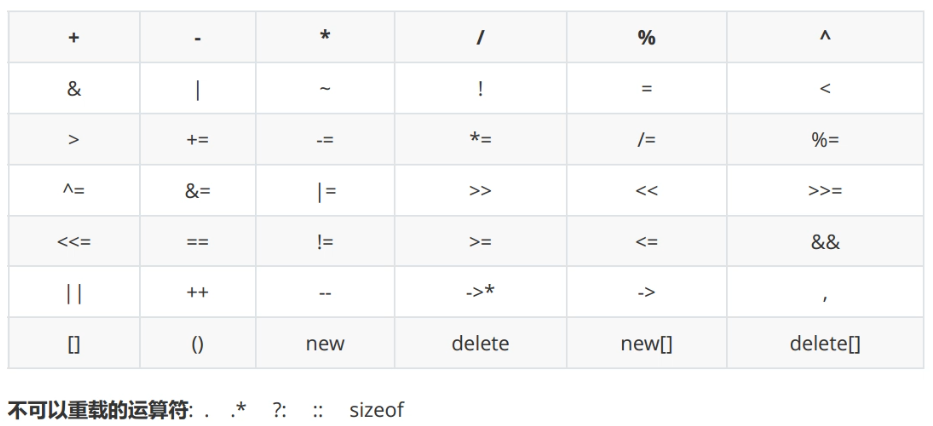
规则:
- 重载运算符的操作对象必须至少有一个是自定义类型或枚举类型
- 优先级和结合性不变
- 操作数不能有默认参数
- 重载逻辑运算符
&&、||后,不再具有短路求值特性 - 不能臆造并不存在的运算符
@、$等
形式
以普通函数的形式进行重载:
#include <iostream>
#include <limits>

using std::cout;
using std::endl;

class Complex{
public:
    Complex(double dreal = 0, double dimag = 0)
    :_dreal(dreal), _dimag(dimag){
        cout << "Complex(double = 0, double = 0)" << endl;
    }

    void print() const{
        cout << _dreal << " + " << _dimag << "i" << endl;
    }

    double getReal() const{
        return _dreal;
    }

    double getImag() const{
        return _dimag;
    }

    ~Complex(){
        cout << "~Complex()" << endl;
    }

private:
    double _dreal;
    double _dimag;
};

Complex operator + (const Complex& lhs, const Complex& rhs){
    cout << "Complex operator + (const Complex&, const Complex&)" << endl;
    return Complex(lhs.getReal() + rhs.getReal(),
                   lhs.getImag() + rhs.getImag());
}

int main(){
    Complex c1(1, 2);
    cout << "c1 = ";
    c1.print();

    cout << endl << endl;
    Complex c2(3, 4);
    cout << "c2 = ";
    c2.print();

    cout << endl << endl;
    Complex c3 = c1 + c2;
    cout << "c3 = ";
    c3.print();
    return 0;
}
/*
Complex(double = 0, double = 0)
c1 = 1 + 2i


Complex(double = 0, double = 0)
c2 = 3 + 4i


Complex operator + (const Complex&, const Complex&)
Complex(double = 0, double = 0)
c3 = 4 + 6i
~Complex()
~Complex()
~Complex()
*/
以成员函数的形式进行重载:
#include <iostream>
#include <limits>

using std::cout;
using std::endl;

class Complex{
public:
    Complex(double dreal = 0, double dimag = 0)
    :_dreal(dreal), _dimag(dimag){
        cout << "Complex(double = 0, double = 0)" << endl;
    }

    void print() const{
        cout << _dreal << " + " << _dimag << "i" << endl;
    }

    Complex operator + (const Complex& rhs){
        cout << "Complex operatro + (const Complex&)" << endl;
        return Complex(_dreal + rhs._dreal, _dimag + rhs._dimag);
    }

    ~Complex(){
        cout << "~Complex()" << endl;
    }

private:
    double _dreal;
    double _dimag;
};

int main(){
    Complex c1(1, 2);
    cout << "c1 = ";
    c1.print();

    cout << endl << endl;
    Complex c2(3, 4);
    cout << "c2 = ";
    c2.print();

    cout << endl << endl;
    Complex c3 = c1 + c2;
    cout << "c3 = ";
    c3.print();
    return 0;
}
/*
Complex(double = 0, double = 0)
c1 = 1 + 2i


Complex(double = 0, double = 0)
c2 = 3 + 4i


Complex operatro + (const Complex&)
Complex(double = 0, double = 0)
c3 = 4 + 6i
~Complex()
~Complex()
~Complex()
*/
以友元函数的形式进行重载:
#include <iostream>
#include <limits>

using std::cout;
using std::endl;

class Complex{
friend Complex operator + (const Complex& lhs, const Complex& rhs);
public:
    Complex(double dreal = 0, double dimag = 0)
    :_dreal(dreal), _dimag(dimag){
        cout << "Complex(double = 0, double = 0)" << endl;
    }

    void print() const{
        cout << _dreal << " + " << _dimag << "i" << endl;
    }

    ~Complex(){
        cout << "~Complex()" << endl;
    }

private:
    double _dreal;
    double _dimag;
};

Complex operator + (const Complex& lhs, const Complex& rhs){
    cout << "friend Complex operator + (const Complex&, const Complex&)" << endl;
    return Complex(lhs._dreal + rhs._dreal,
                   lhs._dimag + rhs._dimag);
}

int main(){
    Complex c1(1, 2);
    cout << "c1 = ";
    c1.print();

    cout << endl << endl;
    Complex c2(3, 4);
    cout << "c2 = ";
    c2.print();

    cout << endl << endl;
    Complex c3 = c1 + c2;
    cout << "c3 = ";
    c3.print();
    return 0;
}
/*
Complex(double = 0, double = 0)
c1 = 1 + 2i


Complex(double = 0, double = 0)
c2 = 3 + 4i


friend Complex operator + (const Complex&, const Complex&)
Complex(double = 0, double = 0)
c3 = 4 + 6i
~Complex()
~Complex()
~Complex()
*/
复合赋值运算符
复合赋值运算符,推荐以成员函数进行重载:
#include <iostream>
#include <limits>

using std::cout;
using std::endl;

class Complex{
friend Complex operator + (const Complex& lhs, const Complex& rhs);
public:
    Complex(double dreal = 0, double dimag = 0)
    :_dreal(dreal), _dimag(dimag){
        cout << "Complex(double = 0, double = 0)" << endl;
    }

	Complex& operator += (const Complex& rhs){
		cout << "Complex& operator +=(const Complex&)" << endl;
		_dreal += rhs._dreal;
		_dimag += rhs._dimag;
		return *this;
	}

    void print() const{
        cout << _dreal << " + " << _dimag << "i" << endl;
    }

    ~Complex(){
        cout << "~Complex()" << endl;
    }

private:
    double _dreal;
    double _dimag;
};

Complex operator + (const Complex& lhs, const Complex& rhs){
    cout << "friend Complex operator + (const Complex&, const Complex&)" << endl;
    return Complex(lhs._dreal + rhs._dreal,
                   lhs._dimag + rhs._dimag);
}

int main(){
    Complex c1(1, 2);
    cout << "c1 = ";
    c1.print();

    cout << endl << endl;
    Complex c2(3, 4);
    cout << "c2 = ";
    c2.print();

    cout << endl << endl;
    Complex c3 = c1 + c2;
    cout << "c3 = ";
    c3.print();

	cout << endl << endl;
	c3 += c1;
	cout << "c3 = ";
	c3.print();
    return 0;
}
/*
Complex(double = 0, double = 0)
c1 = 1 + 2i


Complex(double = 0, double = 0)
c2 = 3 + 4i


friend Complex operator + (const Complex&, const Complex&)
Complex(double = 0, double = 0)
c3 = 4 + 6i


Complex& operator +=(const Complex&)
c3 = 5 + 8i
~Complex()
~Complex()
~Complex()
*/
自增自减
前置和后置++:
#include <iostream>
#include <limits>

using std::cout;
using std::endl;

class Complex{
friend Complex operator + (const Complex& lhs, const Complex& rhs);
public:
    Complex(double dreal = 0, double dimag = 0)
    :_dreal(dreal), _dimag(dimag){
        cout << "Complex(double = 0, double = 0)" << endl;
    }

	Complex& operator += (const Complex& rhs){
		cout << "Complex& operator +=(const Complex&)" << endl;
		_dreal += rhs._dreal;
		_dimag += rhs._dimag;
		return *this;
	}

	Complex& operator ++ (){ // 前置 ++
		cout << "Complex& operator ++()" << endl;
		++_dreal;
		++_dimag;
		return *this;
	}

	Complex operator ++ (int){ // 这里的 int 是标志位,用于区分
		cout << "Complex operator ++ (int)" << endl;
		Complex tmp(*this);
		_dreal++;
		_dimag++;
		return tmp;
	}

    void print() const{
        cout << _dreal << " + " << _dimag << "i" << endl;
    }

    ~Complex(){
        cout << "~Complex()" << endl;
    }

private:
    double _dreal;
    double _dimag;
};

Complex operator + (const Complex& lhs, const Complex& rhs){
    cout << "friend Complex operator + (const Complex&, const Complex&)" << endl;
    return Complex(lhs._dreal + rhs._dreal,
                   lhs._dimag + rhs._dimag);
}

int main(){
    Complex c1(1, 2);
    cout << "c1 = ";
    c1.print();

    cout << endl << endl;
    Complex c2(3, 4);
    cout << "c2 = ";
    c2.print();

    cout << endl << endl;
    Complex c3 = c1 + c2;
    cout << "c3 = ";
    c3.print(); // 4+6i

    cout << endl << endl;
    cout << "(++c3) = ";
    (++c3).print();
	cout << "c3 = ";
	c3.print();

    cout << endl << endl;
    cout << "(c3++) = ";
	(c3++).print();
	cout << "c3 = ";
	c3.print();

    return 0;
}
/*
c1 = 1 + 2i


Complex(double = 0, double = 0)
c2 = 3 + 4i


friend Complex operator + (const Complex&, const Complex&)
Complex(double = 0, double = 0)
c3 = 4 + 6i


(++c3) = Complex& operator ++()
5 + 7i
c3 = 5 + 7i


(c3++) = Complex operator ++ (int)
5 + 7i
~Complex()
c3 = 6 + 8i
~Complex()
~Complex()
~Complex()
*/前置++返回的是对象的引用,是左值,可以取地址;后置++返回的是局部对象,是右值,不能取地址。
前置++的效率比后置++高。
输出流运算符
对于重载输出流运算符而言,不能写成成员函数的形式,因为不能改变操作数的顺序。推荐使用友元:
#include <iostream>
#include <limits>

using std::cout;
using std::endl;

class Complex{
public:
    friend std::ostream& operator << (std::ostream& os, const Complex& rhs);

    Complex(double dreal = 0, double dimag = 0)
    :_dreal(dreal), _dimag(dimag){
        cout << "Complex(double = 0, double = 0)" << endl;
    }

    ~Complex(){
        cout << "~Complex()" << endl;
    }

private:
    double _dreal;
    double _dimag;
};

std::ostream& operator << (std::ostream& os, const Complex& rhs){
    os << rhs._dreal << " + " << rhs._dimag << "i";
    return os;
}

int main(){
    Complex c1(1, 2);
    cout << "c1 = " << c1 << endl;
    return 0;
}
/*
Complex(double = 0, double = 0)
c1 = 1 + 2i
~Complex()
*/
关于下面这句:
cout << "c1 = " << c1 << endl;也可以写为:
operator<<(operator<<(cout, "c1 = "), c1).operator<<(endl);输入流运算符
#include <iostream>
#include <limits>

using std::cout;
using std::endl;
using std::cin;

class Complex{
public:
    friend std::ostream& operator << (std::ostream& os, const Complex& rhs);
    friend std::istream& operator >> (std::istream& is, Complex& rhs);

    Complex(double dreal = 0, double dimag = 0)
    :_dreal(dreal), _dimag(dimag){
        cout << "Complex(double = 0, double = 0)" << endl;
    }

    ~Complex(){
        cout << "~Complex()" << endl;
    }

private:
    double _dreal;
    double _dimag;
};

void readDouble(std::istream& is, double& rhs){
    while(is >> rhs, !is.eof()){
        if(is.bad()){
            std::cerr << "istream is bad." << endl;
            return;
        }
        else if(is.fail()){
            is.clear();
            is.ignore(std::numeric_limits<std::streamsize>::max(), '\n');
            cout << "please input a double-type number : ";
        }
        else break;
    }
}

std::ostream& operator << (std::ostream& os, const Complex& rhs){
    os << rhs._dreal << " + " << rhs._dimag << "i";
    return os;
}

std::istream& operator >> (std::istream& is, Complex& rhs){
    // is >> rhs._dreal >> rhs._dimag;
    readDouble(is, rhs._dreal);
    readDouble(is, rhs._dimag);
    return is;
}

int main(){
    Complex c1(1, 2);
    cout << "c1 = " << c1 << endl << endl;

    Complex c2;
    cin >> c2;
    cout << "c2 = " << c2 << endl;
    return 0;
}
/*
Complex(double = 0, double = 0)
c1 = 1 + 2i

Complex(double = 0, double = 0)
asdf
please input a double-type number : 12
kl
please input a double-type number : 24
c2 = 12 + 24i
~Complex()
~Complex()
*/
函数调用运算符(小括号)
#include <iostream>

using std::cout;
using std::endl;

class FuncObj{
public:
    int operator () (int x, int y){
        cout << "int operator () (int, int)" << endl;
        return x + y;
    }

    int operator () (int x, int y, int z){
        cout << "int operator () (int, int, int)" << endl;
        return x * y * z;
    }
};

int main(){
    FuncObj fo;
    int a = 3, b = 4, c = 5;
    cout << "fo(a, b) = " << fo(a, b) << endl;
    cout << "fo(a, b, c) = " << fo(a, b, c) << endl;
    return 0;
}
/*
fo(a, b) = int operator () (int, int)
7
fo(a, b, c) = int operator () (int, int, int)
60
*/在上面的代码中,fo(a, b)等价于:
fo.operator()(a,b)类似地,fo(a, b, c)等价于:
fo.operator()(a, b, c)重载了函数调用运算符的类创建的对象,称为函数对象。
下标访问运算符(中括号)
#include <iostream>
#include <string.h>

using std::cout;
using std::endl;

class charArray{
public:
    charArray(size_t sz = 10)
    :_size(sz),_data(new char[sz]()){
        cout << "charArray(size_t = 10)" << endl;
    }

    char& operator [] (size_t idx){
        if(idx < _size){
            return _data[idx];
        }
        else {
            static char charNull = '\0';
            return charNull;
        }
    }

    ~charArray(){
        cout << "~charArray()" << endl;
        if(_data){
            delete [] _data;
            _data = nullptr;
        }
    }

    size_t size() const {
        return _size;
    }

private:
    size_t _size;
    char* _data;
};

void test(){
    const char* pstr = "helloworld";
    charArray ca(strlen(pstr) + 1);

    for(size_t i = 0; i < ca.size(); i++){
        ca[i] = pstr[i];
    }
    for(size_t i = 0; i < ca.size(); i++){
        cout << ca[i] << " ";
    }
    cout << endl;
    return;
}

int main(){
    test();
    return 0;
}
/*
charArray(size_t = 10)
h e l l o w o r l d
~charArray()
*/
成员访问运算符
成员访问运算符包括:->、*。
->只能以成员函数的形式重载,其返回值必须是一个指针或是重载了->的对象。
来看->的例子:
#include <iostream>

using std::cout;
using std::endl;

class Data {
public:
    Data(int data = 0):_data(data) {
        cout << "Data(int = 0)" << endl;
    }

    int get_data() const {
        return _data;
    }

    ~Data() {
        cout << "~Data()" << endl;
    }

private:
    int _data;
};

class secondLayyer {
public:
    secondLayyer(Data* pdata):_pdata(pdata) {
        cout << "secondLayyer(Data*)" << endl;
    }

    ~secondLayyer() {
        cout << "~secondLayyer()" << endl;
        if(_pdata){
            delete _pdata;
            _pdata = nullptr;
        }
    }

    Data* operator -> () {
        return _pdata;
    }

private:
    Data* _pdata;
};

class thirdLayyer {
public:
    thirdLayyer(secondLayyer* ps1):_ps1(ps1) {
        cout << "thirdLayyer(secondLayyer*)" << endl;
    }

    secondLayyer& operator -> () {
        return *_ps1;
    }

    ~thirdLayyer() {
        cout << "~thirdLayyer()" << endl;
        if(_ps1){
            delete _ps1;
            _ps1 = nullptr;
        }
    }

private:
    secondLayyer* _ps1;
};

void test() {
    secondLayyer sl(new Data(10)); // 栈对象
    cout << "sl->get_data() = " << sl->get_data() << endl;
    // 勤劳的编译器使我们可以在上面的写法中省略一个箭头
    // 等价的写法:
    cout << "s1->get_data() = " << sl.operator->()->get_data() << endl;
}

int main() {
    test();
    return 0;
}
/*
Data(int = 0)
secondLayyer(Data*)
sl->get_data() = 10
s1->get_data() = 10
~secondLayyer()
~Data()
*/
更进一步的例子:
#include <iostream>

using std::cout;
using std::endl;

class Data {
public:
    Data(int data = 0):_data(data) {
        cout << "Data(int = 0)" << endl;
    }

    int get_data() const {
        return _data;
    }

    ~Data() {
        cout << "~Data()" << endl;
    }

private:
    int _data;
};

class secondLayyer {
public:
    secondLayyer(Data* pdata):_pdata(pdata) {
        cout << "secondLayyer(Data*)" << endl;
    }

    ~secondLayyer() {
        cout << "~secondLayyer()" << endl;
        if(_pdata){
            delete _pdata;
            _pdata = nullptr;
        }
    }

    Data* operator -> () {
        return _pdata; // 返回的是指针
    }

private:
    Data* _pdata;
};

class thirdLayyer {
public:
    thirdLayyer(secondLayyer* ps1):_ps1(ps1) {
        cout << "thirdLayyer(secondLayyer*)" << endl;
    }

    secondLayyer& operator -> () {
        return *_ps1; // 这里的 * 是解引用
    }

    ~thirdLayyer() {
        cout << "~thirdLayyer()" << endl;
        if(_ps1){
            delete _ps1;
            _ps1 = nullptr;
        }
    }

private:
    secondLayyer* _ps1;
};

void test() {
    thirdLayyer tl(new secondLayyer(new Data(30)));
    cout << "tl->get_data() = " << tl->get_data() << endl;
    cout << "tl->get_data() = " << tl.operator->().operator->()->get_data() << endl;
}

int main() {
    test();
    return 0;
}
/*
Data(int = 0)
secondLayyer(Data*)
thirdLayyer(secondLayyer*)
tl->get_data() = 30
tl->get_data() = 30
~thirdLayyer()
~secondLayyer()
~Data()
*/来看*的例子:
#include <iostream>

using std::cout;
using std::endl;

class Data {
public:
    Data(int data = 0):_data(data) {
        cout << "Data(int = 0)" << endl;
    }

    int get_data() const {
        return _data;
    }

    ~Data() {
        cout << "~Data()" << endl;
    }

private:
    int _data;
};

class secondLayyer {
public:
    secondLayyer(Data* pdata):_pdata(pdata) {
        cout << "secondLayyer(Data*)" << endl;
    }

    ~secondLayyer() {
        cout << "~secondLayyer()" << endl;
        if(_pdata){
            delete _pdata;
            _pdata = nullptr;
        }
    }

    Data& operator * () {
        return *_pdata;
    }

private:
    Data* _pdata;
};

void test() {
    secondLayyer sl(new Data(10));
    cout << "(*sl).get_data() = " << (*sl).get_data() << endl;
    cout << "(*sl).get_data() = " << sl.operator*().get_data() << endl;
}

int main() {
    test();
    return 0;
}
/*
Data(int = 0)
secondLayyer(Data*)
(*sl).get_data() = 10
(*sl).get_data() = 10
~secondLayyer()
~Data()
*/
后续内容见 CppNote3 .