数据库学习笔记。
数据库的概念、分类
数据库的引入: 存储数据的结构或方式
- 数组、链表:基于内存,短暂存储
- 文件:永久性存储,但是不利于查找
- 数据库:可以永久存储,并且可以更好的查找
数据库的定义:存储结构化数据的仓库。 结构化数据一般指存储在数据库中,具有一定逻辑结构和物理结构的数据。
数据库的分类:
- 关系型数据库
- 通过外键关联来建立表与表之间的关系
- 例如:Oracle、MySQL、DB2、Informix、SQL Server、SQLite
- 关系型数据库把复杂的数据结构归结为简单的二元关系,在存储数据时实际就是采用的一张二维表(和Word和excell里表格几乎一样)
- 市场占有量较大的是MySQL和oracle数据库,而互联网场景最常用的是MySQL数据库
- 它通过SQL结构化查询语言来存取、管理关系型数据库的数据
- 非关系型数据库
- 数据以对象的形式存储在数据库中,而对象之间的关系通过每个对象自身的属性来决定
- 不是对关系型数据库的否定,而是补充,主要针对大数据
- 种类
- 键值对(key-value):Redis、Memcached
- 按列存储:Hbase、Scylla、Cassandra
- 面向文档:MongoDB、CouchDB
- 图形存储:Neo4J
数据库管理软件(DBMS) 数据库管理员(DBA)
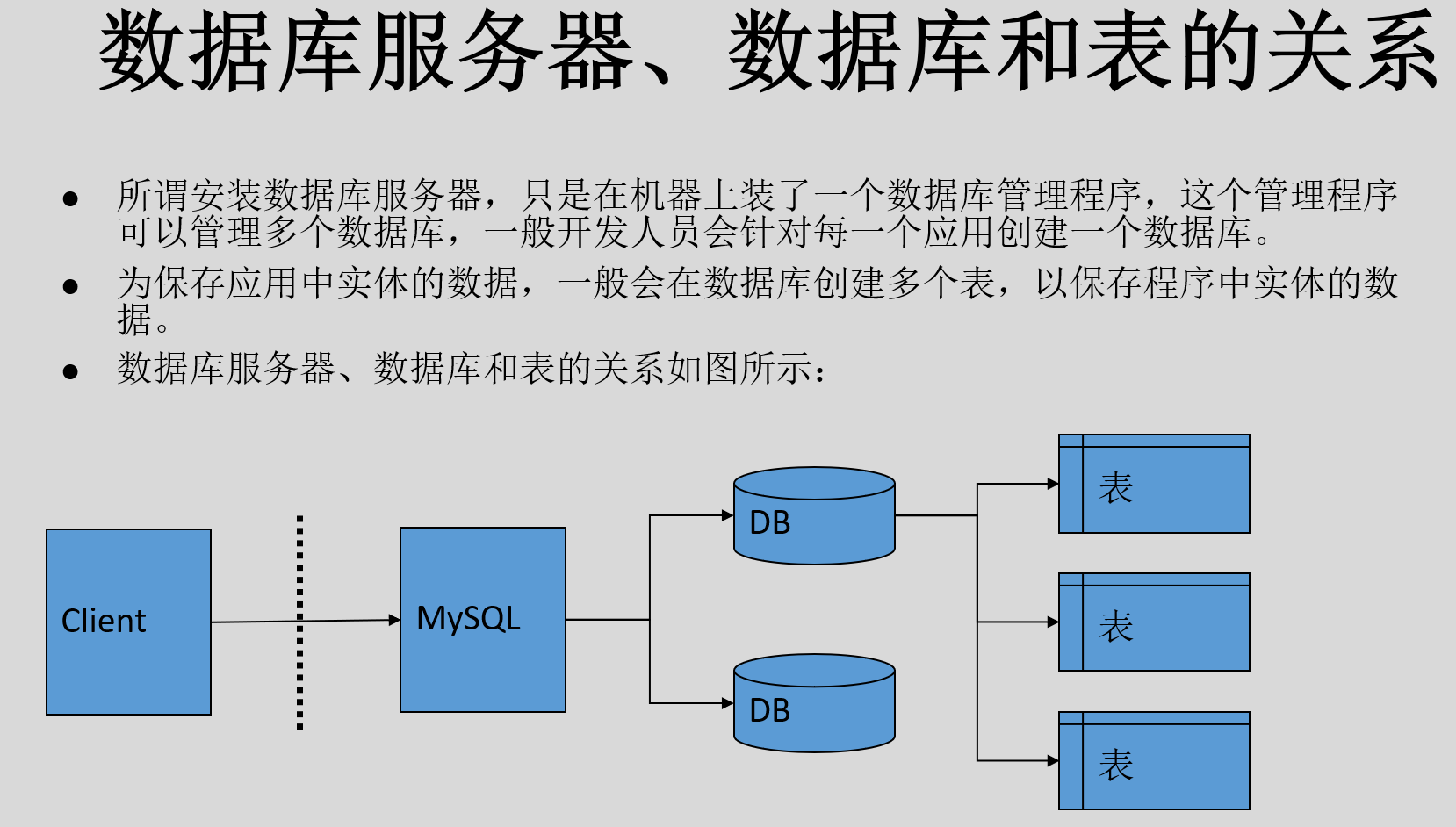
数据库服务器、数据库和表的关系:
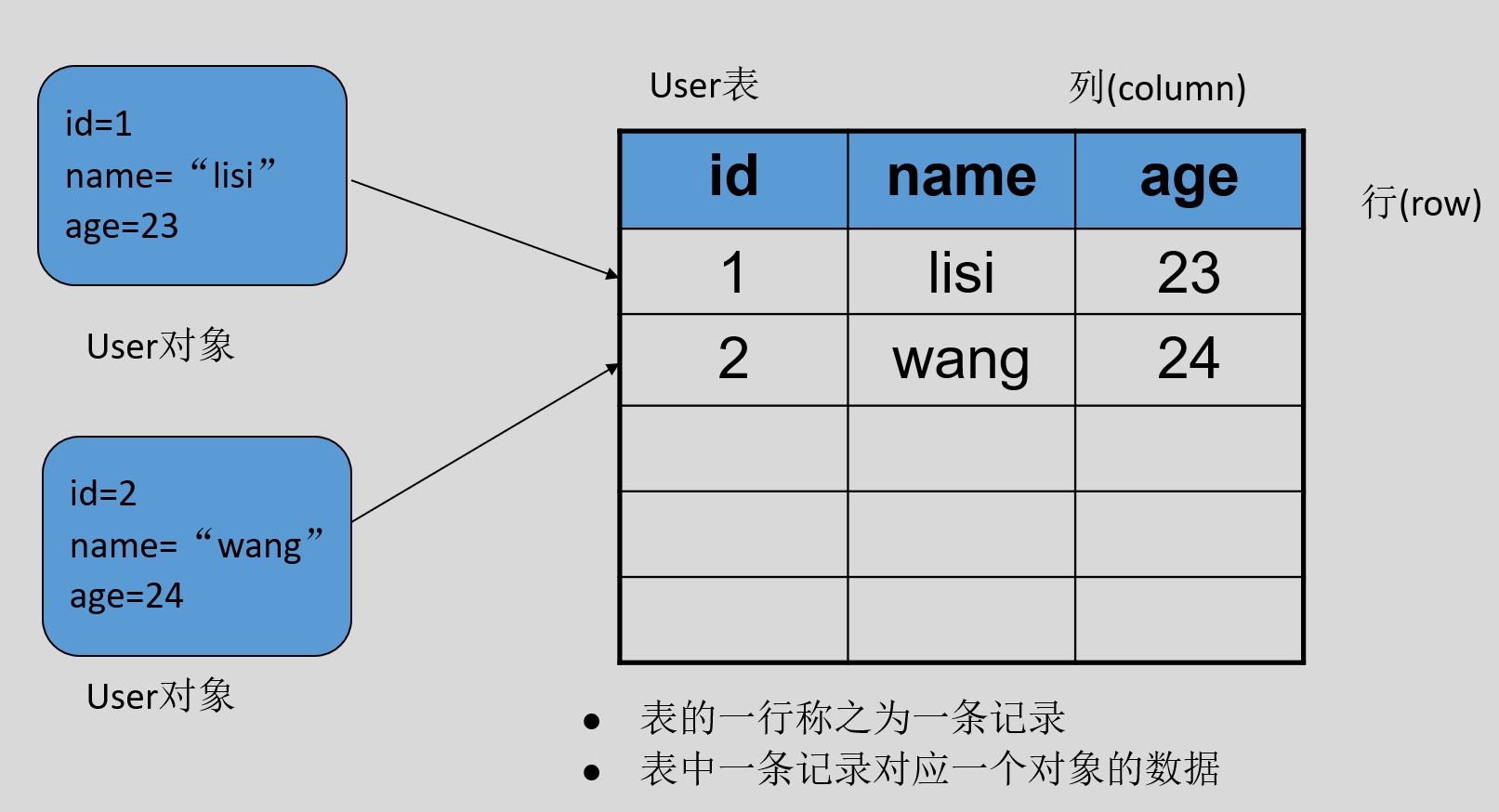
数据在数据库中的存储方式:
SQL(Structured Query Language):结构化查询语言
- 是一种定义、操作、管理关系型数据库的句法。大多数关系型数据库都支持
- 结构化查询语言的工业标准由ANSI(美国国家标准学会,ISO的成员之一)维护
- 组成:
- DQL:数据查询语言
- DML(Data Manipulation Language):数据操作语言
- DDL:数据定义语言
- DCL:数据控制语言
- TPL:事务处理语言
- CCL:指针控制语言
mysql 的安装: https://www.bilibili.com/video/BV12q4y1U7sZ
数据库大小写不敏感。
创建、显示、删除
DDL(Data Definition Language)数据定义语言
- 作用:用于描述数据库中要存储的现实世界实体的语言。即创建数据库和表的结构。
- 常用关键字:
CREATE:创建ALTER:修改DROP:删除TRUNCATE:截断
进入 sql :
sudo mysql -u root -p看到 mysql 的提示符,说明连接成功。
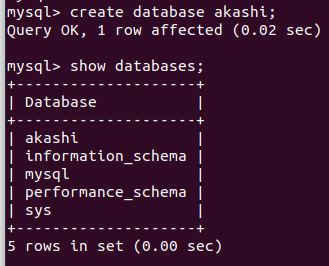
输入 show schemas; 查询自带的数据库。
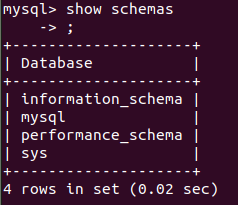
或者 show databases; :
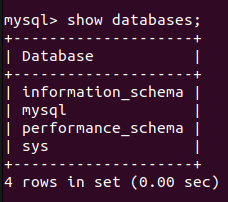
information_schema(元数据) mysql(核心库) performance_schema(性能相关) sys(对DBA有好处)
注释记号:#、-- 、/**/
创建数据库 create database akashi; :
使用数据库:
mysql> use akashi;
Database changed
显示表格(目前为空):
mysql> show tables;
Empty set (0.01 sec)
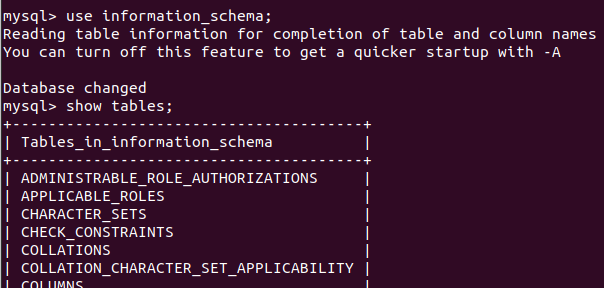
一个另外的例子:
删除一个库:
mysql> drop database akashi;
Query OK, 0 rows affected (0.02 sec)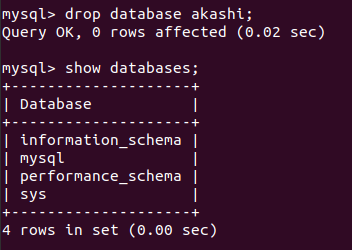
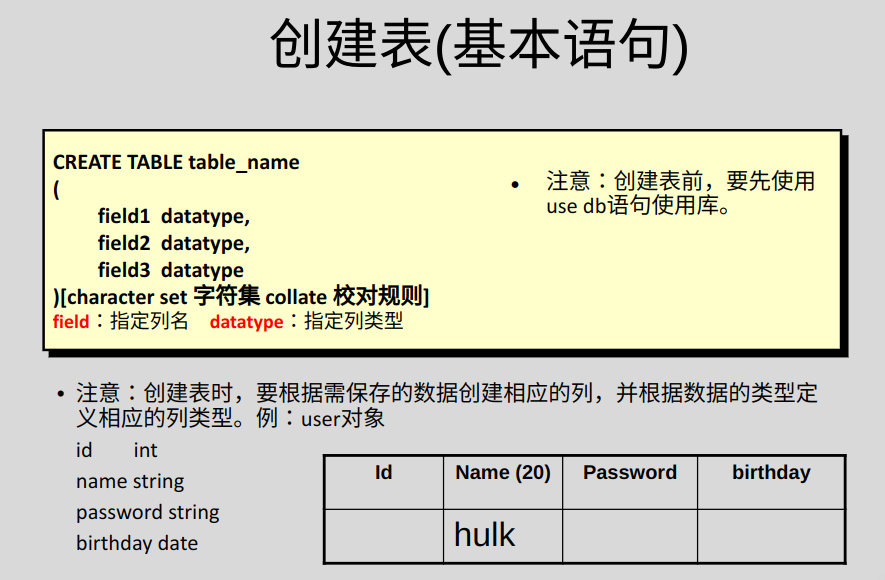
创建表:
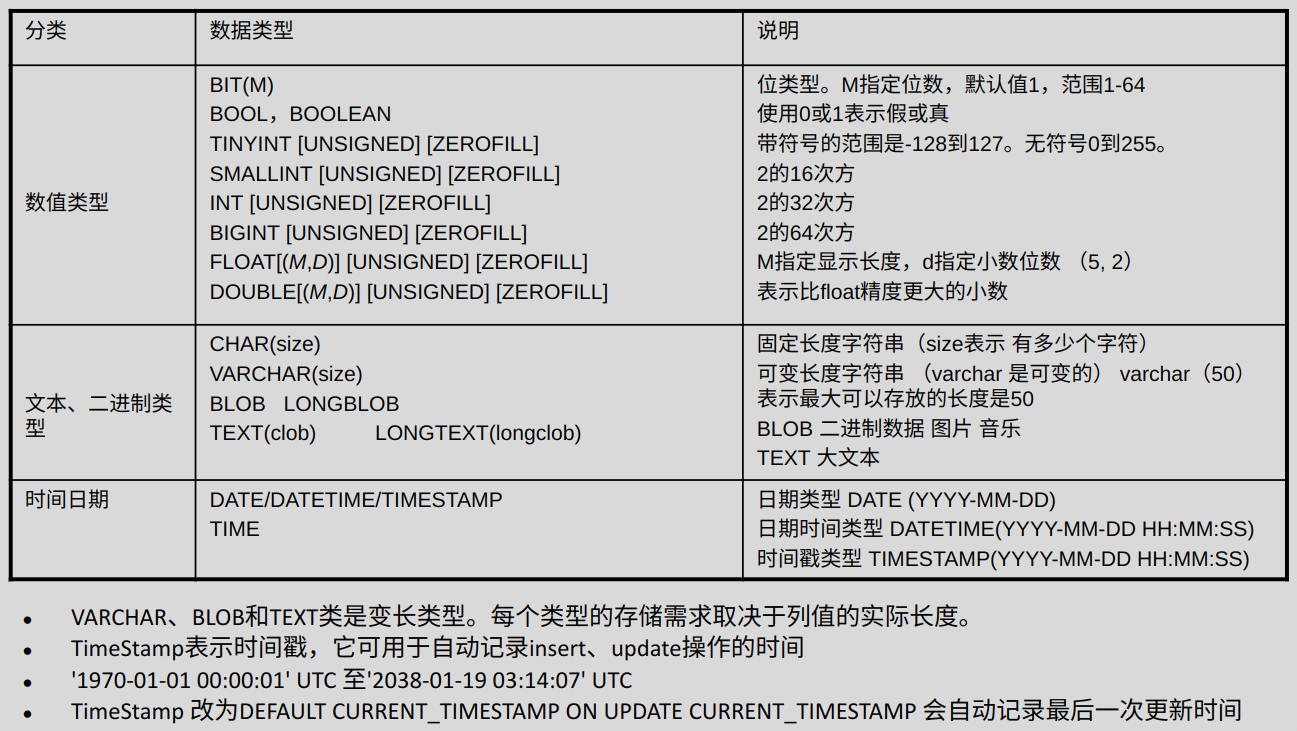
MySQL 常用数据类型:
创建表:
mysql> create table member
    -> (id int, name char(20), age int, math float);
Query OK, 0 rows affected (0.02 sec)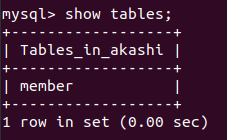
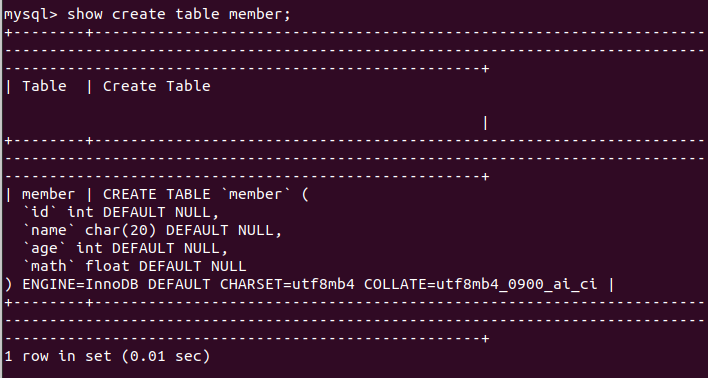
显示表的结构 show create table member; :
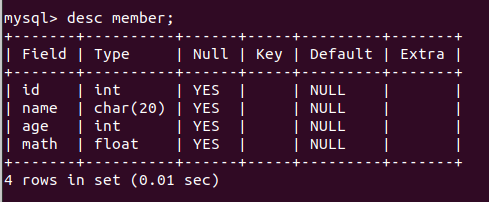
显示表的结构(第二种方法)desc member; :
查看当前所属数据库:
mysql> select database();
+------------+
| database() |
+------------+
| akashi     |
+------------+
1 row in set (0.00 sec)
参看数据库版本:
mysql> select version();
+-------------------------+
| version()               |
+-------------------------+
| 8.0.35-0ubuntu0.22.04.1 |
+-------------------------+
1 row in set (0.00 sec)
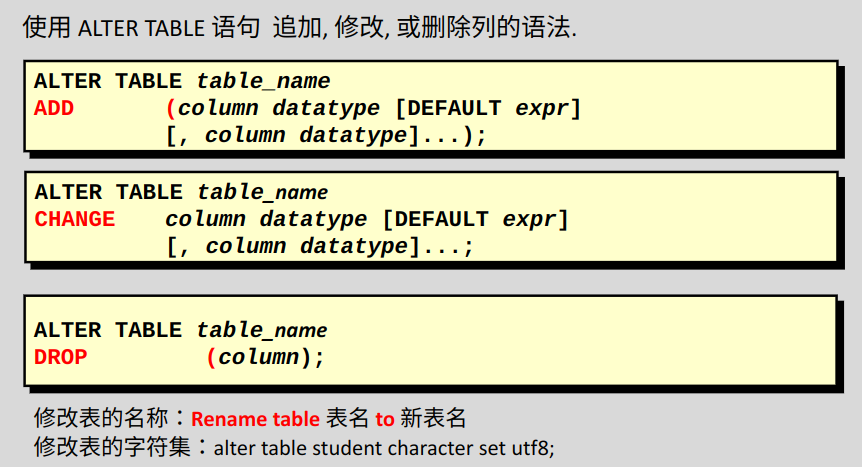
修改
修改表,增加字段,add:
# 在 member 表中增加一个英语成绩,类型为 float ,默认值为 60
alter table member add english float default 60;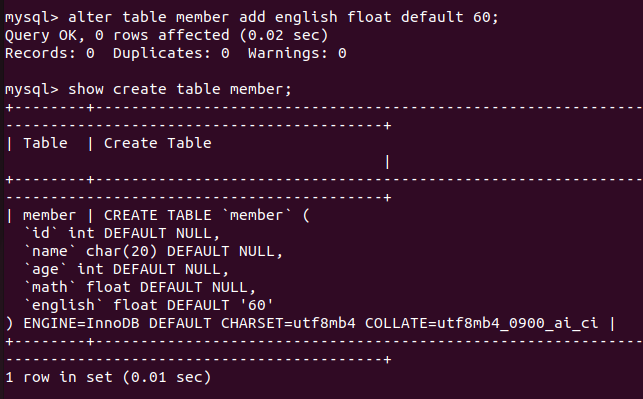
修改表,修改字段类型:
alter table member modify name varchar(20);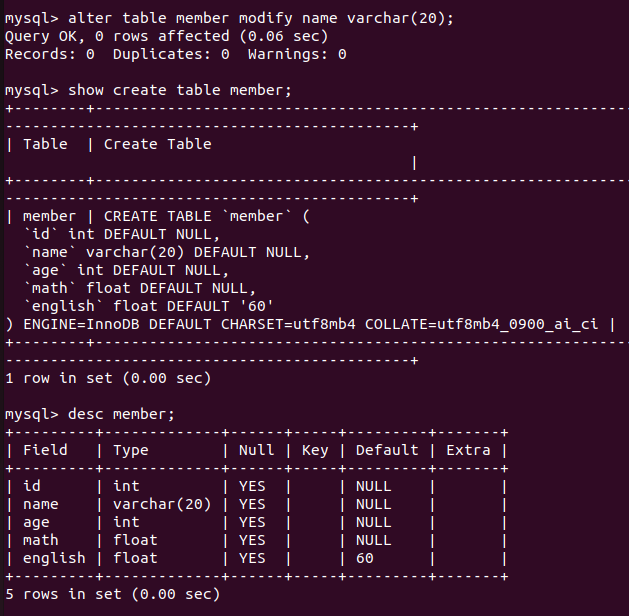
改字段名字:
alter table member change name mname varchar(20);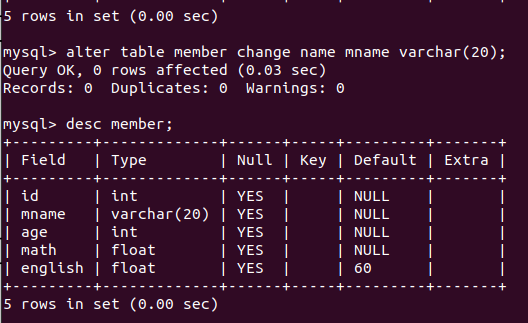
删除字段:
alter table member drop english;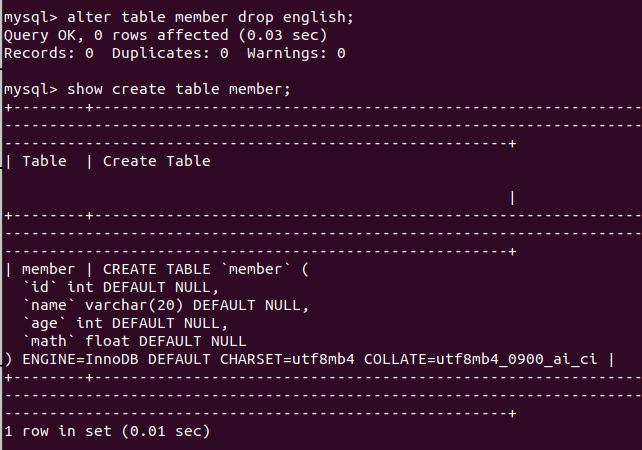
删除表:
drop table test1;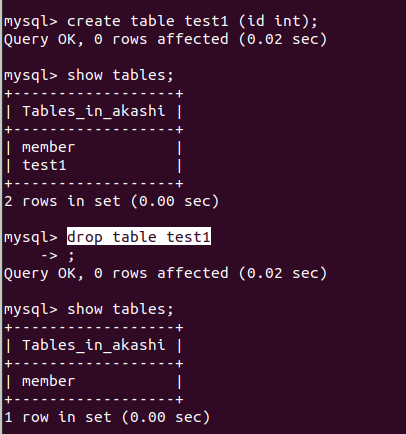
指定位置添加:
alter table member add english float first;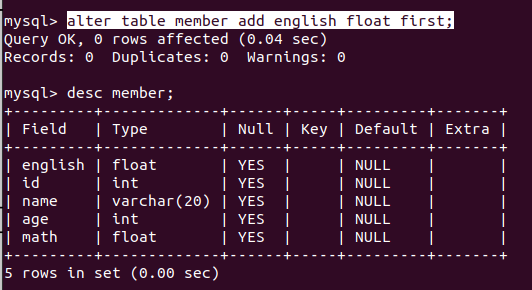
指定相对位置添加:
alter table member add xxx float after id;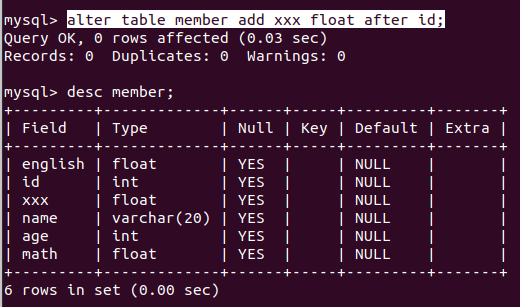
修改表结构:
INSERT、UPDATE、DELETE
DML(Data Manipulation Language)数据操纵语言
- 作用:用于向数据库表中插入、删除、修改数据
- 常用关键字:
INSERT、UPDATE、DELETE
字符串使用单引号。
插入一条记录并查看:
insert into member (id,name,age,math) values (1,'xiaoshuai',30,59);

select * from member;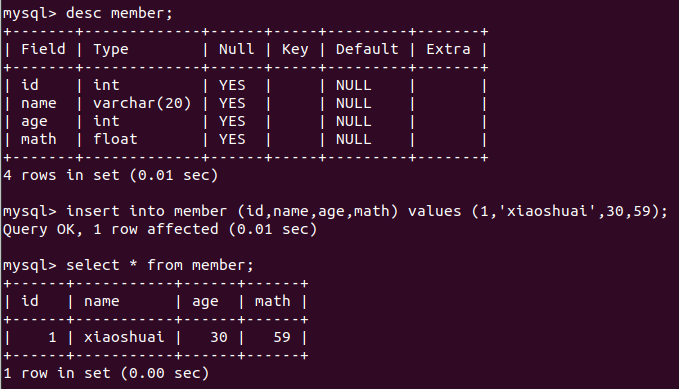
插入一条记录,部分为默认值:
insert into member (id,name) values (2,'xiaoai');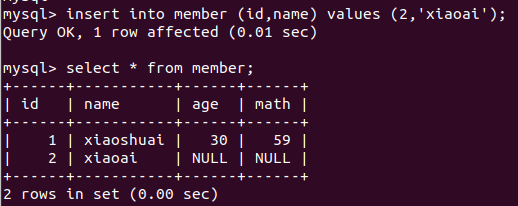
插入多条记录:
insert into member values (3,'xiaomei',20,100),(4,'lumine',17,61),(8,'xiao',18,85);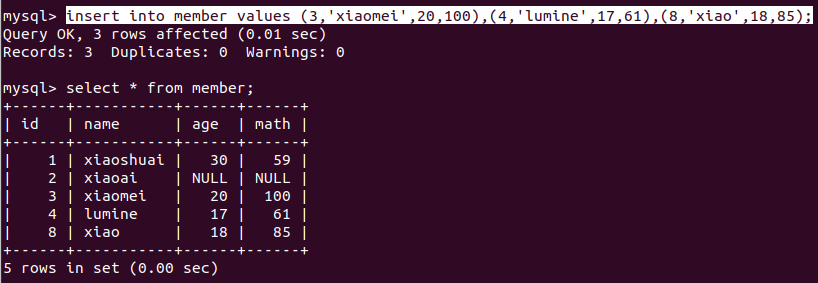
修改一条记录:
update member set age=24 where id=2;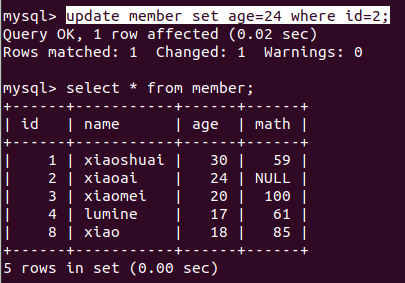
修改一张表的全部记录(修改值相同):
update member set e_date='1999-10-10 10:10:10';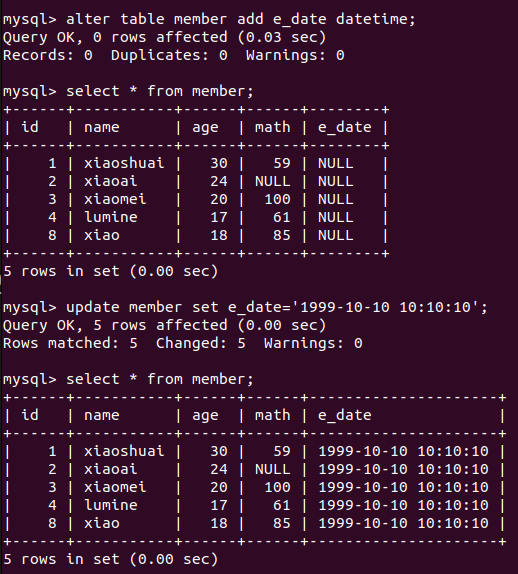
删除记录:
delete from member where id=8;插入空值:
insert into member(name) values(null);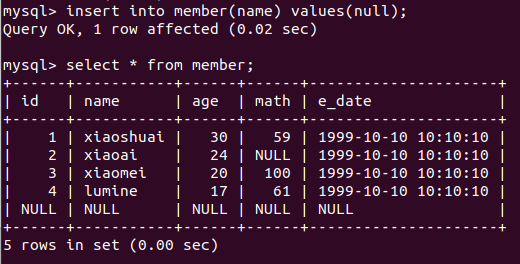
同insert和update一样,从一个表中删除记录将引起其它表的参照完整性问题,在修改数据库数据时,头脑中应该始终不要忘记这个潜在的问题。
Tip: mysql中文乱码
- mysql有六处使用了字符集,分别为:client 、connection、database、results、server 、system
- client是客户端使用的字符集
- connection是连接数据库的字符集设置类型,如果程序没有指明连接数据库使用的字符集类型就按照服务器端默认的字符集设置
- database是数据库服务器中某个库使用的字符集设定,如果建库时没有指明,将使用服务器安装时指定的字符集设置
- results是数据库给客户端返回时使用的字符集设定,如果没有指明,使用服务器默认的字符集
- server是服务器安装时指定的默认字符集设定
- system是数据库系统使用的字符集设定
查询
DQL(Data Query Language)数据查询语言
- 作用:查询数据
- 常用关键字:
SELECT
查看 member 表中数据的条数:
select count(*) from member;或者(效果一样):
select count(1) from member;基本select语句:
SELECT [DISTINCT] [*] |{column1, column2, column3..} FROM table [where];基本select语句
Select指定查询哪些列的数据column指定列名*号代表查询所有列From指定查询哪张表DISTINCT可选,指显示结果时,是否剔除重复数据
选择指定列:
select id,name from member;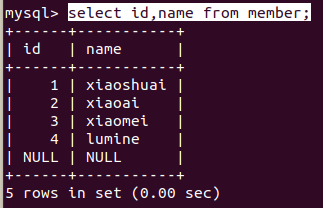
加入限制条件:
# 会同时过滤不满足条件的和 NULL
select id,name from member where id>1;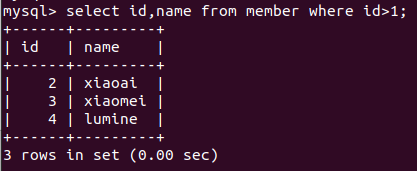
去重查询:
mysql> select distinct e_date from member;
+---------------------+
| e_date              |
+---------------------+
| 1999-10-10 10:10:10 |
| NULL                |
+---------------------+
2 rows in set (0.00 sec)
在select语句中可使用表达式对查询的列进行运算:
SELECT *|{column1|expression, column2|expression,..} FROM table;例子:
mysql> select age,age+10 from member;
+------+--------+
| age  | age+10 |
+------+--------+
|   30 |     40 |
|   24 |     34 |
|   20 |     30 |
|   17 |     27 |
| NULL |   NULL |
+------+--------+
5 rows in set (0.00 sec)在select语句中可使用as语句SELECT column as 别名 from 表名; :
mysql> select age,age+10*100+math*1000 from member;
+------+----------------------+
| age  | age+10*100+math*1000 |
+------+----------------------+
|   30 |                60030 |
|   24 |                 NULL |
|   20 |               101020 |
|   17 |                62017 |
| NULL |                 NULL |
+------+----------------------+
5 rows in set (0.01 sec)

mysql> select age,age+10*100+math*1000 as total from member;
+------+--------+
| age  | total  |
+------+--------+
|   30 |  60030 |
|   24 |   NULL |
|   20 | 101020 |
|   17 |  62017 |
| NULL |   NULL |
+------+--------+
5 rows in set (0.00 sec)在where子句中常用的运算符:
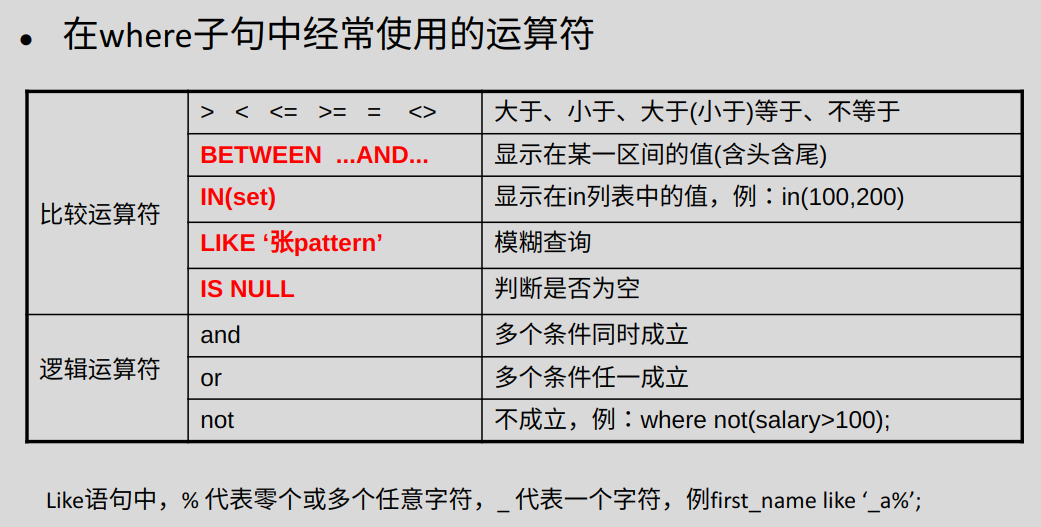
mysql> select age from member where age between 20 and 25;
+------+
| age  |
+------+
|   24 |
|   20 |
+------+
2 rows in set (0.00 sec)mysql> select age from member where age in (17,30);
+------+
| age |
+------+
| 30 |
| 17 |
+------+
2 rows in set (0.01 sec)
mysql> select age from member where age in (17,60);
+------+
| age |
+------+
| 17 |
+------+
1 row in set (0.00 sec)
mysql> select * from member where age in (17,60);
+------+--------+------+------+---------------------+
| id | name | age | math | e_date |
+------+--------+------+------+---------------------+
| 4 | lumine | 17 | 61 | 1999-10-10 10:10:10 |
+------+--------+------+------+---------------------+
1 row in set (0.00 sec)模糊查询:
mysql> select * from member;
+------+-----------+------+------+---------------------+
| id   | name      | age  | math | e_date              |
+------+-----------+------+------+---------------------+
|    1 | xiaoshuai |   30 |   59 | 1999-10-10 10:10:10 |
|    2 | xiaoai    |   24 | NULL | 1999-10-10 10:10:10 |
|    3 | xiaomei   |   20 |  100 | 1999-10-10 10:10:10 |
|    4 | lumine    |   17 |   61 | 1999-10-10 10:10:10 |
| NULL | NULL      | NULL | NULL | NULL                |
+------+-----------+------+------+---------------------+
5 rows in set (0.01 sec)

mysql> select * from member where name like '%i';
+------+-----------+------+------+---------------------+
| id   | name      | age  | math | e_date              |
+------+-----------+------+------+---------------------+
|    1 | xiaoshuai |   30 |   59 | 1999-10-10 10:10:10 |
|    2 | xiaoai    |   24 | NULL | 1999-10-10 10:10:10 |
|    3 | xiaomei   |   20 |  100 | 1999-10-10 10:10:10 |
+------+-----------+------+------+---------------------+
3 rows in set (0.01 sec)

mysql> select * from member where name like '%i__';
+------+--------+------+------+---------------------+
| id   | name   | age  | math | e_date              |
+------+--------+------+------+---------------------+
|    4 | lumine |   17 |   61 | 1999-10-10 10:10:10 |
+------+--------+------+------+---------------------+
1 row in set (0.00 sec)
is NULL:
mysql> select * from member where id is NULL;
+------+------+------+------+--------+
| id   | name | age  | math | e_date |
+------+------+------+------+--------+
| NULL | NULL | NULL | NULL | NULL   |
+------+------+------+------+--------+
1 row in set (0.00 sec)
错误用法:
mysql> select * from member where id=NULL;
Empty set (0.00 sec)
order by排序:
mysql> select age from member order by age;
+------+
| age  |
+------+
| NULL |
|   17 |
|   20 |
|   24 |
|   30 |
+------+
5 rows in set (0.00 sec)

mysql> select * from member order by age;
+------+-----------+------+------+---------------------+
| id   | name      | age  | math | e_date              |
+------+-----------+------+------+---------------------+
| NULL | NULL      | NULL | NULL | NULL                |
|    4 | lumine    |   17 |   61 | 1999-10-10 10:10:10 |
|    3 | xiaomei   |   20 |  100 | 1999-10-10 10:10:10 |
|    2 | xiaoai    |   24 | NULL | 1999-10-10 10:10:10 |
|    1 | xiaoshuai |   30 |   59 | 1999-10-10 10:10:10 |
+------+-----------+------+------+---------------------+
5 rows in set (0.00 sec)
调整升降序:
mysql> select age from member order by age asc;
+------+
| age  |
+------+
| NULL |
|   17 |
|   20 |
|   24 |
|   30 |
+------+
5 rows in set (0.00 sec)

mysql> select age from member order by age desc;
+------+
| age  |
+------+
|   30 |
|   24 |
|   20 |
|   17 |
| NULL |
+------+
5 rows in set (0.00 sec)使用limit限制显示行数:
mysql> select * from member order by age desc limit 1;
+------+-----------+------+------+---------------------+
| id   | name      | age  | math | e_date              |
+------+-----------+------+------+---------------------+
|    1 | xiaoshuai |   30 |   59 | 1999-10-10 10:10:10 |
+------+-----------+------+------+---------------------+
1 row in set (0.00 sec)

mysql> select * from member order by age desc limit 3;
+------+-----------+------+------+---------------------+
| id   | name      | age  | math | e_date              |
+------+-----------+------+------+---------------------+
|    1 | xiaoshuai |   30 |   59 | 1999-10-10 10:10:10 |
|    2 | xiaoai    |   24 | NULL | 1999-10-10 10:10:10 |
|    3 | xiaomei   |   20 |  100 | 1999-10-10 10:10:10 |
+------+-----------+------+------+---------------------+
3 rows in set (0.00 sec)offset选项,偏移量:
mysql> select * from member order by age desc limit 3 offset 1;
+------+---------+------+------+---------------------+
| id   | name    | age  | math | e_date              |
+------+---------+------+------+---------------------+
|    2 | xiaoai  |   24 | NULL | 1999-10-10 10:10:10 |
|    3 | xiaomei |   20 |  100 | 1999-10-10 10:10:10 |
|    4 | lumine  |   17 |   61 | 1999-10-10 10:10:10 |
+------+---------+------+------+---------------------+
3 rows in set (0.00 sec)
数据完整性
数据完整性是为了保证插入到数据库中的数据是正确的,它防止了用户可能的输入错误。
数据完整性主要分为以下三类:
- 实体完整性:规定表的一行(即每一条记录)在表中是唯一的实体。实体完整性通过表的主键来实现。
- 域完整性:指数据库表的列(即字段)必须符合某种特定的数据类型或约束。比如NOT NULL。
- 参照完整性:
- 保证一个表的外键和另一个表的主键对应。
- 参照的完整性要求关系中不允许引用不存在的实体。与实体完整性是关系模型必须满足的完整性约束条件,目的是保证数据的一致性。
定义表的约束
- 定义主键约束
- primary key:不允许为空,不允许重复
- 可以区分两条记录的唯一性
- 删除主键:
alter table tablename drop primary key;
- 定义主键自动增长
- auto_increment
- 定义唯一约束
- unique
- 定义非空约束
- not null
- 定义外键约束
- constraint ordersid_FK foreign key(ordersid) references orders(id)
多表设计、查询进阶
多表设计:一对多、多对多、一对一。(避免数据的冗余)
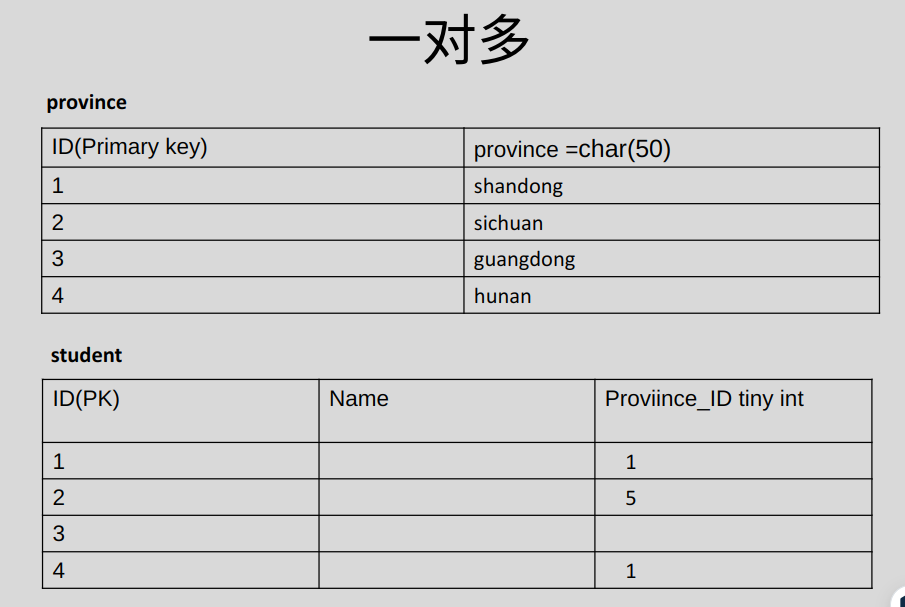
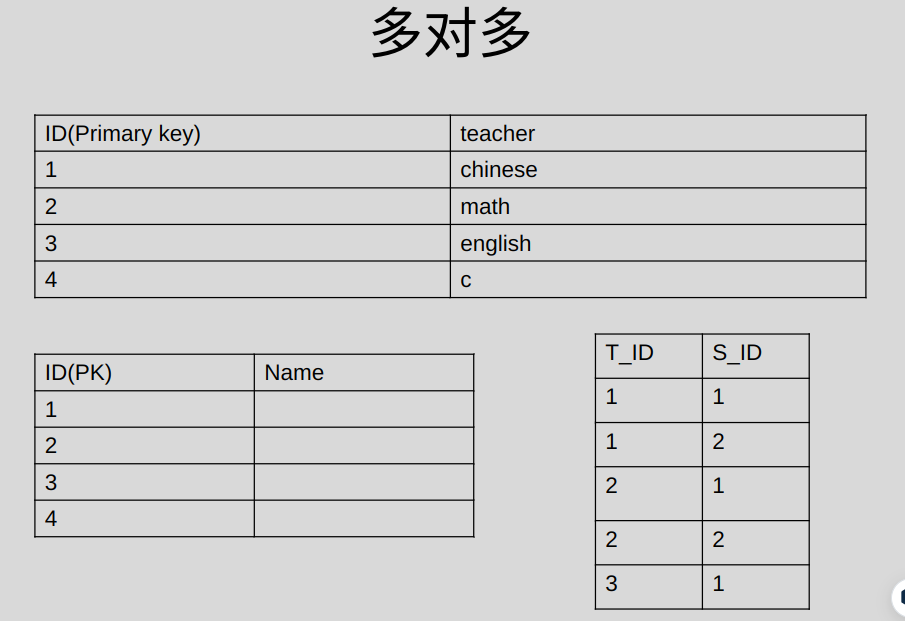
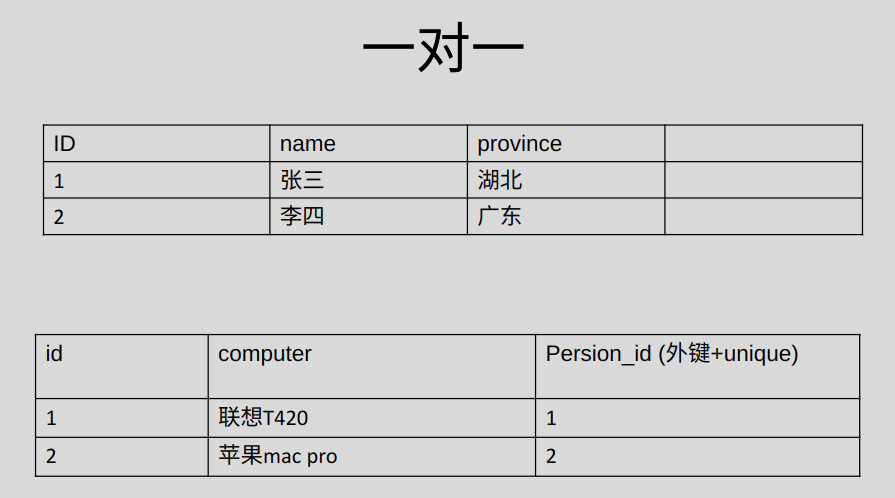
再设计一个表:
mysql> create table customer(
    -> id int auto_increment,
    -> name varchar(30),
    -> age int,
    -> primary key(id));
Query OK, 0 rows affected (0.03 sec)
过程略。结果:
mysql> select * from customer;
+----+---------+------+
| id | name    | age  |
+----+---------+------+
|  1 | Lumine  |  500 |
|  2 | yoimiya |   17 |
|  3 | ayaka   |   16 |
|  5 | nilou   |   17 |
+----+---------+------+
4 rows in set (0.00 sec)

mysql> show create table customer;
+----------+-------------------------------------------------------------------------------------------------------------------------------------------------------------------------------------------------------------------------------------+
| Table    | Create Table                                                                                                                                                                                                                        |
+----------+-------------------------------------------------------------------------------------------------------------------------------------------------------------------------------------------------------------------------------------+
| customer | CREATE TABLE `customer` (
  `id` int NOT NULL AUTO_INCREMENT,
  `name` varchar(30) DEFAULT NULL,
  `age` int DEFAULT NULL,
  PRIMARY KEY (`id`)
) ENGINE=InnoDB AUTO_INCREMENT=6 DEFAULT CHARSET=utf8mb4 COLLATE=utf8mb4_0900_ai_ci |
+----------+-------------------------------------------------------------------------------------------------------------------------------------------------------------------------------------------------------------------------------------+
1 row in set (0.00 sec)
再设计一个表:
mysql> create table order_table(
    -> order_id int auto_increment primary key,
    -> name char(20) not null,
    -> price float,
    -> user_id int,
    -> foreign key(user_id) references customer(id));
Query OK, 0 rows affected (0.04 sec)

mysql> show tables;
+------------------+
| Tables_in_akashi |
+------------------+
| customer         |
| member           |
| order_table      |
+------------------+
3 rows in set (0.01 sec)

mysql> desc order_table;
+----------+----------+------+-----+---------+----------------+
| Field    | Type     | Null | Key | Default | Extra          |
+----------+----------+------+-----+---------+----------------+
| order_id | int      | NO   | PRI | NULL    | auto_increment |
| name     | char(20) | NO   |     | NULL    |                |
| price    | float    | YES  |     | NULL    |                |
| user_id  | int      | YES  | MUL | NULL    |                |
+----------+----------+------+-----+---------+----------------+
4 rows in set (0.00 sec)
插入相关联的记录:
mysql> select * from customer;
+----+---------+------+
| id | name    | age  |
+----+---------+------+
|  1 | Lumine  |  500 |
|  2 | yoimiya |   17 |
|  3 | ayaka   |   16 |
|  5 | nilou   |   17 |
+----+---------+------+
4 rows in set (0.00 sec)

mysql> select * from order_table;
Empty set (0.01 sec)

mysql> insert into order_table values(10,'shanzi',520,3);
Query OK, 1 row affected (0.02 sec)

mysql> select * from order_table;
+----------+--------+-------+---------+
| order_id | name   | price | user_id |
+----------+--------+-------+---------+
|       10 | shanzi |   520 |       3 |
+----------+--------+-------+---------+
1 row in set (0.00 sec)

mysql> insert into order_table values(12,'Alcohol Pads',5,4);
ERROR 1452 (23000): Cannot add or update a child row: a foreign key constraint fails (`akashi`.`order_table`, CONSTRAINT `order_table_ibfk_1` FOREIGN KEY (`user_id`) REFERENCES `customer` (`id`))
此时,不能删除 ayaka :
mysql> delete from customer where id=3;
ERROR 1451 (23000): Cannot delete or update a parent row: a foreign key constraint fails (`akashi`.`order_table`, CONSTRAINT `order_table_ibfk_1` FOREIGN KEY (`user_id`) REFERENCES `customer` (`id`))
DQL数据查询语言
- 连接查询:交叉连接、内连接、外连接
- 联合查询
- 报表查询
连接查询的 from 子句的连接语法格式为:
Select *
from TABLE1 join_type TABLE2  [on (join_condition)]
				              [where (query_condition)]
其中,TABLE1 和 TABLE2 表示参与连接操作的表,TABLE1 为左表,TABLE2 为右表。on 子句设定连接条件,where 子句设定查询条件,join_type 表示连接类型。
交叉连接(cross join),不带on子句,返回连接表中所有数据行的笛卡尔积:
mysql> select * from customer;
+----+---------+------+
| id | name    | age  |
+----+---------+------+
|  1 | Lumine  |  500 |
|  2 | yoimiya |   17 |
|  3 | ayaka   |   16 |
|  5 | nilou   |   17 |
+----+---------+------+
4 rows in set (0.00 sec)

mysql> select * from order_table;
+----------+--------------+-------+---------+
| order_id | name         | price | user_id |
+----------+--------------+-------+---------+
|       10 | shanzi       |   520 |       3 |
|       13 | duojiaoyutou |    50 |       2 |
+----------+--------------+-------+---------+
2 rows in set (0.00 sec)

mysql> select * from customer cross join order_table;
+----+---------+------+----------+--------------+-------+---------+
| id | name    | age  | order_id | name         | price | user_id |
+----+---------+------+----------+--------------+-------+---------+
|  1 | Lumine  |  500 |       13 | duojiaoyutou |    50 |       2 |
|  1 | Lumine  |  500 |       10 | shanzi       |   520 |       3 |
|  2 | yoimiya |   17 |       13 | duojiaoyutou |    50 |       2 |
|  2 | yoimiya |   17 |       10 | shanzi       |   520 |       3 |
|  3 | ayaka   |   16 |       13 | duojiaoyutou |    50 |       2 |
|  3 | ayaka   |   16 |       10 | shanzi       |   520 |       3 |
|  5 | nilou   |   17 |       13 | duojiaoyutou |    50 |       2 |
|  5 | nilou   |   17 |       10 | shanzi       |   520 |       3 |
+----+---------+------+----------+--------------+-------+---------+
8 rows in set (0.00 sec)
内连接(inner join),返回连接表中符合连接条件及查询条件的数据行。
内连接查询:
- 显式内连接:使用
inner join关键字,在on子句中设定连接条件。 - 隐式内连接:不包含
inner join关键字和on关键字,在where子句中设定连接条件。
显式内连接:
mysql> select * from customer inner join order_table on customer.id=order_table.user_id;
+----+---------+------+----------+--------------+-------+---------+
| id | name    | age  | order_id | name         | price | user_id |
+----+---------+------+----------+--------------+-------+---------+
|  3 | ayaka   |   16 |       10 | shanzi       |   520 |       3 |
|  2 | yoimiya |   17 |       13 | duojiaoyutou |    50 |       2 |
+----+---------+------+----------+--------------+-------+---------+
2 rows in set (0.00 sec)

mysql> select * from customer as c inner join order_table as o on c.id=o.user_id;
+----+---------+------+----------+--------------+-------+---------+
| id | name    | age  | order_id | name         | price | user_id |
+----+---------+------+----------+--------------+-------+---------+
|  3 | ayaka   |   16 |       10 | shanzi       |   520 |       3 |
|  2 | yoimiya |   17 |       13 | duojiaoyutou |    50 |       2 |
+----+---------+------+----------+--------------+-------+---------+
2 rows in set (0.01 sec)
隐式内连接:
mysql> select * from customer,order_table where customer.id=order_table.user_id;
+----+---------+------+----------+--------------+-------+---------+
| id | name    | age  | order_id | name         | price | user_id |
+----+---------+------+----------+--------------+-------+---------+
|  3 | ayaka   |   16 |       10 | shanzi       |   520 |       3 |
|  2 | yoimiya |   17 |       13 | duojiaoyutou |    50 |       2 |
+----+---------+------+----------+--------------+-------+---------+
2 rows in set (0.00 sec)
复制一个 table(包含数据):
mysql> create table customer_tmp select * from customer;
Query OK, 4 rows affected (0.02 sec)
Records: 4  Duplicates: 0  Warnings: 0

mysql> desc customer;
+-------+-------------+------+-----+---------+----------------+
| Field | Type        | Null | Key | Default | Extra          |
+-------+-------------+------+-----+---------+----------------+
| id    | int         | NO   | PRI | NULL    | auto_increment |
| name  | varchar(30) | YES  |     | NULL    |                |
| age   | int         | YES  |     | NULL    |                |
+-------+-------------+------+-----+---------+----------------+
3 rows in set (0.01 sec)

mysql> desc customer_tmp;
+-------+-------------+------+-----+---------+-------+
| Field | Type        | Null | Key | Default | Extra |
+-------+-------------+------+-----+---------+-------+
| id    | int         | NO   |     | 0       |       |
| name  | varchar(30) | YES  |     | NULL    |       |
| age   | int         | YES  |     | NULL    |       |
+-------+-------------+------+-----+---------+-------+
3 rows in set (0.01 sec)

mysql> select * from customer_tmp;
+----+---------+------+
| id | name    | age  |
+----+---------+------+
|  1 | Lumine  |  500 |
|  2 | yoimiya |   17 |
|  3 | ayaka   |   16 |
|  5 | nilou   |   17 |
+----+---------+------+
4 rows in set (0.00 sec)
复制一个 table(不包含数据):
mysql> create table customer_tmp_like like customer;
Query OK, 0 rows affected (0.03 sec)

mysql> desc customer_tmp_like;
+-------+-------------+------+-----+---------+----------------+
| Field | Type        | Null | Key | Default | Extra          |
+-------+-------------+------+-----+---------+----------------+
| id    | int         | NO   | PRI | NULL    | auto_increment |
| name  | varchar(30) | YES  |     | NULL    |                |
| age   | int         | YES  |     | NULL    |                |
+-------+-------------+------+-----+---------+----------------+
3 rows in set (0.01 sec)

mysql> select * from customer_tmp_like;
Empty set (0.00 sec)
为(已有的)customer_tmp 添加主键:
mysql> alter table customer_tmp modify id int primary key;
Query OK, 0 rows affected (0.07 sec)
Records: 0  Duplicates: 0  Warnings: 0

mysql> desc customer_tmp;
+-------+-------------+------+-----+---------+-------+
| Field | Type        | Null | Key | Default | Extra |
+-------+-------------+------+-----+---------+-------+
| id    | int         | NO   | PRI | NULL    |       |
| name  | varchar(30) | YES  |     | NULL    |       |
| age   | int         | YES  |     | NULL    |       |
+-------+-------------+------+-----+---------+-------+
3 rows in set (0.00 sec)
现有表如下:
mysql> show tables;
+-------------------+
| Tables_in_akashi  |
+-------------------+
| customer          |
| customer_tmp      |
| customer_tmp_like |
| member            |
| order_table       |
| order_table_tmp   |
+-------------------+
6 rows in set (0.01 sec)

mysql> show create table order_table_tmp;
+-----------------+-----------------------------------------------------------------------------------------------------------------------------------------------------------------------------------------------------------------------------------------------------------------------------------------------+
| Table           | Create Table                                                                                                                                                                                                                                                                                  |
+-----------------+-----------------------------------------------------------------------------------------------------------------------------------------------------------------------------------------------------------------------------------------------------------------------------------------------+
| order_table_tmp | CREATE TABLE `order_table_tmp` (
  `order_id` int NOT NULL AUTO_INCREMENT,
  `name` char(20) NOT NULL,
  `price` float DEFAULT NULL,
  `user_id` int DEFAULT NULL,
  PRIMARY KEY (`order_id`),
  KEY `user_id` (`user_id`)
) ENGINE=InnoDB DEFAULT CHARSET=utf8mb4 COLLATE=utf8mb4_0900_ai_ci |
+-----------------+-----------------------------------------------------------------------------------------------------------------------------------------------------------------------------------------------------------------------------------------------------------------------------------------------+
1 row in set (0.00 sec)

mysql> desc order_table_tmp;
+----------+----------+------+-----+---------+----------------+
| Field    | Type     | Null | Key | Default | Extra          |
+----------+----------+------+-----+---------+----------------+
| order_id | int      | NO   | PRI | NULL    | auto_increment |
| name     | char(20) | NO   |     | NULL    |                |
| price    | float    | YES  |     | NULL    |                |
| user_id  | int      | YES  | MUL | NULL    |                |
+----------+----------+------+-----+---------+----------------+
4 rows in set (0.00 sec)
对 order_table_tmp 作外键约束:
mysql> alter table order_table_tmp add foreign key(user_id) references customer_tmp(id);
Query OK, 0 rows affected (0.07 sec)
Records: 0  Duplicates: 0  Warnings: 0

mysql> show create table order_table_tmp;
+-----------------+-----------------------------------------------------------------------------------------------------------------------------------------------------------------------------------------------------------------------------------------------------------------------------------------------------------------------------------------------------------------------------------------------+
| Table           | Create Table                                                                                                                                                                                                                                                                                                                                                                                  |
+-----------------+-----------------------------------------------------------------------------------------------------------------------------------------------------------------------------------------------------------------------------------------------------------------------------------------------------------------------------------------------------------------------------------------------+
| order_table_tmp | CREATE TABLE `order_table_tmp` (
  `order_id` int NOT NULL AUTO_INCREMENT,
  `name` char(20) NOT NULL,
  `price` float DEFAULT NULL,
  `user_id` int DEFAULT NULL,
  PRIMARY KEY (`order_id`),
  KEY `user_id` (`user_id`),
  CONSTRAINT `order_table_tmp_ibfk_1` FOREIGN KEY (`user_id`) REFERENCES `customer_tmp` (`id`)
) ENGINE=InnoDB DEFAULT CHARSET=utf8mb4 COLLATE=utf8mb4_0900_ai_ci |
+-----------------+-----------------------------------------------------------------------------------------------------------------------------------------------------------------------------------------------------------------------------------------------------------------------------------------------------------------------------------------------------------------------------------------------+
1 row in set (0.00 sec)
(?)如果想修改外键名字,可以先删除外键约束,然后再新建。
外连接:分为左外连接(left outer join)、右外连接(right outer join)。与内连接不同的是,外连接不仅返回连接表中符合连接条件及查询条件的数据行,也返回左表(左外连接时)或右表(右外连接时)中仅符合查询条件但不符合连接条件的数据行。
左外连接(left outer join):
mysql> select * from order_table;
+----------+--------------+-------+---------+
| order_id | name         | price | user_id |
+----------+--------------+-------+---------+
|       10 | shanzi       |   520 |       3 |
|       13 | duojiaoyutou |    50 |       2 |
+----------+--------------+-------+---------+
2 rows in set (0.00 sec)

mysql> select * from customer;
+----+---------+------+
| id | name    | age  |
+----+---------+------+
|  1 | Lumine  |  500 |
|  2 | yoimiya |   17 |
|  3 | ayaka   |   16 |
|  5 | nilou   |   17 |
+----+---------+------+
4 rows in set (0.00 sec)

mysql> select * from customer as c left outer join order_table as o on c.id=o.user_id;
+----+---------+------+----------+--------------+-------+---------+
| id | name    | age  | order_id | name         | price | user_id |
+----+---------+------+----------+--------------+-------+---------+
|  1 | Lumine  |  500 |     NULL | NULL         |  NULL |    NULL |
|  2 | yoimiya |   17 |       13 | duojiaoyutou |    50 |       2 |
|  3 | ayaka   |   16 |       10 | shanzi       |   520 |       3 |
|  5 | nilou   |   17 |     NULL | NULL         |  NULL |    NULL |
+----+---------+------+----------+--------------+-------+---------+
4 rows in set (0.00 sec)
外连接的时候,必须要加上连接条件 on .
追加限制:
mysql> select * from customer as c left outer join order_table as o on c.id=o.user_id where o.order_id is not null;
+----+---------+------+----------+--------------+-------+---------+
| id | name    | age  | order_id | name         | price | user_id |
+----+---------+------+----------+--------------+-------+---------+
|  3 | ayaka   |   16 |       10 | shanzi       |   520 |       3 |
|  2 | yoimiya |   17 |       13 | duojiaoyutou |    50 |       2 |
+----+---------+------+----------+--------------+-------+---------+
2 rows in set (0.00 sec)
右外连接:
mysql> select * from customer as c right outer join order_table as o
on c.id=o.user_id;
+------+---------+------+----------+--------------+-------+---------+
| id   | name    | age  | order_id | name         | price | user_id |
+------+---------+------+----------+--------------+-------+---------+
|    3 | ayaka   |   16 |       10 | shanzi       |   520 |       3 |
|    2 | yoimiya |   17 |       13 | duojiaoyutou |    50 |       2 |
+------+---------+------+----------+--------------+-------+---------+
2 rows in set (0.00 sec)
这种查询并不要求左表和右表有外键约束:
mysql> select * from member;
+------+-----------+------+------+---------------------+
| id   | name      | age  | math | e_date              |
+------+-----------+------+------+---------------------+
|    1 | xiaoshuai |   30 |   59 | 1999-10-10 10:10:10 |
|    2 | xiaoai    |   24 | NULL | 1999-10-10 10:10:10 |
|    3 | xiaomei   |   20 |  100 | 1999-10-10 10:10:10 |
|    4 | lumine    |   17 |   61 | 1999-10-10 10:10:10 |
| NULL | NULL      | NULL | NULL | NULL                |
+------+-----------+------+------+---------------------+
5 rows in set (0.00 sec)

mysql> select * from customer;
+----+---------+------+
| id | name    | age  |
+----+---------+------+
|  1 | Lumine  |  500 |
|  2 | yoimiya |   17 |
|  3 | ayaka   |   16 |
|  5 | nilou   |   17 |
+----+---------+------+
4 rows in set (0.00 sec)

mysql> select * from customer as c right outer join member as m on c.id=m.id;
+------+---------+------+------+-----------+------+------+---------------------+
| id   | name    | age  | id   | name      | age  | math | e_date              |
+------+---------+------+------+-----------+------+------+---------------------+
|    1 | Lumine  |  500 |    1 | xiaoshuai |   30 |   59 | 1999-10-10 10:10:10 |
|    2 | yoimiya |   17 |    2 | xiaoai    |   24 | NULL | 1999-10-10 10:10:10 |
|    3 | ayaka   |   16 |    3 | xiaomei   |   20 |  100 | 1999-10-10 10:10:10 |
| NULL | NULL    | NULL |    4 | lumine    |   17 |   61 | 1999-10-10 10:10:10 |
| NULL | NULL    | NULL | NULL | NULL      | NULL | NULL | NULL                |
+------+---------+------+------+-----------+------+------+---------------------+
5 rows in set (0.00 sec)

mysql> desc member;
+--------+-------------+------+-----+---------+-------+
| Field  | Type        | Null | Key | Default | Extra |
+--------+-------------+------+-----+---------+-------+
| id     | int         | YES  |     | NULL    |       |
| name   | varchar(20) | YES  |     | NULL    |       |
| age    | int         | YES  |     | NULL    |       |
| math   | float       | YES  |     | NULL    |       |
| e_date | datetime    | YES  |     | NULL    |       |
+--------+-------------+------+-----+---------+-------+
5 rows in set (0.00 sec)

mysql> desc customer;
+-------+-------------+------+-----+---------+----------------+
| Field | Type        | Null | Key | Default | Extra          |
+-------+-------------+------+-----+---------+----------------+
| id    | int         | NO   | PRI | NULL    | auto_increment |
| name  | varchar(30) | YES  |     | NULL    |                |
| age   | int         | YES  |     | NULL    |                |
+-------+-------------+------+-----+---------+----------------+
3 rows in set (0.01 sec)子查询:也叫“嵌套查询”,是指在where子句或from子句中又嵌入select查询语句(一般写在where子句)。
【练习】查询“郭靖”的所有订单信息:
SELECT * FROM orders WHERE customer_id=(SELECT id FROM customer WHERE name LIKE '%郭靖%');联合查询:合并两条查询语句的查询结果,去掉其中的重复数据行,然后返回没有重复数据行的查询结果。联合查询使用union关键字。例子:
SELECT * FROM orders WHERE price>100 UNION SELECT * FROM orders WHERE customer_id=1;mysql> insert into member(id,name,age,math) values(5,'huohuo',14,71);
Query OK, 1 row affected (0.01 sec)
mysql> select * from member;
+------+-----------+------+------+---------------------+
| id | name | age | math | e_date |
+------+-----------+------+------+---------------------+
| 1 | xiaoshuai | 30 | 59 | 1999-10-10 10:10:10 |
| 2 | xiaoai | 24 | NULL | 1999-10-10 10:10:10 |
| 3 | xiaomei | 20 | 100 | 1999-10-10 10:10:10 |
| 4 | lumine | 17 | 61 | 1999-10-10 10:10:10 |
| NULL | NULL | NULL | NULL | NULL |
| 5 | huohuo | 14 | 71 | NULL |
+------+-----------+------+------+---------------------+
6 rows in set (0.00 sec)
mysql> select * from member where age>19;
+------+-----------+------+------+---------------------+
| id | name | age | math | e_date |
+------+-----------+------+------+---------------------+
| 1 | xiaoshuai | 30 | 59 | 1999-10-10 10:10:10 |
| 2 | xiaoai | 24 | NULL | 1999-10-10 10:10:10 |
| 3 | xiaomei | 20 | 100 | 1999-10-10 10:10:10 |
+------+-----------+------+------+---------------------+
3 rows in set (0.00 sec)
mysql> select * from member where math>60;
+------+---------+------+------+---------------------+
| id | name | age | math | e_date |
+------+---------+------+------+---------------------+
| 3 | xiaomei | 20 | 100 | 1999-10-10 10:10:10 |
| 4 | lumine | 17 | 61 | 1999-10-10 10:10:10 |
| 5 | huohuo | 14 | 71 | NULL |
+------+---------+------+------+---------------------+
3 rows in set (0.00 sec)
mysql> select * from member where age>19 union select * from member where math>60;
+------+-----------+------+------+---------------------+
| id | name | age | math | e_date |
+------+-----------+------+------+---------------------+
| 1 | xiaoshuai | 30 | 59 | 1999-10-10 10:10:10 |
| 2 | xiaoai | 24 | NULL | 1999-10-10 10:10:10 |
| 3 | xiaomei | 20 | 100 | 1999-10-10 10:10:10 |
| 4 | lumine | 17 | 61 | 1999-10-10 10:10:10 |
| 5 | huohuo | 14 | 71 | NULL |
+------+-----------+------+------+---------------------+
5 rows in set (0.01 sec)其效果等价于:
mysql> select * from member where age>19 or math>60;
+------+-----------+------+------+---------------------+
| id   | name      | age  | math | e_date              |
+------+-----------+------+------+---------------------+
|    1 | xiaoshuai |   30 |   59 | 1999-10-10 10:10:10 |
|    2 | xiaoai    |   24 | NULL | 1999-10-10 10:10:10 |
|    3 | xiaomei   |   20 |  100 | 1999-10-10 10:10:10 |
|    4 | lumine    |   17 |   61 | 1999-10-10 10:10:10 |
|    5 | huohuo    |   14 |   71 | NULL                |
+------+-----------+------+------+---------------------+
5 rows in set (0.00 sec)加all,不去重:
mysql> select * from member where age>19 union all select * from member where math>60;
+------+-----------+------+------+---------------------+
| id   | name      | age  | math | e_date              |
+------+-----------+------+------+---------------------+
|    1 | xiaoshuai |   30 |   59 | 1999-10-10 10:10:10 |
|    2 | xiaoai    |   24 | NULL | 1999-10-10 10:10:10 |
|    3 | xiaomei   |   20 |  100 | 1999-10-10 10:10:10 |
|    3 | xiaomei   |   20 |  100 | 1999-10-10 10:10:10 |
|    4 | lumine    |   17 |   61 | 1999-10-10 10:10:10 |
|    5 | huohuo    |   14 |   71 | NULL                |
+------+-----------+------+------+---------------------+
6 rows in set (0.00 sec)报表查询,对数据行进行分组统计,其语法格式为:
select… from… [where…] [group by… [having… ]] [order by… ] 其中group by子句指定按照哪些字段分组,having子句设定分组查询条件。
mysql> select * from member;
+------+-----------+------+------+---------------------+
| id   | name      | age  | math | e_date              |
+------+-----------+------+------+---------------------+
|    1 | xiaoshuai |   30 |   59 | 1999-10-10 10:10:10 |
|    2 | xiaoai    |   24 | NULL | 1999-10-10 10:10:10 |
|    3 | xiaomei   |   20 |  100 | 1999-10-10 10:10:10 |
|    4 | lumine    |   17 |   61 | 1999-10-10 10:10:10 |
| NULL | NULL      | NULL | NULL | NULL                |
|    5 | huohuo    |   14 |   71 | NULL                |
|    7 | ai        |   17 |   99 | NULL                |
| NULL | zhuangzi  |   99 |  120 | NULL                |
| NULL | laozi     |   99 |  120 | NULL                |
+------+-----------+------+------+---------------------+
9 rows in set (0.00 sec)

mysql> select age from member group by age;
+------+
| age  |
+------+
|   30 |
|   24 |
|   20 |
|   17 |
| NULL |
|   14 |
|   99 |
+------+
7 rows in set (0.00 sec)
在报表查询中可以使用SQL函数
count()计数sum()求和avg()求平均值max()最大值min()最小值
mysql> select count(age),age from member group by age;
+------------+------+
| count(age) | age  |
+------------+------+
|          1 |   30 |
|          1 |   24 |
|          1 |   20 |
|          2 |   17 |
|          0 | NULL |
|          1 |   14 |
|          2 |   99 |
+------------+------+
7 rows in set (0.01 sec)mysql> select min(math) from member;
+-----------+
| min(math) |
+-----------+
| 59 |
+-----------+
1 row in set (0.00 sec)
mysql> select sum(age),min(math) from member;
+----------+-----------+
| sum(age) | min(math) |
+----------+-----------+
| 320 | 59 |
+----------+-----------+
1 row in set (0.00 sec)having用法:
mysql> select count(age),age from member group by age having age<22;
+------------+------+
| count(age) | age  |
+------------+------+
|          1 |   20 |
|          2 |   17 |
|          1 |   14 |
+------------+------+
3 rows in set (0.00 sec)

mysql> select count(age),age from member group by age having count(age)>1;
+------------+------+
| count(age) | age  |
+------------+------+
|          2 |   17 |
|          2 |   99 |
+------------+------+
2 rows in set (0.00 sec)
数据的备份与恢复
在此之前: https://stackoverflow.com/questions/39281594/error-1698-28000-access-denied-for-user-rootlocalhost
备份:
mysqldump -u root -p akashi>akashi.sql备份得到的文件akashi.sql可以用vim打开查看。
目前为止的备份文件:Google Drive文件分享
恢复:
在此之前,akashi 库已被删除:
mysql> show databases;
+--------------------+
| Database           |
+--------------------+
| akashi             |
| information_schema |
| mysql              |
| performance_schema |
| sys                |
+--------------------+
5 rows in set (0.01 sec)

mysql> drop database akashi;
Query OK, 6 rows affected (0.06 sec)

mysql> show databases;
+--------------------+
| Database           |
+--------------------+
| information_schema |
| mysql              |
| performance_schema |
| sys                |
+--------------------+
4 rows in set (0.00 sec)
为了恢复 akashi 库,需要先进行如下准备:
mysql> create database akashi;
Query OK, 1 row affected (0.01 sec)

mysql> show databases;
+--------------------+
| Database           |
+--------------------+
| akashi             |
| information_schema |
| mysql              |
| performance_schema |
| sys                |
+--------------------+
5 rows in set (0.00 sec)

mysql> use akashi;
Database changed
mysql> show tables;
Empty set (0.00 sec)
然后在命令行中执行:
mysql -u root -p akashi<akashi.sql即可恢复 akashi 库:
mysql> show tables;
+-------------------+
| Tables_in_akashi  |
+-------------------+
| customer          |
| customer_tmp      |
| customer_tmp_like |
| member            |
| order_table       |
| order_table_tmp   |
+-------------------+
6 rows in set (0.00 sec)
备份原理:insert
- 通过协议连接到 MySQL数据库,将需要备份的数据查询出来并转换成对应的insert语句,当我们需要还原这些数据时,只要执行这些 insert 语句,即可将对应的数据还原
数据库编程
文档资料:
查看 port :
wanko@wanko:~$ cd /etc/mysql
wanko@wanko:/etc/mysql$ ll
total 40
drwxr-xr-x   4 root root  4096  1月  1 22:05 ./
drwxr-xr-x 129 root root 12288  1月  9 17:15 ../
drwxr-xr-x   2 root root  4096  1月  1 22:05 conf.d/
-rw-------   1 root root   317  1月  1 22:05 debian.cnf
-rwxr-xr-x   1 root root   120 10月 26 01:34 debian-start*
lrwxrwxrwx   1 root root    24  1月  1 22:05 my.cnf -> /etc/alternatives/my.cnf
-rw-r--r--   1 root root   839 10月 20  2020 my.cnf.fallback
-rw-r--r--   1 root root   682  6月 15  2023 mysql.cnf
drwxr-xr-x   2 root root  4096  1月  1 22:05 mysql.conf.d/
wanko@wanko:/etc/mysql$ cd mysql.conf.d/
wanko@wanko:/etc/mysql/mysql.conf.d$ ll
total 16
drwxr-xr-x 2 root root 4096  1月  1 22:05 ./
drwxr-xr-x 4 root root 4096  1月  1 22:05 ../
-rw-r--r-- 1 root root  132  6月 15  2023 mysql.cnf
-rw-r--r-- 1 root root 2220  6月 15  2023 mysqld.cnf
wanko@wanko:/etc/mysql/mysql.conf.d$ sudo vim mysqld.cnf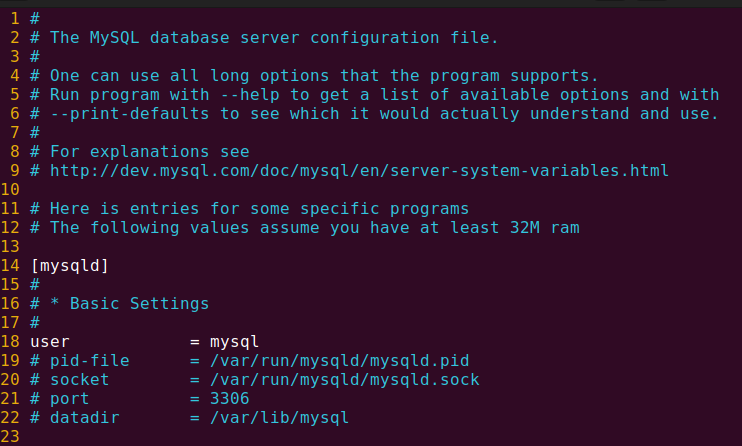
初学关注:
mysql_real_connect()mysql_query()mysql_store_result()mysql_num_rows()
安装 libmysqlclient-dev :
sudo apt-get install libmysqlclient-dev(在某些情况下 linux 真的比 Windows 方便许多,令人感叹)
写一段用于查询的 C 程序:
#include <mysql/mysql.h>
#include <string.h>
#include <stdio.h>

int main(int argc, char* argv[]){
    if(argc != 2){
        printf("error args\n");
        return -1;
    }

    MYSQL* conn;
    MYSQL_RES* res;
    MYSQL_ROW row;
    char* server = "localhost";
    char* user = "root";
    char* password = ""; // input passwd, use "" if there isn't a password
    char* database = "akashi"; // name of the database to access
    char query[300] = "select * from member where name = '";
    unsigned int queryRet;
    sprintf(query, "%s%s%s", query, argv[1], "'");
    /* strcpy(query, "select * from www"); */

    /* Print the query statement before output */
    puts(query);

    // init
    conn = mysql_init(NULL);
    if(!conn){
        printf("MySQL init failed.\n");
        return -1;
    }

    /* Connect to the database, continue if successful */
    if(!mysql_real_connect(conn, server, user, password, database, 0, NULL, 0))
    {
        printf("Error connecting to database: %s\n", mysql_error(conn));
        return -1;
    }
    else {
        printf("MySQL Connected.\n");
    }

    // Passing SQL Statements to MySQL
    queryRet = mysql_query(conn, query);
    if(queryRet){
        printf("Error making query: %s\n", mysql_error(conn));
    }
    else {
        res = mysql_store_result(conn);
        printf("mysql_store_result = %lu\n", (unsigned long)mysql_num_rows(res));
        /* alternative way of the two lines above */
        /* res = mysql_use_result(conn); */

        row = mysql_fetch_row(res);
        if(row == NULL){
            printf("No data found.\n");
        }
        else {
            do{
                // print an entire line of content every single loop
                for(queryRet = 0; queryRet < mysql_num_fields(res); queryRet++)
                {
                    printf("%8s ", row[queryRet]);
                }
                printf("\n");
            }while((row = mysql_fetch_row(res)) != NULL);
        }

        mysql_free_result(res);
    }

    mysql_close(conn);
    return 0;
}
编译(可能会跳一些 warning 不过不影响大局):
gcc query.c -lmysqlclient运行结果:
wanko@wanko:~/mycode/example_mysql$ ./a.out lumine
select * from member where name = 'lumine'
MySQL Connected.
mysql_store_result = 1
       4   lumine       17       61 1999-10-10 10:10:10
来看一下是否和 akashi 库中的表 member 数据吻合:
mysql> select * from member;
+------+-----------+------+------+---------------------+
| id   | name      | age  | math | e_date              |
+------+-----------+------+------+---------------------+
|    1 | xiaoshuai |   30 |   59 | 1999-10-10 10:10:10 |
|    2 | xiaoai    |   24 | NULL | 1999-10-10 10:10:10 |
|    3 | xiaomei   |   20 |  100 | 1999-10-10 10:10:10 |
|    4 | lumine    |   17 |   61 | 1999-10-10 10:10:10 |
| NULL | NULL      | NULL | NULL | NULL                |
|    5 | huohuo    |   14 |   71 | NULL                |
|    7 | ai        |   17 |   99 | NULL                |
| NULL | zhuangzi  |   99 |  120 | NULL                |
| NULL | laozi     |   99 |  120 | NULL                |
+------+-----------+------+------+---------------------+
9 rows in set (0.00 sec)
写一个用来插入的程序:
#include <mysql/mysql.h>
#include <string.h>
#include <stdio.h>

int main(int argc, char* argv[]){
    MYSQL *conn;
    char* server = "localhost";
    char* user = "root";
    char* password = ""; // input passwd, use "" if there isn't a password
    char* database = "akashi"; // name of the database to access
    char query[300] = "insert into member (id, name, age, math) values (8,'Kafka',28,99)";
    int queryResult;

    conn = mysql_init(NULL);

    if(!mysql_real_connect(conn, server, user, password, database, 0, NULL, 0))
    {
        printf("Error connecting to database: %s\n", mysql_error(conn));
        return -1;
    }
    else {
        printf("MySQL Connected.\n");
    }

    queryResult = mysql_query(conn, query);
    if(queryResult){
        printf("Error making querry: %s\n", mysql_error(conn));
    }
    else {
        printf("insert succeed.\n");
    }

    mysql_close(conn);
    return 0;
}
运行上面的代码之后:
mysql> select * from member;
+------+-----------+------+------+---------------------+
| id   | name      | age  | math | e_date              |
+------+-----------+------+------+---------------------+
|    1 | xiaoshuai |   30 |   59 | 1999-10-10 10:10:10 |
|    2 | xiaoai    |   24 | NULL | 1999-10-10 10:10:10 |
|    3 | xiaomei   |   20 |  100 | 1999-10-10 10:10:10 |
|    4 | lumine    |   17 |   61 | 1999-10-10 10:10:10 |
| NULL | NULL      | NULL | NULL | NULL                |
|    5 | huohuo    |   14 |   71 | NULL                |
|    7 | ai        |   17 |   99 | NULL                |
| NULL | zhuangzi  |   99 |  120 | NULL                |
| NULL | laozi     |   99 |  120 | NULL                |
|    8 | Kafka     |   28 |   99 | NULL                |
+------+-----------+------+------+---------------------+
10 rows in set (0.00 sec)
写一个用来 update 的程序:
#include <mysql/mysql.h>
#include <string.h>
#include <stdio.h>

int main(int argc, char* argv[]){
    if(argc != 2){
        printf("error args\n");
        return -1;
    }

    MYSQL* conn;
    MYSQL_RES* res;
    MYSQL_ROW row;
    char* server = "localhost";
    char* user = "root";
    char* password = ""; // input passwd, use "" if there isn't a password
    char* database = "akashi"; // name of the database to access
    char query[300] = "update member set name = '";
    sprintf(query, "%s%s%s", query, argv[1], "' where id = 1");
    puts(query);

    int queryResult;
    conn = mysql_init(NULL);

    if(!mysql_real_connect(conn, server, user, password, database, 0, NULL, 0))
    {
        printf("Error connecting to database: %s\n", mysql_error(conn));
        return -1;
    }
    else {
        printf("MySQL Connected.\n");
    }

    queryResult = mysql_query(conn, query);
    if(queryResult){
        printf("Error making query: %s\n", mysql_error(conn));
    }
    else {
        int ret = mysql_affected_rows(conn);
        if(ret){
            printf("update succeed.\n");
        }
        else {
            printf("update failed, mysql_affected_rows: %d\n", ret);
        }
    }

    mysql_close(conn);
    return 0;
}
运行:
wanko@wanko:~/mycode/example_mysql$ ./a.out Natasha
update member set name = 'Natasha' where id = 1
MySQL Connected.
update succeed.
结果:
mysql> select * from member;
+------+----------+------+------+---------------------+
| id   | name     | age  | math | e_date              |
+------+----------+------+------+---------------------+
|    1 | Natasha  |   30 |   59 | 1999-10-10 10:10:10 |
|    2 | xiaoai   |   24 | NULL | 1999-10-10 10:10:10 |
|    3 | xiaomei  |   20 |  100 | 1999-10-10 10:10:10 |
|    4 | lumine   |   17 |   61 | 1999-10-10 10:10:10 |
| NULL | NULL     | NULL | NULL | NULL                |
|    5 | huohuo   |   14 |   71 | NULL                |
|    7 | ai       |   17 |   99 | NULL                |
| NULL | zhuangzi |   99 |  120 | NULL                |
| NULL | laozi    |   99 |  120 | NULL                |
|    8 | Kafka    |   28 |   99 | NULL                |
+------+----------+------+------+---------------------+
10 rows in set (0.01 sec)
事务(transaction)
引入
考虑一个常见操作,转账。
现在 A 要给 B 转账 1000 元。这个过程可分两步:
- A 的账户减去 1000 元
- B 的账户增加 1000 元
- 以上两步都完成时,“转账”才算完成
但是,现实世界有各种突发情况。若 A 的账户减去 1000 元后,由于某些故障,如系统崩坏、网络故障等,转账操作未完成。此时,A 账户少了 1000 元,但 B 账户的余额没变——即 A 平白无故少了 1000 元。
因此要求,这些操作要么全发生,要么由于故障而全不发生。
构成单一逻辑工作单元的操作集合,称为事务(transaction)。事务是一组原子性的 SQL 查询,或者说一个独立的工作单元。
即使有故障,数据库系统也必须保证事务的正确执行——要么执行整个事务,要么属于该事务的操作一个也不执行。
性质——ACID
原子性(Atomicity)。
一致性(Consistency):当一个事务开始执行时,系统处于一种合法的状态,而当事务成功提交后,系统将转移到另一个合法的状态。具体来说,一致性要求事务在执行过程中必须遵循预定义的规则和约束,以保持数据的完整性。
隔离性(Isolation):尽管多个事务可能并发执行,但系统保证,对于任何一对事务 i 和 j ,在 i 看来,j 要么在 i 开始之前已经完成,要么在 i 完成之后才开始执行。因此,每个事务都感觉不到系统中有其他事务在并发地执行。即:一个事务的执行不能被其他事务干扰。即一个事务内部的操作及使用的数据对并发的其他事务是隔离的。 做不到 100% 隔离,与隔离级别有关。
持久性(Durability):一个事务成功完成后,对数据库中数据的修改将被永久保存,即使发生系统故障或崩溃,数据也不会丢失。
基本操作
开启一个事务,标记事务的起点:START TRANSACTION / BEGIN
提交事务,表示事务成功被执行:COMMIT
回滚事务,回滚到初始状态或者回滚点:ROLL BACK
回滚点:SAVEPOINT
删除回滚点:RELEASE SAVEPOINT
设置隔离级别:SET TRANSACTION
- - - - - 隔离性的体现 - - - - -
最开始的表:
mysql> select * from member;
+------+----------+------+------+---------------------+
| id   | name     | age  | math | e_date              |
+------+----------+------+------+---------------------+
|    1 | Natasha  |   30 |   59 | 1999-10-10 10:10:10 |
|    2 | xiaoai   |   24 | NULL | 1999-10-10 10:10:10 |
|    3 | xiaomei  |   20 |  100 | 1999-10-10 10:10:10 |
|    4 | lumine   |   17 |   61 | 1999-10-10 10:10:10 |
| NULL | NULL     | NULL | NULL | NULL                |
|    5 | huohuo   |   14 |   71 | NULL                |
|    7 | ai       |   17 |   99 | NULL                |
| NULL | zhuangzi |   99 |  120 | NULL                |
| NULL | laozi    |   99 |  120 | NULL                |
|    8 | Kafka    |   28 |   99 | NULL                |
+------+----------+------+------+---------------------+
10 rows in set (0.00 sec)
在终端 1 操作:
mysql> start transaction;
Query OK, 0 rows affected (0.00 sec)
终端 2(与此同时,另一边 …):
mysql> start transaction;
Query OK, 0 rows affected (0.00 sec)
终端 1 :
mysql> update member set age = 17 where id = 3;
Query OK, 1 row affected (0.01 sec)
Rows matched: 1  Changed: 1  Warnings: 0

mysql> select * from member;
+------+----------+------+------+---------------------+
| id   | name     | age  | math | e_date              |
+------+----------+------+------+---------------------+
|    1 | Natasha  |   30 |   59 | 1999-10-10 10:10:10 |
|    2 | xiaoai   |   24 | NULL | 1999-10-10 10:10:10 |
|    3 | xiaomei  |   17 |  100 | 1999-10-10 10:10:10 |
|    4 | lumine   |   17 |   61 | 1999-10-10 10:10:10 |
| NULL | NULL     | NULL | NULL | NULL                |
|    5 | huohuo   |   14 |   71 | NULL                |
|    7 | ai       |   17 |   99 | NULL                |
| NULL | zhuangzi |   99 |  120 | NULL                |
| NULL | laozi    |   99 |  120 | NULL                |
|    8 | Kafka    |   28 |   99 | NULL                |
+------+----------+------+------+---------------------+
10 rows in set (0.00 sec)
然后在终端 2 :
mysql> select * from member;
+------+----------+------+------+---------------------+
| id   | name     | age  | math | e_date              |
+------+----------+------+------+---------------------+
|    1 | Natasha  |   30 |   59 | 1999-10-10 10:10:10 |
|    2 | xiaoai   |   24 | NULL | 1999-10-10 10:10:10 |
|    3 | xiaomei  |   20 |  100 | 1999-10-10 10:10:10 |
|    4 | lumine   |   17 |   61 | 1999-10-10 10:10:10 |
| NULL | NULL     | NULL | NULL | NULL                |
|    5 | huohuo   |   14 |   71 | NULL                |
|    7 | ai       |   17 |   99 | NULL                |
| NULL | zhuangzi |   99 |  120 | NULL                |
| NULL | laozi    |   99 |  120 | NULL                |
|    8 | Kafka    |   28 |   99 | NULL                |
+------+----------+------+------+---------------------+
10 rows in set (0.00 sec)
我们发现,终端 2 中尚未同步终端 1 的修改,这是因为终端 1 的事务尚未提交。体现了隔离性。
- - - - - 隔离性的体现 END - - - - -
终端 1 :
mysql> commit;
Query OK, 0 rows affected (0.01 sec)
终端 2 :
mysql> commit;
Query OK, 0 rows affected (0.00 sec)
此时在终端 1 查看数据:
mysql> select * from member;
+------+----------+------+------+---------------------+
| id   | name     | age  | math | e_date              |
+------+----------+------+------+---------------------+
|    1 | Natasha  |   30 |   59 | 1999-10-10 10:10:10 |
|    2 | xiaoai   |   24 | NULL | 1999-10-10 10:10:10 |
|    3 | xiaomei  |   17 |  100 | 1999-10-10 10:10:10 |
|    4 | lumine   |   17 |   61 | 1999-10-10 10:10:10 |
| NULL | NULL     | NULL | NULL | NULL                |
|    5 | huohuo   |   14 |   71 | NULL                |
|    7 | ai       |   17 |   99 | NULL                |
| NULL | zhuangzi |   99 |  120 | NULL                |
| NULL | laozi    |   99 |  120 | NULL                |
|    8 | Kafka    |   28 |   99 | NULL                |
+------+----------+------+------+---------------------+
10 rows in set (0.00 sec)
在终端 2 查看数据:
mysql> select * from member;
+------+----------+------+------+---------------------+
| id   | name     | age  | math | e_date              |
+------+----------+------+------+---------------------+
|    1 | Natasha  |   30 |   59 | 1999-10-10 10:10:10 |
|    2 | xiaoai   |   24 | NULL | 1999-10-10 10:10:10 |
|    3 | xiaomei  |   17 |  100 | 1999-10-10 10:10:10 |
|    4 | lumine   |   17 |   61 | 1999-10-10 10:10:10 |
| NULL | NULL     | NULL | NULL | NULL                |
|    5 | huohuo   |   14 |   71 | NULL                |
|    7 | ai       |   17 |   99 | NULL                |
| NULL | zhuangzi |   99 |  120 | NULL                |
| NULL | laozi    |   99 |  120 | NULL                |
|    8 | Kafka    |   28 |   99 | NULL                |
+------+----------+------+------+---------------------+
10 rows in set (0.00 sec)
两个查看结果相同了。
- - - - - rollback - - - - -
终端 1 :
mysql> start transaction;
Query OK, 0 rows affected (0.00 sec)

mysql> select * from member;
+------+----------+------+------+---------------------+
| id   | name     | age  | math | e_date              |
+------+----------+------+------+---------------------+
|    1 | Natasha  |   30 |   59 | 1999-10-10 10:10:10 |
|    2 | xiaoai   |   24 | NULL | 1999-10-10 10:10:10 |
|    3 | xiaomei  |   17 |  100 | 1999-10-10 10:10:10 |
|    4 | lumine   |   17 |   61 | 1999-10-10 10:10:10 |
| NULL | NULL     | NULL | NULL | NULL                |
|    5 | huohuo   |   14 |   71 | NULL                |
|    7 | ai       |   17 |   99 | NULL                |
| NULL | zhuangzi |   99 |  120 | NULL                |
| NULL | laozi    |   99 |  120 | NULL                |
|    8 | Kafka    |   28 |   99 | NULL                |
+------+----------+------+------+---------------------+
10 rows in set (0.00 sec)

mysql> update member set age = 15 where id = 5;
Query OK, 1 row affected (0.00 sec)
Rows matched: 1  Changed: 1  Warnings: 0

mysql> select * from member;
+------+----------+------+------+---------------------+
| id   | name     | age  | math | e_date              |
+------+----------+------+------+---------------------+
|    1 | Natasha  |   30 |   59 | 1999-10-10 10:10:10 |
|    2 | xiaoai   |   24 | NULL | 1999-10-10 10:10:10 |
|    3 | xiaomei  |   17 |  100 | 1999-10-10 10:10:10 |
|    4 | lumine   |   17 |   61 | 1999-10-10 10:10:10 |
| NULL | NULL     | NULL | NULL | NULL                |
|    5 | huohuo   |   15 |   71 | NULL                |
|    7 | ai       |   17 |   99 | NULL                |
| NULL | zhuangzi |   99 |  120 | NULL                |
| NULL | laozi    |   99 |  120 | NULL                |
|    8 | Kafka    |   28 |   99 | NULL                |
+------+----------+------+------+---------------------+
10 rows in set (0.00 sec)

mysql> rollback;
Query OK, 0 rows affected (0.01 sec)

mysql> select * from member;
+------+----------+------+------+---------------------+
| id   | name     | age  | math | e_date              |
+------+----------+------+------+---------------------+
|    1 | Natasha  |   30 |   59 | 1999-10-10 10:10:10 |
|    2 | xiaoai   |   24 | NULL | 1999-10-10 10:10:10 |
|    3 | xiaomei  |   17 |  100 | 1999-10-10 10:10:10 |
|    4 | lumine   |   17 |   61 | 1999-10-10 10:10:10 |
| NULL | NULL     | NULL | NULL | NULL                |
|    5 | huohuo   |   14 |   71 | NULL                |
|    7 | ai       |   17 |   99 | NULL                |
| NULL | zhuangzi |   99 |  120 | NULL                |
| NULL | laozi    |   99 |  120 | NULL                |
|    8 | Kafka    |   28 |   99 | NULL                |
+------+----------+------+------+---------------------+
10 rows in set (0.00 sec)
huohuo 的 age 又回退到事务开始之前的状态。
此时再 commit ,查看数据:
mysql> commit;
Query OK, 0 rows affected (0.00 sec)

mysql> select * from member;
+------+----------+------+------+---------------------+
| id   | name     | age  | math | e_date              |
+------+----------+------+------+---------------------+
|    1 | Natasha  |   30 |   59 | 1999-10-10 10:10:10 |
|    2 | xiaoai   |   24 | NULL | 1999-10-10 10:10:10 |
|    3 | xiaomei  |   17 |  100 | 1999-10-10 10:10:10 |
|    4 | lumine   |   17 |   61 | 1999-10-10 10:10:10 |
| NULL | NULL     | NULL | NULL | NULL                |
|    5 | huohuo   |   14 |   71 | NULL                |
|    7 | ai       |   17 |   99 | NULL                |
| NULL | zhuangzi |   99 |  120 | NULL                |
| NULL | laozi    |   99 |  120 | NULL                |
|    8 | Kafka    |   28 |   99 | NULL                |
+------+----------+------+------+---------------------+
10 rows in set (0.00 sec)
- - - - - rollback _ END - - - - -

- - - - - 回滚点 - - - - -
mysql> start transaction;
Query OK, 0 rows affected (0.01 sec)

mysql> select * from member;
+------+----------+------+------+---------------------+
| id   | name     | age  | math | e_date              |
+------+----------+------+------+---------------------+
|    1 | Natasha  |   30 |   59 | 1999-10-10 10:10:10 |
|    2 | xiaoai   |   24 | NULL | 1999-10-10 10:10:10 |
|    3 | xiaomei  |   17 |  100 | 1999-10-10 10:10:10 |
|    4 | lumine   |   17 |   61 | 1999-10-10 10:10:10 |
| NULL | NULL     | NULL | NULL | NULL                |
|    5 | huohuo   |   14 |   71 | NULL                |
|    7 | ai       |   17 |   99 | NULL                |
| NULL | zhuangzi |   99 |  120 | NULL                |
| NULL | laozi    |   99 |  120 | NULL                |
|    8 | Kafka    |   28 |   99 | NULL                |
+------+----------+------+------+---------------------+
10 rows in set (0.00 sec)

mysql> update member set age = 15 where id = 5;
Query OK, 1 row affected (0.01 sec)
Rows matched: 1  Changed: 1  Warnings: 0
设置回滚点:
mysql> savepoint sq1;
Query OK, 0 rows affected (0.00 sec)

mysql> select * from member;
+------+----------+------+------+---------------------+
| id   | name     | age  | math | e_date              |
+------+----------+------+------+---------------------+
|    1 | Natasha  |   30 |   59 | 1999-10-10 10:10:10 |
|    2 | xiaoai   |   24 | NULL | 1999-10-10 10:10:10 |
|    3 | xiaomei  |   17 |  100 | 1999-10-10 10:10:10 |
|    4 | lumine   |   17 |   61 | 1999-10-10 10:10:10 |
| NULL | NULL     | NULL | NULL | NULL                |
|    5 | huohuo   |   15 |   71 | NULL                |
|    7 | ai       |   17 |   99 | NULL                |
| NULL | zhuangzi |   99 |  120 | NULL                |
| NULL | laozi    |   99 |  120 | NULL                |
|    8 | Kafka    |   28 |   99 | NULL                |
+------+----------+------+------+---------------------+
10 rows in set (0.00 sec)
再次修改:
mysql> update member set age = 51 where id = 5;
Query OK, 1 row affected (0.00 sec)
Rows matched: 1  Changed: 1  Warnings: 0

mysql> select * from member;
+------+----------+------+------+---------------------+
| id   | name     | age  | math | e_date              |
+------+----------+------+------+---------------------+
|    1 | Natasha  |   30 |   59 | 1999-10-10 10:10:10 |
|    2 | xiaoai   |   24 | NULL | 1999-10-10 10:10:10 |
|    3 | xiaomei  |   17 |  100 | 1999-10-10 10:10:10 |
|    4 | lumine   |   17 |   61 | 1999-10-10 10:10:10 |
| NULL | NULL     | NULL | NULL | NULL                |
|    5 | huohuo   |   51 |   71 | NULL                |
|    7 | ai       |   17 |   99 | NULL                |
| NULL | zhuangzi |   99 |  120 | NULL                |
| NULL | laozi    |   99 |  120 | NULL                |
|    8 | Kafka    |   28 |   99 | NULL                |
+------+----------+------+------+---------------------+
10 rows in set (0.00 sec)
回滚:
mysql> rollback to sq1;
Query OK, 0 rows affected (0.00 sec)

mysql> select * from member;
+------+----------+------+------+---------------------+
| id   | name     | age  | math | e_date              |
+------+----------+------+------+---------------------+
|    1 | Natasha  |   30 |   59 | 1999-10-10 10:10:10 |
|    2 | xiaoai   |   24 | NULL | 1999-10-10 10:10:10 |
|    3 | xiaomei  |   17 |  100 | 1999-10-10 10:10:10 |
|    4 | lumine   |   17 |   61 | 1999-10-10 10:10:10 |
| NULL | NULL     | NULL | NULL | NULL                |
|    5 | huohuo   |   15 |   71 | NULL                |
|    7 | ai       |   17 |   99 | NULL                |
| NULL | zhuangzi |   99 |  120 | NULL                |
| NULL | laozi    |   99 |  120 | NULL                |
|    8 | Kafka    |   28 |   99 | NULL                |
+------+----------+------+------+---------------------+
10 rows in set (0.00 sec)
commit 之后再看数据:
mysql> commit;
Query OK, 0 rows affected (0.01 sec)

mysql> select * from member;
+------+----------+------+------+---------------------+
| id   | name     | age  | math | e_date              |
+------+----------+------+------+---------------------+
|    1 | Natasha  |   30 |   59 | 1999-10-10 10:10:10 |
|    2 | xiaoai   |   24 | NULL | 1999-10-10 10:10:10 |
|    3 | xiaomei  |   17 |  100 | 1999-10-10 10:10:10 |
|    4 | lumine   |   17 |   61 | 1999-10-10 10:10:10 |
| NULL | NULL     | NULL | NULL | NULL                |
|    5 | huohuo   |   15 |   71 | NULL                |
|    7 | ai       |   17 |   99 | NULL                |
| NULL | zhuangzi |   99 |  120 | NULL                |
| NULL | laozi    |   99 |  120 | NULL                |
|    8 | Kafka    |   28 |   99 | NULL                |
+------+----------+------+------+---------------------+
10 rows in set (0.00 sec)
可以发现回到了之前设置的回滚点处。
- - - - - 回滚点END - - - - -
注意事项:
START TRANSACTION标志事务的开始,在 MySQL 中可以用set autocommit = 0替代。- 结束事务的情况只有两种:
COMMIT:表示事务成功被执行,结束事务。- 发生故障:结束事务,不管有没有设置回滚点,都会回到事务开启前的状态。
ROLLBACK:不表示发生故障, 它也是一个数据库操作,属于事务的一部分。表示回滚事务,回滚到事务开启前的状态,或者中间的某个回滚点。要想rollback生效,必须要commit。
并发产生的问题
一、脏写
脏写是指当多个事务并发写同一数据时,先执行的事务所写的数据会被后写的数据覆盖。
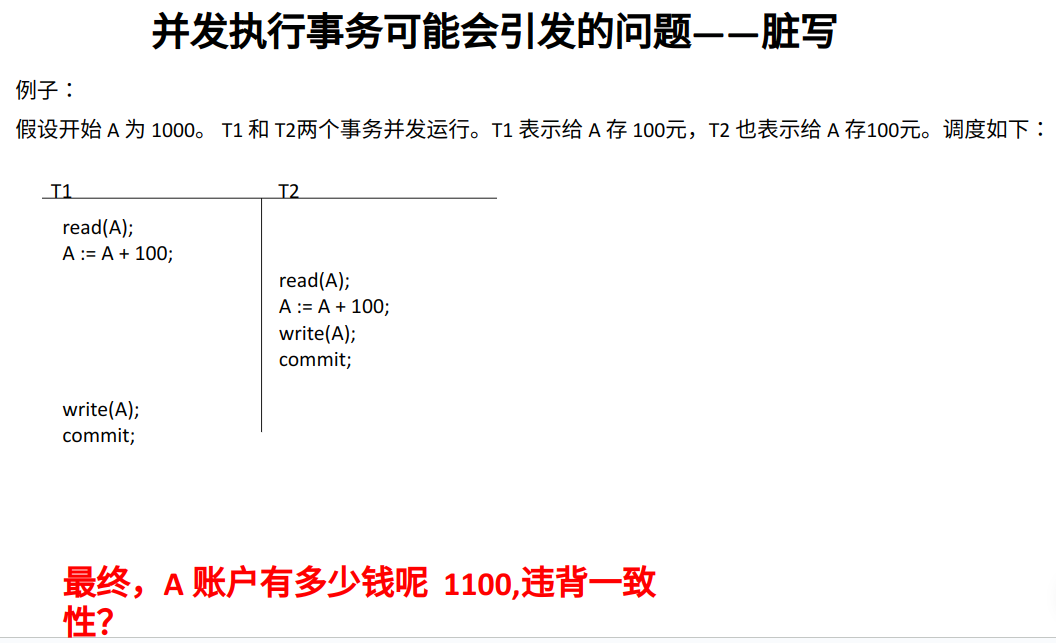
脏写会导致更新丢失。就好像先提交的事务根本没有执行一样。
二、脏读
若事务A向数据库写数据,但 A 还没提交或终止,另一个事务 B 就读到了事务A写入数据库的数据,这个现象称为脏读。
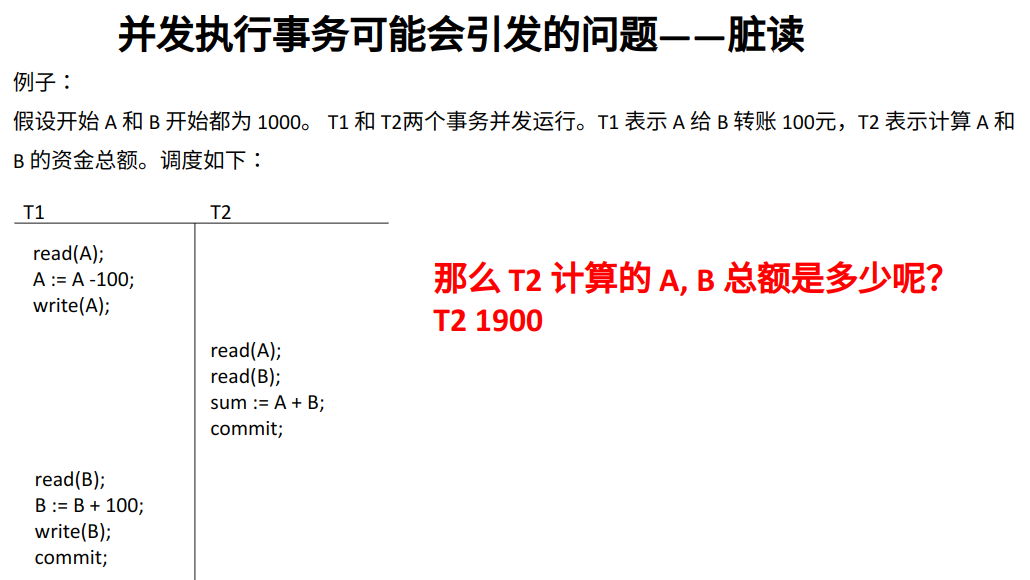
- - - - - AIGC - - - - -
问: 什么是数据库的 “脏读“ 现象?请举例
答: “脏读” 是数据库中一种并发控制的问题,指的是一个事务读取了另一个事务尚未提交的数据。当一个事务读取了另一事务的未提交数据,而后者最终回滚,导致读取的数据是无效的,这就是脏读。
举个例子:
假设有两个事务 A 和 B。
- 事务 A 开始,读取某一行数据。
- 事务 B 修改了这一行数据,但尚未提交。
- 事务 A 继续读取同一行数据,此时它读取到了事务 B 修改但未提交的数据,即脏数据。
- 事务 B 回滚,因为某种原因导致事务 B 的修改被撤销。
- 事务 A 最终得到的数据是基于已经回滚的事务 B 的修改,而这个修改实际上是无效的。
这就是脏读的典型情况,因为事务 A 读取了未提交的、后来被回滚的数据。脏读可能导致不一致的查询结果,因为读取到的数据可能并不代表数据库的真实状态。为了避免脏读,通常使用事务隔离级别来控制事务之间的可见性。
问: 事务B 的修改不应该被隔离吗?为什么 A 会读到 B 未提交的数据?
答: 对于事务的隔离级别有不同的设定,而脏读的发生与事务隔离级别有关。在数据库中,有四种标准的事务隔离级别,从低到高分别是:读未提交(Read Uncommitted)、读提交(Read Committed)、可重复读(Repeatable Read)和串行化(Serializable)。
- 读未提交(Read Uncommitted):允许事务读取其他事务尚未提交的数据,因此可能发生脏读。
- 读提交(Read Committed):保证一个事务提交后才能被其他事务读取,避免了脏读。但在并发环境下,仍可能发生不可重复读和幻读。
- 可重复读(Repeatable Read):保证一个事务在执行期间多次读取同一行数据时,能够得到一致的结果。防止了脏读和不可重复读,但仍可能发生幻读。
- 串行化(Serializable):最高的隔离级别,通过完全锁定读取的数据,确保事务的完全隔离。避免了脏读、不可重复读和幻读,但也降低了并发性能。
在读未提交的隔离级别下,事务 A 可以读取事务 B 尚未提交的数据,导致脏读。在实际应用中,通常会选择适当的隔离级别,权衡事务的隔离和性能需求。
- - - - - AIGC END - - - - -
三、不可重复读
一个事务有对同一个数据项的多次读取,但是在某前后两次读取之间,另一个事务更新该数据项,并且提交了。在后一次读取时,感知到了提交的更新。称为不可重复读。
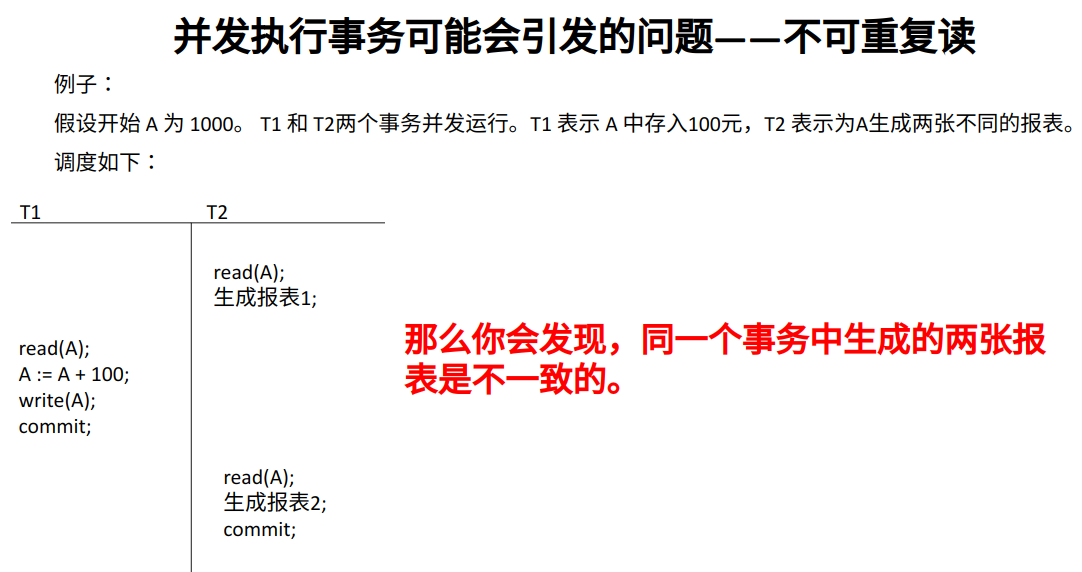
- - - - - AIGC - - - - -
问: 什么是数据库的 不可重复读?
答: 不可重复读是数据库中的一种并发控制问题,它指的是在同一个事务内,由于其他事务的修改,导致事务中多次读取同一行数据时,得到的结果不一致。
举个例子:
假设有两个事务 A 和 B。
- 事务 A 开始,读取某一行数据。
- 事务 B 修改了这一行数据,并提交。
- 事务 A 再次读取同一行数据,此时它得到的结果与第一次读取时不一样,因为在两次读取之间,事务 B 进行了修改。
这种情况就是不可重复读,因为同一个事务内的两次读取操作得到的数据不一致。不可重复读可能导致事务中的操作基于不一致的数据,从而产生意料之外的结果。
为了解决不可重复读的问题,数据库系统通常提供不同的事务隔离级别。在可重复读(Repeatable Read)隔离级别下,数据库系统会确保在同一个事务内多次读取同一行数据时,得到的结果保持一致,不受其他事务的影响。
- - - - - AIGC END - - - - -
四、幻读
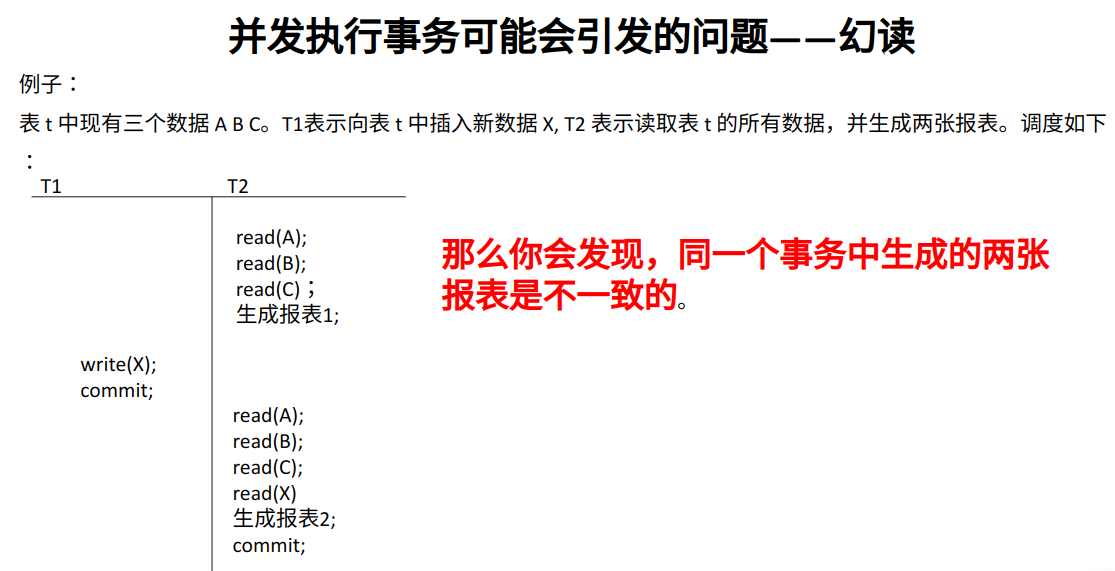
一个事务需要进行前后两次统计,在这两次统计期间,另一个事务插入了新的符合统计条件的记录,并且提交了。导致前后两次统计的数据不一致。这种现象,我们称之为幻读。
- - - - - AIGC - - - - -
问: 什么是数据库的 幻读?
答: 幻读是数据库中的一种并发控制问题,它指的是在同一个事务中,由于其他事务的插入或删除操作,导致事务中的查询结果集合发生变化,产生了额外的行,就像出现了幻觉一样。
举个例子:
假设有两个事务 A 和 B。
- 事务 A 开始,执行一个范围查询,得到一定的结果集合。
- 事务 B 在此期间插入了新的数据,符合事务 A 的查询条件。
- 事务 A 再次执行相同的范围查询,但这次得到的结果集合比第一次查询时更大,因为事务 B 插入的新数据导致了额外的行出现。
为了解决幻读的问题,数据库系统通常提供不同的事务隔离级别。在串行化(Serializable)隔离级别下,数据库系统会确保一个事务中的查询结果是一致的,不受其他事务的插入或删除操作的影响。然而,串行化隔离级别也可能降低并发性能。在实际应用中,选择适当的隔离级别需要权衡一致性和性能的需求。
- - - - - AIGC END - - - - -
隔离级别
SQL 标准规定了四种隔离级别,分别为(隔离性依次增高):
- 读未提交(read uncommitted):允许读取未提交的数据。
- 读已提交(read committed):只允许读取已提交的数据,但不要求可重复读。比如,在事务两次读取一个数据项期间,另一个事务更新了该数据项并提交。
- 可重复读(repeatable read):只允许读取已提交的数据,且在一个事务两次读取一个数据项期间,其他事务不得更新该数据。但该事务不要求与其他事务可串行化。比如,在两次统计查询中,另一个事务可以插入一些记录,这些记录若有符合查询条件的,就会导致幻读。
- 可串行化(serializable):看起来事务就好像是串行执行的一样。一个事务结束后,另一个事务才开始执行。
| 脏写 | 脏读 | 不可重复读 | 幻读 | |
| 读未提交 | × | √ | √ | √ |
| 读已提交 | × | × | √ |
√ |
| 可重复读 |
× | × | × | √ |
| 可串行化 | × | × | × | × |
以上所有隔离级别都不允许脏写(dirty write),即:若一个数据项正在被一个尚未提交或中止的事务执行写操作,则其他事务不能对该数据项执行写操作。
查看当前隔离级别:
mysql> select @@session.transaction_isolation;
+---------------------------------+
| @@session.transaction_isolation |
+---------------------------------+
| REPEATABLE-READ                 |
+---------------------------------+
1 row in set (0.00 sec)
设置当前隔离级别为读未提交:
mysql> set session transaction isolation level read uncommitted;
Query OK, 0 rows affected (0.00 sec)

mysql> select @@session.transaction_isolation;
+---------------------------------+
| @@session.transaction_isolation |
+---------------------------------+
| READ-UNCOMMITTED                |
+---------------------------------+
1 row in set (0.00 sec)
设置当前隔离级别为读已提交:
mysql> set session transaction isolation level read committed;
Query OK, 0 rows affected (0.00 sec)

mysql> select @@session.transaction_isolation;
+---------------------------------+
| @@session.transaction_isolation |
+---------------------------------+
| READ-COMMITTED                  |
+---------------------------------+
1 row in set (0.01 sec)
设置当前隔离级别为可重复读:
mysql> set session transaction isolation level repeatable read;
Query OK, 0 rows affected (0.00 sec)

mysql> select @@session.transaction_isolation;
+---------------------------------+
| @@session.transaction_isolation |
+---------------------------------+
| REPEATABLE-READ                 |
+---------------------------------+
1 row in set (0.00 sec)
设置当前隔离级别为可串行化:
mysql> set session transaction isolation level serializable;
Query OK, 0 rows affected (0.00 sec)

mysql> select @@session.transaction_isolation;
+---------------------------------+
| @@session.transaction_isolation |
+---------------------------------+
| SERIALIZABLE                    |
+---------------------------------+
1 row in set (0.00 sec)
- - - - - Presentation - - - - -
在 REPEATABLE-READ 下演示幻读现象:
terminal 1:
mysql> start transaction;
Query OK, 0 rows affected (0.00 sec)

mysql> select @@session.transaction_isolation;
+---------------------------------+
| @@session.transaction_isolation |
+---------------------------------+
| REPEATABLE-READ                 |
+---------------------------------+
1 row in set (0.00 sec)

mysql> select * from member;
+------+-------------+------+------+---------------------+
| id   | name        | age  | math | e_date              |
+------+-------------+------+------+---------------------+
|    1 | Natasha     |   30 |   59 | 1999-10-10 10:10:10 |
|    2 | xiaoai      |   24 | NULL | 1999-10-10 10:10:10 |
|    3 | xiaomei     |   17 |  100 | 1999-10-10 10:10:10 |
|    4 | lumine      |   17 |   61 | 1999-10-10 10:10:10 |
| NULL | NULL        | NULL | NULL | NULL                |
|    5 | huohuo      |   15 |   71 | NULL                |
|    7 | ai          |   40 |   99 | NULL                |
| NULL | zhuangzi    |   99 |  120 | NULL                |
| NULL | laozi       |   99 |  120 | NULL                |
|    8 | Kafka       |   28 |   99 | NULL                |
|    9 | kongfupanda |   30 | NULL | NULL                |
+------+-------------+------+------+---------------------+
11 rows in set (0.01 sec)
terminal 2:
mysql> start transaction;
Query OK, 0 rows affected (0.00 sec)

mysql> select @@session.transaction_isolation;
+---------------------------------+
| @@session.transaction_isolation |
+---------------------------------+
| REPEATABLE-READ                 |
+---------------------------------+
1 row in set (0.00 sec)

mysql> select * from member;
+------+-------------+------+------+---------------------+
| id   | name        | age  | math | e_date              |
+------+-------------+------+------+---------------------+
|    1 | Natasha     |   30 |   59 | 1999-10-10 10:10:10 |
|    2 | xiaoai      |   24 | NULL | 1999-10-10 10:10:10 |
|    3 | xiaomei     |   17 |  100 | 1999-10-10 10:10:10 |
|    4 | lumine      |   17 |   61 | 1999-10-10 10:10:10 |
| NULL | NULL        | NULL | NULL | NULL                |
|    5 | huohuo      |   15 |   71 | NULL                |
|    7 | ai          |   40 |   99 | NULL                |
| NULL | zhuangzi    |   99 |  120 | NULL                |
| NULL | laozi       |   99 |  120 | NULL                |
|    8 | Kafka       |   28 |   99 | NULL                |
|    9 | kongfupanda |   30 | NULL | NULL                |
+------+-------------+------+------+---------------------+
11 rows in set (0.00 sec)
terminal 1:
mysql> insert into member (id, name, age) values(10, "po", 3);
Query OK, 1 row affected (0.00 sec)

mysql> commit;
Query OK, 0 rows affected (0.01 sec)

mysql> select * from member;
+------+-------------+------+------+---------------------+
| id   | name        | age  | math | e_date              |
+------+-------------+------+------+---------------------+
|    1 | Natasha     |   30 |   59 | 1999-10-10 10:10:10 |
|    2 | xiaoai      |   24 | NULL | 1999-10-10 10:10:10 |
|    3 | xiaomei     |   17 |  100 | 1999-10-10 10:10:10 |
|    4 | lumine      |   17 |   61 | 1999-10-10 10:10:10 |
| NULL | NULL        | NULL | NULL | NULL                |
|    5 | huohuo      |   15 |   71 | NULL                |
|    7 | ai          |   40 |   99 | NULL                |
| NULL | zhuangzi    |   99 |  120 | NULL                |
| NULL | laozi       |   99 |  120 | NULL                |
|    8 | Kafka       |   28 |   99 | NULL                |
|    9 | kongfupanda |   30 | NULL | NULL                |
|   10 | po          |    3 | NULL | NULL                |
+------+-------------+------+------+---------------------+
12 rows in set (0.00 sec)
此时在 terminal 2 中,按道理应该是能读到 id 为 10 的记录,但是 terminal 2 显示如下:
mysql> select * from member;
+------+-------------+------+------+---------------------+
| id   | name        | age  | math | e_date              |
+------+-------------+------+------+---------------------+
|    1 | Natasha     |   30 |   59 | 1999-10-10 10:10:10 |
|    2 | xiaoai      |   24 | NULL | 1999-10-10 10:10:10 |
|    3 | xiaomei     |   17 |  100 | 1999-10-10 10:10:10 |
|    4 | lumine      |   17 |   61 | 1999-10-10 10:10:10 |
| NULL | NULL        | NULL | NULL | NULL                |
|    5 | huohuo      |   15 |   71 | NULL                |
|    7 | ai          |   40 |   99 | NULL                |
| NULL | zhuangzi    |   99 |  120 | NULL                |
| NULL | laozi       |   99 |  120 | NULL                |
|    8 | Kafka       |   28 |   99 | NULL                |
|    9 | kongfupanda |   30 | NULL | NULL                |
+------+-------------+------+------+---------------------+
11 rows in set (0.00 sec)
体现幻读的现象,terminal 2:
mysql> insert into member (id, name, age) values(10, "po", 3);
Query OK, 1 row affected (0.00 sec)

mysql> desc member;
+--------+-------------+------+-----+---------+-------+
| Field  | Type        | Null | Key | Default | Extra |
+--------+-------------+------+-----+---------+-------+
| id     | int         | YES  |     | NULL    |       |
| name   | varchar(20) | YES  |     | NULL    |       |
| age    | int         | YES  |     | NULL    |       |
| math   | float       | YES  |     | NULL    |       |
| e_date | datetime    | YES  |     | NULL    |       |
+--------+-------------+------+-----+---------+-------+
5 rows in set (0.01 sec)

mysql> select * from member;
+------+-------------+------+------+---------------------+
| id   | name        | age  | math | e_date              |
+------+-------------+------+------+---------------------+
|    1 | Natasha     |   30 |   59 | 1999-10-10 10:10:10 |
|    2 | xiaoai      |   24 | NULL | 1999-10-10 10:10:10 |
|    3 | xiaomei     |   17 |  100 | 1999-10-10 10:10:10 |
|    4 | lumine      |   17 |   61 | 1999-10-10 10:10:10 |
| NULL | NULL        | NULL | NULL | NULL                |
|    5 | huohuo      |   15 |   71 | NULL                |
|    7 | ai          |   40 |   99 | NULL                |
| NULL | zhuangzi    |   99 |  120 | NULL                |
| NULL | laozi       |   99 |  120 | NULL                |
|    8 | Kafka       |   28 |   99 | NULL                |
|    9 | kongfupanda |   30 | NULL | NULL                |
|   10 | po          |    3 | NULL | NULL                |
+------+-------------+------+------+---------------------+
12 rows in set (0.00 sec)

mysql> commit;
Query OK, 0 rows affected (0.01 sec)

mysql> select * from member;
+------+-------------+------+------+---------------------+
| id   | name        | age  | math | e_date              |
+------+-------------+------+------+---------------------+
|    1 | Natasha     |   30 |   59 | 1999-10-10 10:10:10 |
|    2 | xiaoai      |   24 | NULL | 1999-10-10 10:10:10 |
|    3 | xiaomei     |   17 |  100 | 1999-10-10 10:10:10 |
|    4 | lumine      |   17 |   61 | 1999-10-10 10:10:10 |
| NULL | NULL        | NULL | NULL | NULL                |
|    5 | huohuo      |   15 |   71 | NULL                |
|    7 | ai          |   40 |   99 | NULL                |
| NULL | zhuangzi    |   99 |  120 | NULL                |
| NULL | laozi       |   99 |  120 | NULL                |
|    8 | Kafka       |   28 |   99 | NULL                |
|    9 | kongfupanda |   30 | NULL | NULL                |
|   10 | po          |    3 | NULL | NULL                |
|   10 | po          |    3 | NULL | NULL                |
+------+-------------+------+------+---------------------+
13 rows in set (0.01 sec)
terminal 1 之前插入的数据已经在了,只是刚才没有显式地显示出来。 另一种体现方式:如果 id 被设为主键,则在 terminal 2 中会无法插入。
- - - - - Presentation END - - - - -
下面简单展示一下可串行化。
terminal 1 :
mysql> select @@session.transaction_isolation;
+---------------------------------+
| @@session.transaction_isolation |
+---------------------------------+
| SERIALIZABLE                    |
+---------------------------------+
1 row in set (0.00 sec)

mysql> start transaction;
Query OK, 0 rows affected (0.00 sec)

mysql> select * from member;
+------+-------------+------+------+---------------------+
| id   | name        | age  | math | e_date              |
+------+-------------+------+------+---------------------+
|    1 | Natasha     |   30 |   59 | 1999-10-10 10:10:10 |
|    2 | xiaoai      |   24 | NULL | 1999-10-10 10:10:10 |
|    3 | xiaomei     |   17 |  100 | 1999-10-10 10:10:10 |
|    4 | lumine      |   17 |   61 | 1999-10-10 10:10:10 |
| NULL | NULL        | NULL | NULL | NULL                |
|    5 | huohuo      |   15 |   71 | NULL                |
|    7 | ai          |   40 |   99 | NULL                |
| NULL | zhuangzi    |   99 |  120 | NULL                |
| NULL | laozi       |   99 |  120 | NULL                |
|    8 | Kafka       |   28 |   99 | NULL                |
|    9 | kongfupanda |   30 | NULL | NULL                |
|   10 | po          |    3 | NULL | NULL                |
|   10 | po          |    3 | NULL | NULL                |
+------+-------------+------+------+---------------------+
13 rows in set (0.00 sec)
terminal 2 :
mysql> select @@session.transaction_isolation;
+---------------------------------+
| @@session.transaction_isolation |
+---------------------------------+
| SERIALIZABLE                    |
+---------------------------------+
1 row in set (0.00 sec)

mysql> start transaction;
Query OK, 0 rows affected (0.00 sec)

mysql> select * from member;
+------+-------------+------+------+---------------------+
| id   | name        | age  | math | e_date              |
+------+-------------+------+------+---------------------+
|    1 | Natasha     |   30 |   59 | 1999-10-10 10:10:10 |
|    2 | xiaoai      |   24 | NULL | 1999-10-10 10:10:10 |
|    3 | xiaomei     |   17 |  100 | 1999-10-10 10:10:10 |
|    4 | lumine      |   17 |   61 | 1999-10-10 10:10:10 |
| NULL | NULL        | NULL | NULL | NULL                |
|    5 | huohuo      |   15 |   71 | NULL                |
|    7 | ai          |   40 |   99 | NULL                |
| NULL | zhuangzi    |   99 |  120 | NULL                |
| NULL | laozi       |   99 |  120 | NULL                |
|    8 | Kafka       |   28 |   99 | NULL                |
|    9 | kongfupanda |   30 | NULL | NULL                |
|   10 | po          |    3 | NULL | NULL                |
|   10 | po          |    3 | NULL | NULL                |
+------+-------------+------+------+---------------------+
13 rows in set (0.00 sec)
terminal 1 :
mysql> update member set age = 4 where id = 9;
ERROR 1205 (HY000): Lock wait timeout exceeded; try restarting transaction注意: MySQL 支持 4 种隔离级别,默认为 RR(repeatable read),MySQL 的 RR 隔离级别,在一定程度上避免了幻读问题。 Oracle 只支持 read committed 和 serializable 两种隔离级别,默认为 read committed.
索引
引入
索引(Index)是帮助 MySQL 高效获取数据的数据结构。
示例(查找的快慢):
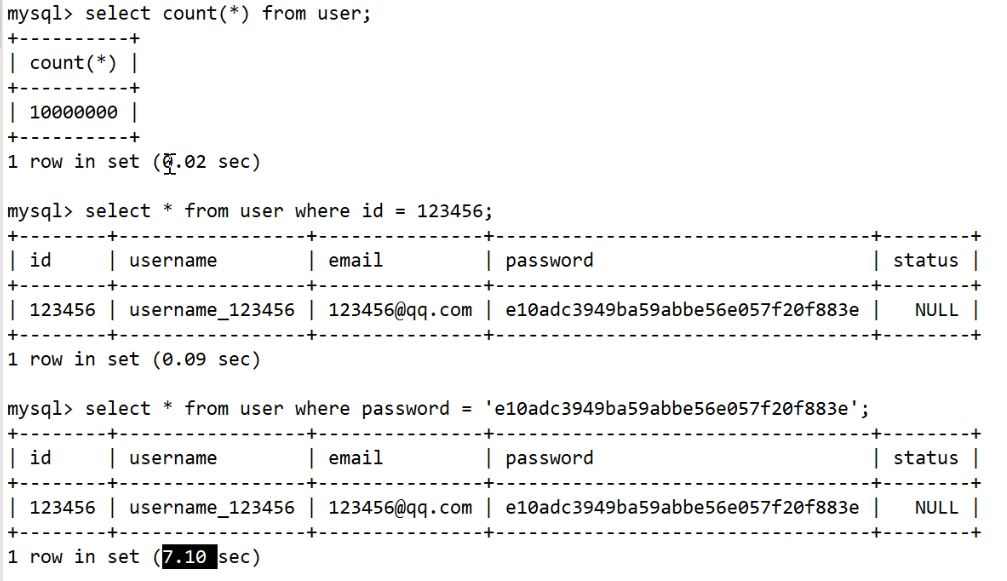
数据结构选择的参考维度:空间的连续性、时间复杂度、磁盘 IO 的次数、范围查找。
- 顺序查找:遍历操作,时间复杂度是 O(N),需要大块连续的空间。
- 二分查找:时间复杂度 O(logN),需要大块连续的空间。
- 二叉树:时间复杂度 O(logN),不需要连续的空间。但如果数据量比较大(如:百万级别),二叉树的高度会非常高,导致磁盘 IO 次数随之变多,而磁盘 IO 很慢。
- 哈希:时间复杂度 O(1). 哈希会有哈希冲突,会影响查找速度。哈希意味着无序。在 SQL 里常进行范围查找,而哈希是没有顺序的,故数据量大的时不能用哈希。
- B树和B+树:见数据结构笔记。
查看节点大小:
mysql> show variables like 'innodb_page_size';
+------------------+-------+
| Variable_name    | Value |
+------------------+-------+
| innodb_page_size | 16384 |
+------------------+-------+
1 row in set (0.02 sec)
索引的分类:
- 主键索引:以主键创建的索引
- 非主键索引(辅助索引):普通索引、唯一索引、全文索引、组合索引
主键索引
创建主键索引(创建表的时候,创建主键):
mysql> create table test1(id int, age int, primary key(id));
Query OK, 0 rows affected (0.03 sec)

mysql> desc test1;
+-------+------+------+-----+---------+-------+
| Field | Type | Null | Key | Default | Extra |
+-------+------+------+-----+---------+-------+
| id    | int  | NO   | PRI | NULL    |       |
| age   | int  | YES  |     | NULL    |       |
+-------+------+------+-----+---------+-------+
2 rows in set (0.00 sec)
创建主键索引(表创建完之后,再创建主键):
mysql> desc test2;
+-------+------+------+-----+---------+-------+
| Field | Type | Null | Key | Default | Extra |
+-------+------+------+-----+---------+-------+
| id    | int  | YES  |     | NULL    |       |
| age   | int  | YES  |     | NULL    |       |
+-------+------+------+-----+---------+-------+
2 rows in set (0.00 sec)

mysql> alter table test2 add primary key(id);
Query OK, 0 rows affected (0.03 sec)
Records: 0  Duplicates: 0  Warnings: 0

mysql> desc test2;
+-------+------+------+-----+---------+-------+
| Field | Type | Null | Key | Default | Extra |
+-------+------+------+-----+---------+-------+
| id    | int  | NO   | PRI | NULL    |       |
| age   | int  | YES  |     | NULL    |       |
+-------+------+------+-----+---------+-------+
2 rows in set (0.00 sec)
主键特点:非空、唯一。
普通索引
普通索引的创建(创建表的时候,创建普通索引):
mysql> create table test3(id int, age int, index idx_age(age));
Query OK, 0 rows affected (0.04 sec)

mysql> desc test3;
+-------+------+------+-----+---------+-------+
| Field | Type | Null | Key | Default | Extra |
+-------+------+------+-----+---------+-------+
| id    | int  | YES  |     | NULL    |       |
| age   | int  | YES  | MUL | NULL    |       |
+-------+------+------+-----+---------+-------+
2 rows in set (0.00 sec)
普通索引的创建(创建表之后,再创建普通索引):
mysql> create table test4(id int, age int);
Query OK, 0 rows affected (0.03 sec)

mysql> desc test4;
+-------+------+------+-----+---------+-------+
| Field | Type | Null | Key | Default | Extra |
+-------+------+------+-----+---------+-------+
| id    | int  | YES  |     | NULL    |       |
| age   | int  | YES  |     | NULL    |       |
+-------+------+------+-----+---------+-------+
2 rows in set (0.00 sec)

mysql> alter table test4 add index idx_age(age);
Query OK, 0 rows affected (0.02 sec)
Records: 0  Duplicates: 0  Warnings: 0

mysql> desc test4;
+-------+------+------+-----+---------+-------+
| Field | Type | Null | Key | Default | Extra |
+-------+------+------+-----+---------+-------+
| id    | int  | YES  |     | NULL    |       |
| age   | int  | YES  | MUL | NULL    |       |
+-------+------+------+-----+---------+-------+
2 rows in set (0.01 sec)
在创建表之后,使用 create index 创建索引:
mysql> create index idx_id on test4(id);
Query OK, 0 rows affected (0.03 sec)
Records: 0  Duplicates: 0  Warnings: 0

mysql> desc test4;
+-------+------+------+-----+---------+-------+
| Field | Type | Null | Key | Default | Extra |
+-------+------+------+-----+---------+-------+
| id    | int  | YES  | MUL | NULL    |       |
| age   | int  | YES  | MUL | NULL    |       |
+-------+------+------+-----+---------+-------+
2 rows in set (0.00 sec)
唯一索引
唯一索引(创建方法和普通索引大同小异):
create table test3(id int, age int, unique index idx_age(age));

alter table test4 add unique index idx_age(age);

create unique index idx_id on test4(id);
组合索引
组合索引是由多个列一起组成的。
创建表之后再创建组合索引:
mysql> create table test5(id int, age int, name varchar(20), math int, eng int, primary key(id));
Query OK, 0 rows affected (0.03 sec)

mysql> desc test5;
+-------+-------------+------+-----+---------+-------+
| Field | Type        | Null | Key | Default | Extra |
+-------+-------------+------+-----+---------+-------+
| id    | int         | NO   | PRI | NULL    |       |
| age   | int         | YES  |     | NULL    |       |
| name  | varchar(20) | YES  |     | NULL    |       |
| math  | int         | YES  |     | NULL    |       |
| eng   | int         | YES  |     | NULL    |       |
+-------+-------------+------+-----+---------+-------+
5 rows in set (0.00 sec)

mysql> alter table test5 add index idx_name_math_eng(name, math, eng);
Query OK, 0 rows affected (0.02 sec)
Records: 0  Duplicates: 0  Warnings: 0

mysql> desc test5;
+-------+-------------+------+-----+---------+-------+
| Field | Type        | Null | Key | Default | Extra |
+-------+-------------+------+-----+---------+-------+
| id    | int         | NO   | PRI | NULL    |       |
| age   | int         | YES  |     | NULL    |       |
| name  | varchar(20) | YES  | MUL | NULL    |       |
| math  | int         | YES  |     | NULL    |       |
| eng   | int         | YES  |     | NULL    |       |
+-------+-------------+------+-----+---------+-------+
5 rows in set (0.00 sec)

mysql> show create table test5;
+-------+--------------------------------------------------------------------------------------------------------------------------------------------------------------------------------------------------------------------------------------------------------------------------------------------------------+
| Table | Create Table                                                                                                                                                                                                                                                                                           |
+-------+--------------------------------------------------------------------------------------------------------------------------------------------------------------------------------------------------------------------------------------------------------------------------------------------------------+
| test5 | CREATE TABLE `test5` (
  `id` int NOT NULL,
  `age` int DEFAULT NULL,
  `name` varchar(20) DEFAULT NULL,
  `math` int DEFAULT NULL,
  `eng` int DEFAULT NULL,
  PRIMARY KEY (`id`),
  KEY `idx_name_math_eng` (`name`,`math`,`eng`)
) ENGINE=InnoDB DEFAULT CHARSET=utf8mb4 COLLATE=utf8mb4_0900_ai_ci |
+-------+--------------------------------------------------------------------------------------------------------------------------------------------------------------------------------------------------------------------------------------------------------------------------------------------------------+
1 row in set (0.00 sec)
也可以:
create index idx_name_math_eng on test5(name, math, eng);显示表的索引情况:
mysql> show index from test5;
+-------+------------+-------------------+--------------+-------------+-----------+-------------+----------+--------+------+------------+---------+---------------+---------+------------+
| Table | Non_unique | Key_name          | Seq_in_index | Column_name | Collation | Cardinality | Sub_part | Packed | Null | Index_type | Comment | Index_comment | Visible | Expression |
+-------+------------+-------------------+--------------+-------------+-----------+-------------+----------+--------+------+------------+---------+---------------+---------+------------+
| test5 |          0 | PRIMARY           |            1 | id          | A         |           0 |     NULL |   NULL |      | BTREE      |         |               | YES     | NULL       |
| test5 |          1 | idx_name_math_eng |            1 | name        | A         |           0 |     NULL |   NULL | YES  | BTREE      |         |               | YES     | NULL       |
| test5 |          1 | idx_name_math_eng |            2 | math        | A         |           0 |     NULL |   NULL | YES  | BTREE      |         |               | YES     | NULL       |
| test5 |          1 | idx_name_math_eng |            3 | eng         | A         |           0 |     NULL |   NULL | YES  | BTREE      |         |               | YES     | NULL       |
+-------+------------+-------------------+--------------+-------------+-----------+-------------+----------+--------+------+------------+---------+---------------+---------+------------+
4 rows in set (0.02 sec)
换一种打印方式(竖着看):
mysql> show index from test5\G
*************************** 1. row ***************************
        Table: test5
   Non_unique: 0
     Key_name: PRIMARY
 Seq_in_index: 1
  Column_name: id
    Collation: A
  Cardinality: 0
     Sub_part: NULL
       Packed: NULL
         Null:
   Index_type: BTREE
      Comment:
Index_comment:
      Visible: YES
   Expression: NULL
*************************** 2. row ***************************
        Table: test5
   Non_unique: 1
     Key_name: idx_name_math_eng
 Seq_in_index: 1
  Column_name: name
    Collation: A
  Cardinality: 0
     Sub_part: NULL
       Packed: NULL
         Null: YES
   Index_type: BTREE
      Comment:
Index_comment:
      Visible: YES
   Expression: NULL
*************************** 3. row ***************************
        Table: test5
   Non_unique: 1
     Key_name: idx_name_math_eng
 Seq_in_index: 2
  Column_name: math
    Collation: A
  Cardinality: 0
     Sub_part: NULL
       Packed: NULL
         Null: YES
   Index_type: BTREE
      Comment:
Index_comment:
      Visible: YES
   Expression: NULL
*************************** 4. row ***************************
        Table: test5
   Non_unique: 1
     Key_name: idx_name_math_eng
 Seq_in_index: 3
  Column_name: eng
    Collation: A
  Cardinality: 0
     Sub_part: NULL
       Packed: NULL
         Null: YES
   Index_type: BTREE
      Comment:
Index_comment:
      Visible: YES
   Expression: NULL
4 rows in set (0.00 sec)
索引的删除
ALTER TABLE table_name DROP INDEX index_name;
DORP INDEX IndexName ON TableName;
例子:
mysql> desc test5;
+-------+-------------+------+-----+---------+-------+
| Field | Type        | Null | Key | Default | Extra |
+-------+-------------+------+-----+---------+-------+
| id    | int         | NO   | PRI | NULL    |       |
| age   | int         | YES  |     | NULL    |       |
| name  | varchar(20) | YES  | MUL | NULL    |       |
| math  | int         | YES  |     | NULL    |       |
| eng   | int         | YES  |     | NULL    |       |
+-------+-------------+------+-----+---------+-------+
5 rows in set (0.00 sec)

mysql> alter table test5 drop index idx_name_math_eng;
Query OK, 0 rows affected (0.01 sec)
Records: 0  Duplicates: 0  Warnings: 0

mysql> desc test5;
+-------+-------------+------+-----+---------+-------+
| Field | Type        | Null | Key | Default | Extra |
+-------+-------------+------+-----+---------+-------+
| id    | int         | NO   | PRI | NULL    |       |
| age   | int         | YES  |     | NULL    |       |
| name  | varchar(20) | YES  |     | NULL    |       |
| math  | int         | YES  |     | NULL    |       |
| eng   | int         | YES  |     | NULL    |       |
+-------+-------------+------+-----+---------+-------+
5 rows in set (0.00 sec)mysql> desc test4;
+-------+------+------+-----+---------+-------+
| Field | Type | Null | Key | Default | Extra |
+-------+------+------+-----+---------+-------+
| id | int | YES | MUL | NULL | |
| age | int | YES | MUL | NULL | |
+-------+------+------+-----+---------+-------+
2 rows in set (0.00 sec)
mysql> drop index idx_id on test4;
Query OK, 0 rows affected (0.02 sec)
Records: 0 Duplicates: 0 Warnings: 0
mysql> desc test4;
+-------+------+------+-----+---------+-------+
| Field | Type | Null | Key | Default | Extra |
+-------+------+------+-----+---------+-------+
| id | int | YES | | NULL | |
| age | int | YES | MUL | NULL | |
+-------+------+------+-----+---------+-------+
2 rows in set (0.01 sec)索引的好处和坏处
好处: 提高数据检索效率,降低数据库 IO 成本。
- 查找
- 排序
- 分组
- 表的连接
坏处
- 额外占用空间。有时候索引占用的空间甚至比数据占用的空间还多。
- 降低更新表的速度。因为数据库不仅要更新数据,还要更新对应的索引信息。
组合索引的最左前缀
大概理解一下,这个图示不是很好:
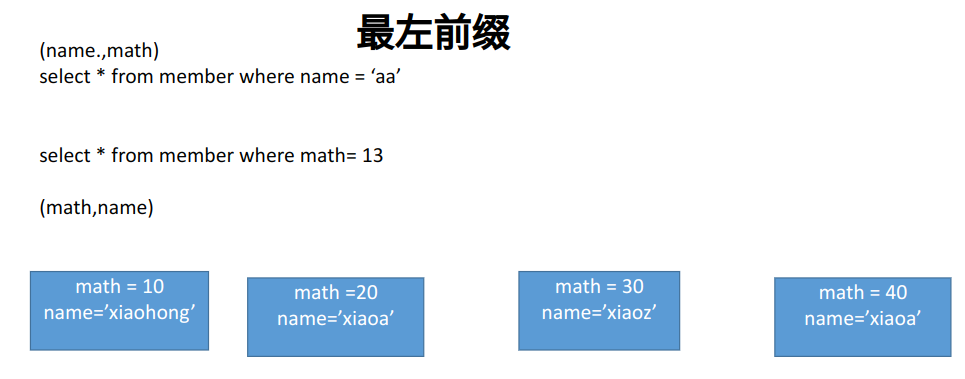
简单理解,其实就和结构体排序差不多。例如洛谷 P9472 :
#include <algorithm>
#include <cstdio>
using LL = long long;
using namespace std;

LL n,m;

struct mnode{
    LL mcontent;
    LL mindex;
    bool operator < (const mnode& v)const{
        if(mcontent != v.mcontent)
            return mcontent < v.mcontent;
        else
            if(mcontent > 0)
                return mindex < v.mindex;
            else
                return mindex > v.mindex;
    }
}marray[100010];

int main(){
    scanf("%lld%lld",&n,&m);
    for(LL i=1; i<=n; i++){
        LL x;
        scanf("%lld",&x);
        marray[i].mcontent = x;
        marray[i].mindex = i;
    }

    sort(marray+1, marray+1+n);

    for(LL i=1; i<=n; i++){
        printf("%lld ",marray[i].mindex);
    }

    return 0;
}
MySQL 逻辑架构
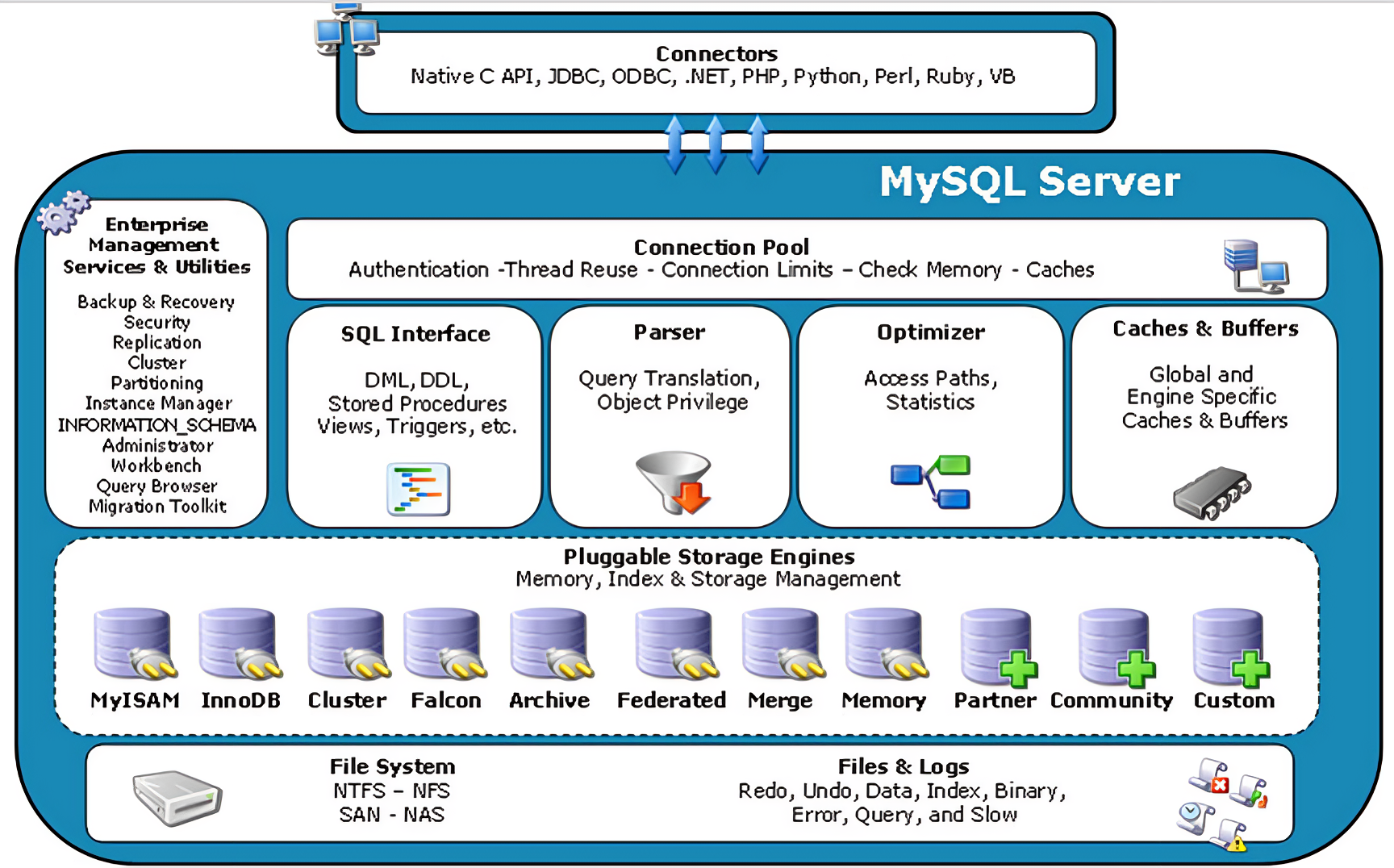
Cache : 侧重读 Buffer : 侧重写

大体来说,MySQL 分为 Server 层和存储引擎层。
Server 层包括连接器、查询缓存、解析器、优化器和执行器等,涵盖了 MySQL 大多数核心服务功能。
存储引擎层负责数据的存储和提取。其架构模式是插件式的,支持 InnoDB、MyISAM、Memory 等多个存储引擎。
MySQL 是如何工作的?
- 连接器
当你在客户端输入
mysql –u [user] –p [pwd]连接 mysql 的时候,接待你的就是连接器。连接器的作用就是和客户端建立连接、获取权限、维持和管理连接。 - 查询缓存
建立连接后,就可以执行
select语句了。首先 MySQL 会去查看查询缓存,看下之前是否已经执行过这条查询语句。如果命中缓存,就直接返回。否则就扔给解析器。 - 解析器 MySQL 需要知道你想做什么,因此我们就来到了解析器。解析器会做词法分析和语法分析。词法分析主要是分析每个词的含义,语法分析会判断你写的 SQL 语句是否满足 SQL 语法。
- 优化器 经过解析器,MySQL 就知道你想做什么了。但是在开始执行之前,还需要经过优化器的处理。优化器会优化你的 SQL 语句。生成最终的执行方案(execution plan)。然后进入执行器阶段。
- 执行器 执行器首先会判断你对这张表有没有相应的权限。如果没有,就报错。如果有,就调用相应的存储引擎接口,执行语句。然后将结果集返回给客户端。
存储引擎
数据的存储和提取是由存储引擎负责的,它负责和文件系统打交道。
MySQL 的存储引擎是插件式的。不同的存储引擎支持不同的特性。
查看 MySQL 支持哪些存储引擎:
mysql> SHOW ENGINES;
+--------------------+---------+----------------------------------------------------------------+--------------+------+------------+
| Engine             | Support | Comment                                                        | Transactions | XA   | Savepoints |
+--------------------+---------+----------------------------------------------------------------+--------------+------+------------+
| ARCHIVE            | YES     | Archive storage engine                                         | NO           | NO   | NO         |
| BLACKHOLE          | YES     | /dev/null storage engine (anything you write to it disappears) | NO           | NO   | NO         |
| MRG_MYISAM         | YES     | Collection of identical MyISAM tables                          | NO           | NO   | NO         |
| FEDERATED          | NO      | Federated MySQL storage engine                                 | NULL         | NULL | NULL       |
| MyISAM             | YES     | MyISAM storage engine                                          | NO           | NO   | NO         |
| PERFORMANCE_SCHEMA | YES     | Performance Schema                                             | NO           | NO   | NO         |
| InnoDB             | DEFAULT | Supports transactions, row-level locking, and foreign keys     | YES          | YES  | YES        |
| MEMORY             | YES     | Hash based, stored in memory, useful for temporary tables      | NO           | NO   | NO         |
| CSV                | YES     | CSV storage engine                                             | NO           | NO   | NO         |
+--------------------+---------+----------------------------------------------------------------+--------------+------+------------+
9 rows in set (0.01 sec)
查看默认存储引擎:
mysql> SHOW VARIABLES LIKE '%storage_engine%';
+---------------------------------+-----------+
| Variable_name                   | Value     |
+---------------------------------+-----------+
| default_storage_engine          | InnoDB    |
| default_tmp_storage_engine      | InnoDB    |
| disabled_storage_engines        |           |
| internal_tmp_mem_storage_engine | TempTable |
+---------------------------------+-----------+
4 rows in set (0.02 sec)
MyISAM(MySQL5.5 之前的默认存储引擎):
- 支持表锁
- 支持全文索引(正排索引、倒排索引)
- 不支持事务
使用 MyISAM 存储表,会生成三个文件:
.frm存储表结构,是任何存储引擎都有的.myd存放数据.myi存放索引
索引和数据分开存放,这样的索引叫非聚集索引。
InnoDB(MySQL5.5 及之后版本默认的存储引擎。没有特殊应用,推荐使用 InnoDB 引擎):
- 支持事务
- 支持行锁和表锁(默认支持行锁)
- 支持 MVCC(多版本并发控制),原理类似于事务的编号
- 支持崩溃恢复
- 支持外键一致性约束
使用 InnoDB 存储表,会生成两个文件:
.frm存储表结构,是任何存储引擎都有的.ibd存放数据和索引
索引和数据存放在一起,这样的索引叫聚集索引。
看看:
wanko@wanko:~$ sudo -i
[sudo] password for wanko:
root@wanko:~# cd /var/lib/mysql/
root@wanko:/var/lib/mysql# ls -a
 .               binlog.000024   binlog.000051   binlog.000078
 ..              binlog.000025   binlog.000052   binlog.000079
 akashi          binlog.000026   binlog.000053   binlog.index
 auto.cnf        binlog.000027   binlog.000054   ca-key.pem
 binlog.000001   binlog.000028   binlog.000055   ca.pem
 binlog.000002   binlog.000029   binlog.000056   client-cert.pem
 binlog.000003   binlog.000030   binlog.000057   client-key.pem
 binlog.000004   binlog.000031   binlog.000058   debian-5.7.flag
 binlog.000005   binlog.000032   binlog.000059  '#ib_16384_0.dblwr'
 binlog.000006   binlog.000033   binlog.000060  '#ib_16384_1.dblwr'
 binlog.000007   binlog.000034   binlog.000061   ib_buffer_pool
 binlog.000008   binlog.000035   binlog.000062   ibdata1
 binlog.000009   binlog.000036   binlog.000063   ibtmp1
 binlog.000010   binlog.000037   binlog.000064  '#innodb_redo'
 binlog.000011   binlog.000038   binlog.000065  '#innodb_temp'
 binlog.000012   binlog.000039   binlog.000066   mysql
 binlog.000013   binlog.000040   binlog.000067   mysql.ibd
 binlog.000014   binlog.000041   binlog.000068   performance_schema
 binlog.000015   binlog.000042   binlog.000069   private_key.pem
 binlog.000016   binlog.000043   binlog.000070   public_key.pem
 binlog.000017   binlog.000044   binlog.000071   server-cert.pem
 binlog.000018   binlog.000045   binlog.000072   server-key.pem
 binlog.000019   binlog.000046   binlog.000073   sys
 binlog.000020   binlog.000047   binlog.000074   undo_001
 binlog.000021   binlog.000048   binlog.000075   undo_002
 binlog.000022   binlog.000049   binlog.000076   wanko.pid
 binlog.000023   binlog.000050   binlog.000077
root@wanko:/var/lib/mysql# cd akashi
root@wanko:/var/lib/mysql/akashi# ls -a
.             customer_tmp.ibd       order_table.ibd      test2.ibd  test5.ibd
..            customer_tmp_like.ibd  order_table_tmp.ibd  test3.ibd
customer.ibd  member.ibd             test1.ibd            test4.ibd
root@wanko:/var/lib/mysql/akashi# file test1.ibd
test1.ibd: OpenPGP Secret Key
root@wanko:/var/lib/mysql/akashi# file member.ibd
member.ibd: data
Memory 引擎特点:
- 数据都存放在内存中,因此数据库重启后会丢失
- 支持表锁
- 支持 Hash 和 BTree 索引
- 不支持 Blob(大的二进制)和 Text(大的文本)字段
Memory 引擎数据都放在内存中,支持 Hash 索引,因此它的查询速度最快。
一般使用 Memory 存放临时表。
临时表:在单个连接中可见,当连接断开时,临时表也将不复存在。
临时表的创建:
mysql> show tables;
+-------------------+
| Tables_in_akashi  |
+-------------------+
| customer          |
| customer_tmp      |
| customer_tmp_like |
| member            |
| order_table       |
| order_table_tmp   |
+-------------------+
6 rows in set (0.01 sec)

mysql> create temporary table test1(id int, age int, name varchar(20));
Query OK, 0 rows affected (0.00 sec)

mysql> show tables;
+-------------------+
| Tables_in_akashi  |
+-------------------+
| customer          |
| customer_tmp      |
| customer_tmp_like |
| member            |
| order_table       |
| order_table_tmp   |
+-------------------+
6 rows in set (0.00 sec)

mysql> show create table test1;
+-------+------------------------------------------------------------------------------------------------------------------------------------------------------------------------------------------+
| Table | Create Table                                                                                                                                                                             |
+-------+------------------------------------------------------------------------------------------------------------------------------------------------------------------------------------------+
| test1 | CREATE TEMPORARY TABLE `test1` (
  `id` int DEFAULT NULL,
  `age` int DEFAULT NULL,
  `name` varchar(20) DEFAULT NULL
) ENGINE=InnoDB DEFAULT CHARSET=utf8mb4 COLLATE=utf8mb4_0900_ai_ci |
+-------+------------------------------------------------------------------------------------------------------------------------------------------------------------------------------------------+
1 row in set (0.00 sec)
临时表创建完成后,默认的引擎还是 InnoDB ,但是show tables看不到表的名字。还可以进行插入、更新、删除、查找:
mysql> insert into test1 values(1, 20, 'hajimi');
Query OK, 1 row affected (0.00 sec)

mysql> select * from test1;
+------+------+--------+
| id   | age  | name   |
+------+------+--------+
|    1 |   20 | hajimi |
+------+------+--------+
1 row in set (0.00 sec)创建存储引擎是 memory 的表:
mysql> create table test3(id int, age int, name varchar(20)) ENGINE = memory;
Query OK, 0 rows affected (0.02 sec)

mysql> show tables;
+-------------------+
| Tables_in_akashi  |
+-------------------+
| customer          |
| customer_tmp      |
| customer_tmp_like |
| member            |
| order_table       |
| order_table_tmp   |
| test3             |
+-------------------+
7 rows in set (0.00 sec)

mysql> show create table test3;
+-------+--------------------------------------------------------------------------------------------------------------------------------------------------------------------------------+
| Table | Create Table                                                                                                                                                                   |
+-------+--------------------------------------------------------------------------------------------------------------------------------------------------------------------------------+
| test3 | CREATE TABLE `test3` (
  `id` int DEFAULT NULL,
  `age` int DEFAULT NULL,
  `name` varchar(20) DEFAULT NULL
) ENGINE=MEMORY DEFAULT CHARSET=utf8mb4 COLLATE=utf8mb4_0900_ai_ci |
+-------+--------------------------------------------------------------------------------------------------------------------------------------------------------------------------------+
1 row in set (0.00 sec)
存储引擎是 memory 的表创建之后,可以进行正常的 SQL 语句:
mysql> insert into test3 values(1, 20, 'newbrush');
Query OK, 1 row affected (0.00 sec)

mysql> select * from test3;
+------+------+----------+
| id   | age  | name     |
+------+------+----------+
|    1 |   20 | newbrush |
+------+------+----------+
1 row in set (0.00 sec)
现在,直接关闭 terminal. 然后重启:
mysql> show tables;
+-------------------+
| Tables_in_akashi  |
+-------------------+
| customer          |
| customer_tmp      |
| customer_tmp_like |
| member            |
| order_table       |
| order_table_tmp   |
| test3             |
+-------------------+
7 rows in set (0.00 sec)

mysql> select * from test1;
ERROR 1146 (42S02): Table 'akashi.test1' doesn't exist

mysql> show create table test3;
+-------+--------------------------------------------------------------------------------------------------------------------------------------------------------------------------------+
| Table | Create Table                                                                                                                                                                   |
+-------+--------------------------------------------------------------------------------------------------------------------------------------------------------------------------------+
| test3 | CREATE TABLE `test3` (
  `id` int DEFAULT NULL,
  `age` int DEFAULT NULL,
  `name` varchar(20) DEFAULT NULL
) ENGINE=MEMORY DEFAULT CHARSET=utf8mb4 COLLATE=utf8mb4_0900_ai_ci |
+-------+--------------------------------------------------------------------------------------------------------------------------------------------------------------------------------+
1 row in set (0.00 sec)

mysql> select * from test3;
+------+------+----------+
| id   | age  | name     |
+------+------+----------+
|    1 |   20 | newbrush |
+------+------+----------+
1 row in set (0.00 sec)
即:将会话关闭,存储引擎是 memory 的表,表及数据不会消失;但断电重启之后,表的结构还在,内容消失。
MySQL 锁机制
原理可参考操作系统笔记中的 PV 操作。
锁的分类
锁是计算机协调多个进程或线程并发访问某一资源的机制。
MySQL 中不同的存储引擎支持不同的锁机制:
- MyISAM 和 MEMORY 存储引擎采用表级锁(table-level locking)
- BDB 存储引擎采用页面锁(page-level locking),但也支持表级锁
- InnoDB 存储引擎既支持行级锁(row-level locking),也支持表级锁。默认采用行级锁
锁的分类,从对数据操作的粒度划分:
- 表级锁:加锁快;不会出现死锁;锁定粒度大,发生锁冲突的概率最高,并发度最低。
- 行级锁:加锁慢;会出现死锁;锁定粒度最小,发生锁冲突的概率最低,并发度也最高。
锁的分类,从对数据操作的类型划分:
- 读锁(共享锁):同一份数据,多个读操作可以同时进行而互不影响。
- 写锁(排它锁):当前操作没有完成之前,它会阻断其他读锁和写锁。
MyISAM 的表锁
加锁:
lock table 表名 read;   # 加读锁

lock table 表名 write;  # 加写锁
MyISAM 在执行查询语句SELECT前,会自动给涉及的所有表加读锁;在执行更新操作UPDATE、DELETE、INSERT等前,会自动给涉及的表加写锁。这个过程不需要用户干预,因此,用户一般不需要直接用LOCK TABLE命令给 MyISAM 表显式加锁。
解锁:
unlock tables;查看加锁的表:
show open tables;MyISAM 的表锁分为读锁(共享锁)和写锁(独占锁)。
给表加上读锁(写锁)有什么效果?
读锁(共享锁):
- 加了读锁的进程可以读加读锁的表,但不能读其他表。
- 加读锁的进程不能对这张表做写操作 。
- 其他进程可以读加读锁的表(因为是共享锁),也可以读其他表。
- 其他进程
update加读锁的表会一直处于等待锁的状态,直到锁被释放后才会update成功。
写锁(独占锁):
- 加锁进程可以对加锁的表做任何操作。
- 其他进程不能查询加锁的表,需等待锁释放。
总结: 读锁阻塞写,但不堵塞读。写锁阻塞读和写。
InnoDB 的行锁
行级锁在 Mysql 中锁定粒度最细,能大大减少数据库的操作冲突。
用法:
SELECT ... LOCK IN SHARE MODE; # 读锁在查询语句后加LOCK IN SHARE MODE,Mysql 会对查询结果中的每行都加共享锁,当没有其他线程对查询结果集中的任何一行使用排他锁时,成功申请共享锁,否则被阻塞。其他线程可以读上了共享锁的表,且这些线程读的数据为同一版本。
SELECT ... FOR UPDATE; # 写锁在查询语句后加FOR UPDATE,Mysql 会对查询结果中的每行都加排他锁,当没有其他线程对查询结果集中的任何一行使用排他锁时,成功申请排他锁,否则被阻塞。
- - - - - 演示 - - - - -
演示的时候,需使用事务。
terminal 1 :
mysql> select * from member;
+------+----------+------+------+---------------------+
| id   | name     | age  | math | e_date              |
+------+----------+------+------+---------------------+
|    1 | Natasha  |   30 |   59 | 1999-10-10 10:10:10 |
|    2 | xiaoai   |   24 | NULL | 1999-10-10 10:10:10 |
|    3 | xiaomei  |   17 |  100 | 1999-10-10 10:10:10 |
|    4 | lumine   |   17 |   61 | 1999-10-10 10:10:10 |
| NULL | NULL     | NULL | NULL | NULL                |
|    5 | huohuo   |   15 |   71 | NULL                |
|    7 | ai       |   40 |   99 | NULL                |
| NULL | zhuangzi |   99 |  120 | NULL                |
| NULL | laozi    |   99 |  120 | NULL                |
|    8 | Kafka    |   28 |   99 | NULL                |
+------+----------+------+------+---------------------+
10 rows in set (0.00 sec)

mysql> begin;
Query OK, 0 rows affected (0.00 sec)
terminal 2 :
mysql> select * from member;
+------+----------+------+------+---------------------+
| id   | name     | age  | math | e_date              |
+------+----------+------+------+---------------------+
|    1 | Natasha  |   30 |   59 | 1999-10-10 10:10:10 |
|    2 | xiaoai   |   24 | NULL | 1999-10-10 10:10:10 |
|    3 | xiaomei  |   17 |  100 | 1999-10-10 10:10:10 |
|    4 | lumine   |   17 |   61 | 1999-10-10 10:10:10 |
| NULL | NULL     | NULL | NULL | NULL                |
|    5 | huohuo   |   15 |   71 | NULL                |
|    7 | ai       |   40 |   99 | NULL                |
| NULL | zhuangzi |   99 |  120 | NULL                |
| NULL | laozi    |   99 |  120 | NULL                |
|    8 | Kafka    |   28 |   99 | NULL                |
+------+----------+------+------+---------------------+
10 rows in set (0.00 sec)

mysql> begin;
Query OK, 0 rows affected (0.00 sec)
terminal 1 :
mysql> select * from member where id = 5 lock in share mode;
+------+--------+------+------+--------+
| id   | name   | age  | math | e_date |
+------+--------+------+------+--------+
|    5 | huohuo |   15 |   71 | NULL   |
+------+--------+------+------+--------+
1 row in set (0.00 sec)
terminal 2 :
mysql> select * from member where id = 5;
+------+--------+------+------+--------+
| id   | name   | age  | math | e_date |
+------+--------+------+------+--------+
|    5 | huohuo |   15 |   71 | NULL   |
+------+--------+------+------+--------+
1 row in set (0.00 sec)
后略。
- - - - - 演示 END - - - - -
InnoDB 的表锁
InnoDB 还有两个表锁:
- 意向共享锁(IS):表示事务准备给数据行上共享锁,即一个数据行上共享锁前必须先取得该表的 IS锁。
- 意向排他锁(IX):表示事务准备给数据行上排他锁,即一个数据行上排他锁前必须先取得该表的 IX锁。
意向锁由 InnoDB 自动添加,不需用户干预。
间隙锁
terminal 1 :
mysql> select * from member;
+------+----------+------+------+---------------------+
| id   | name     | age  | math | e_date              |
+------+----------+------+------+---------------------+
|    1 | Natasha  |   30 |   59 | 1999-10-10 10:10:10 |
|    2 | xiaoai   |   24 | NULL | 1999-10-10 10:10:10 |
|    3 | xiaomei  |   17 |  100 | 1999-10-10 10:10:10 |
|    4 | lumine   |   17 |   61 | 1999-10-10 10:10:10 |
| NULL | NULL     | NULL | NULL | NULL                |
|    5 | huohuo   |   15 |   71 | NULL                |
|    7 | ai       |   40 |   99 | NULL                |
| NULL | zhuangzi |   99 |  120 | NULL                |
| NULL | laozi    |   99 |  120 | NULL                |
|    8 | Kafka    |   28 |   99 | NULL                |
+------+----------+------+------+---------------------+
10 rows in set (0.00 sec)

mysql> begin;
Query OK, 0 rows affected (0.00 sec)
terminal 2 :
mysql> begin;
Query OK, 0 rows affected (0.00 sec)
terminal 1 :
mysql> select * from member where id>4 and id<8 lock in share mode;
+------+--------+------+------+--------+
| id   | name   | age  | math | e_date |
+------+--------+------+------+--------+
|    5 | huohuo |   15 |   71 | NULL   |
|    7 | ai     |   40 |   99 | NULL   |
+------+--------+------+------+--------+
2 rows in set (0.00 sec)
terminal 2 :
mysql> insert into member(id, name, age, math) values(6, 'silverwolf', 16, 100);
ERROR 1205 (HY000): Lock wait timeout exceeded; try restarting transaction
业务设计
逻辑设计: 范式设计、反范式设计
物理设计: 命名规范、存储引擎选择、数据类型选择
范式设计
为建立冗余较小、结构合理的数据库,设计数据库时必须遵循一定的规则。在关系型数据库中这种规则就称为范式。要想设计一个结构合理的关系型数据库,必须满足一定的范式。
第一范式:
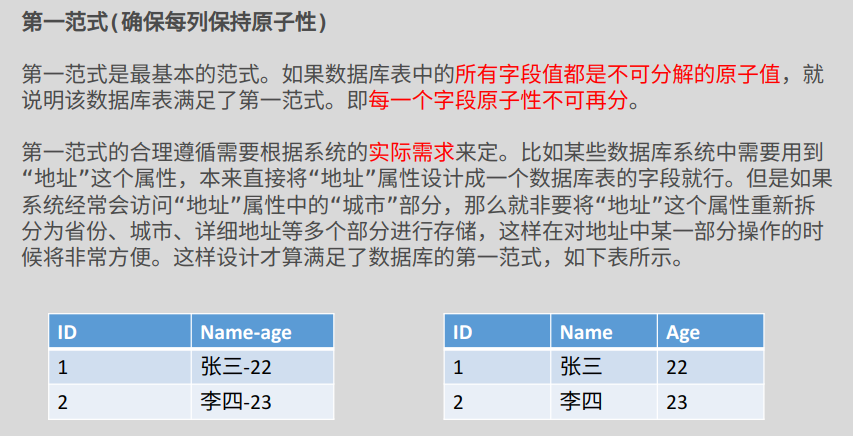
第二范式:
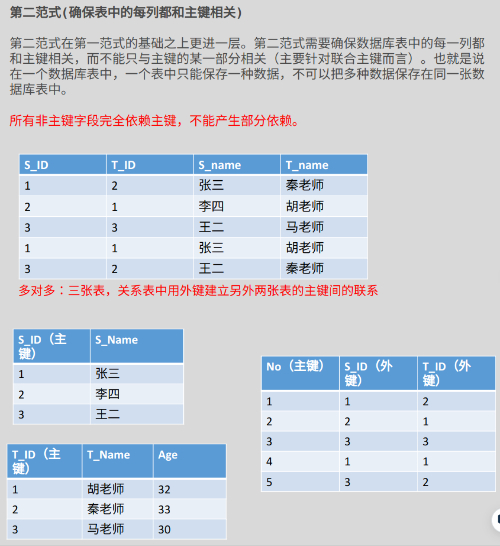
第三范式:
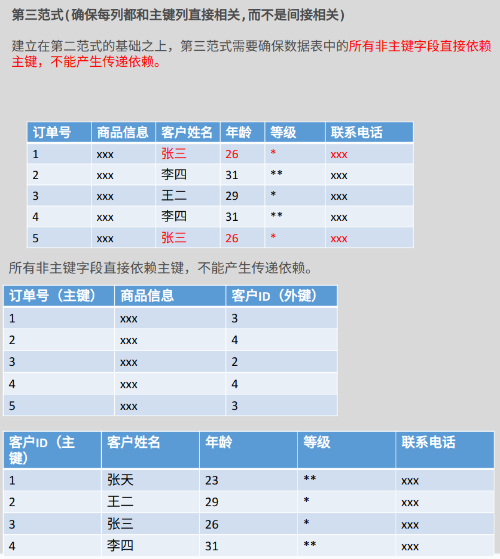
范式化设计的优缺点:
- 优点:
- 可以尽量减少数据冗余
- 范式化的表通常比反范式化的表更小
- 范式化的数据库更新起来更快
- 缺点:
- 范式化的表,在查询的时候经常需要很多
join关联,增加查询的代价。 - 更难进行索引优化
- 范式化的表,在查询的时候经常需要很多
完全符合范式化的设计有时并不能得到良好的 SQL 查询性能。
反范式化设计
反范式化设计,是出于性能的考虑,适当地违反范式设计的要求。
反范式化设计允许存在少量冗余,用空间换时间。
反范式化设计的优缺点:
- 优点:
- 可以减少表的关联
- 可以更好的进行索引优化
- 缺点:
- 存在数据冗余及数据维护异常
- 修改数据的成本更高
物理设计
不同的存储引擎有各自的特点,以适应不同的需求。如下图所示:
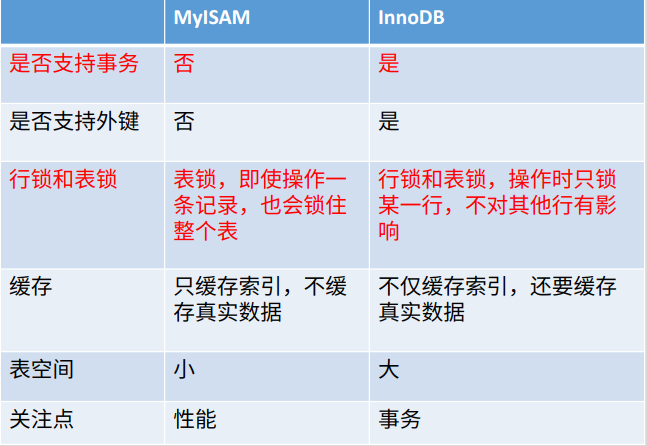
为表中的字段选择合适的数据类型:
- 更小的通常更好
- 简单就好
- 简单数据类型的操作通常需要更少的 CPU 周期。比如:整形比字符操作代价更低。
- 用 MySQL 内建的类型而不是字符串来存储日期和时间。
- 尽量避免 NULL
- 可以为
NULL是列的默认属性,通常情况下最好指定列为NOT NULL,除非真的需要存储 NULL 值。 - 如果查询中包含可为 NULL 的列,对 MySQL 来说更难优化,因为可以为 NULL 的列使得索引和值比较都更为复杂。
- 可为 NULL 的列会使用更多存储空间,在 MySQL 里需要特殊处理。
- 可以为
索引再探
- - - - - InnoDB - - - - -
InnoDB 以 主键/非主键 创建索引的一些细节:
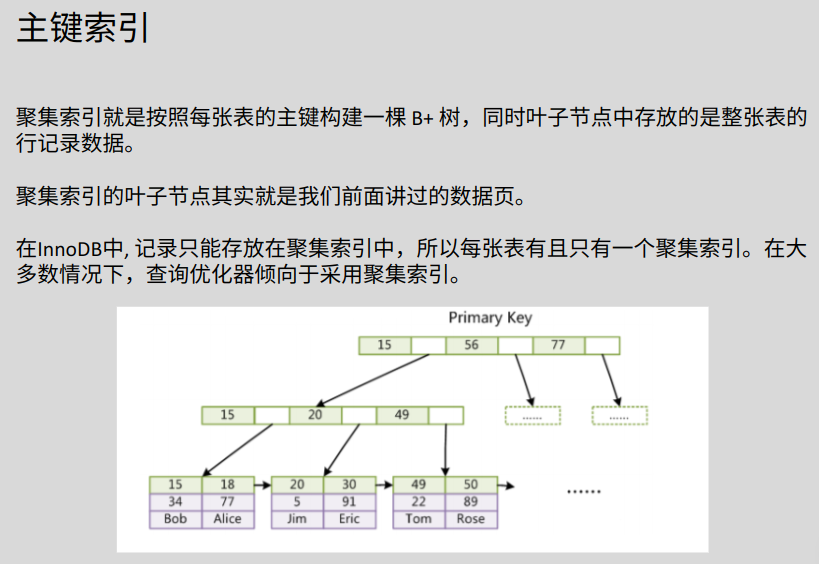
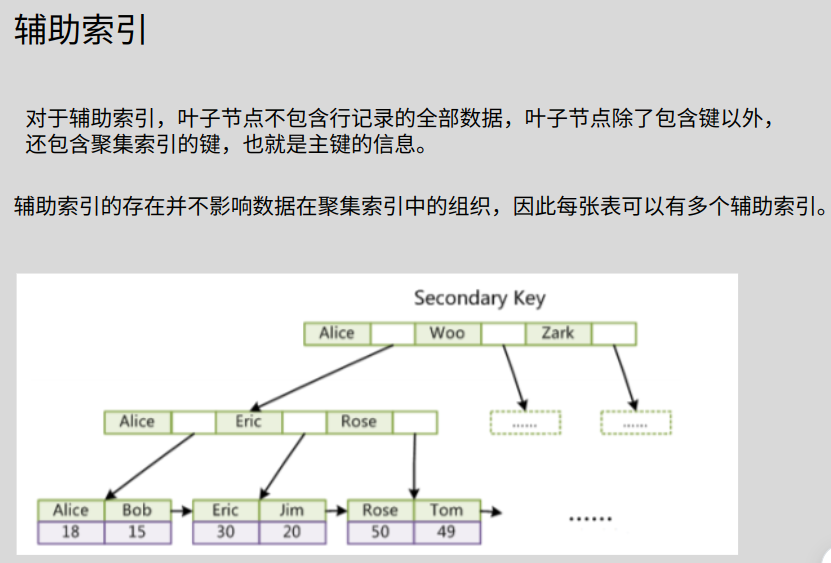
回表:使用辅助索引查询时,若查询的列在辅助索引树上没有,那么就需要通过该条信息对应的主键,在主键索引树上继续查找。即在两个索引树上进行查找,磁盘 IO 增多,查询速度变慢。(尽量避免回表)
思考下面 SQL 语句的执行过程:
select id from citizen where id = 1;

//不需要回表,该数据直接可以找到
select id_card from citizen where id_card = '';

select name from citizen where id = 1;

select name from citizen where id_card = ''; //回表

select * from citizen where id = 1;

select * from citizen where id_card = ''; //回表
索引覆盖:使用辅助索引查询时,查询的列在辅助索引树上命中。
- - - - - InnoDB END - - - - -
- - - - - MyISAM - - - - -
MyISAM 以 主键/非主键 创建的索引:
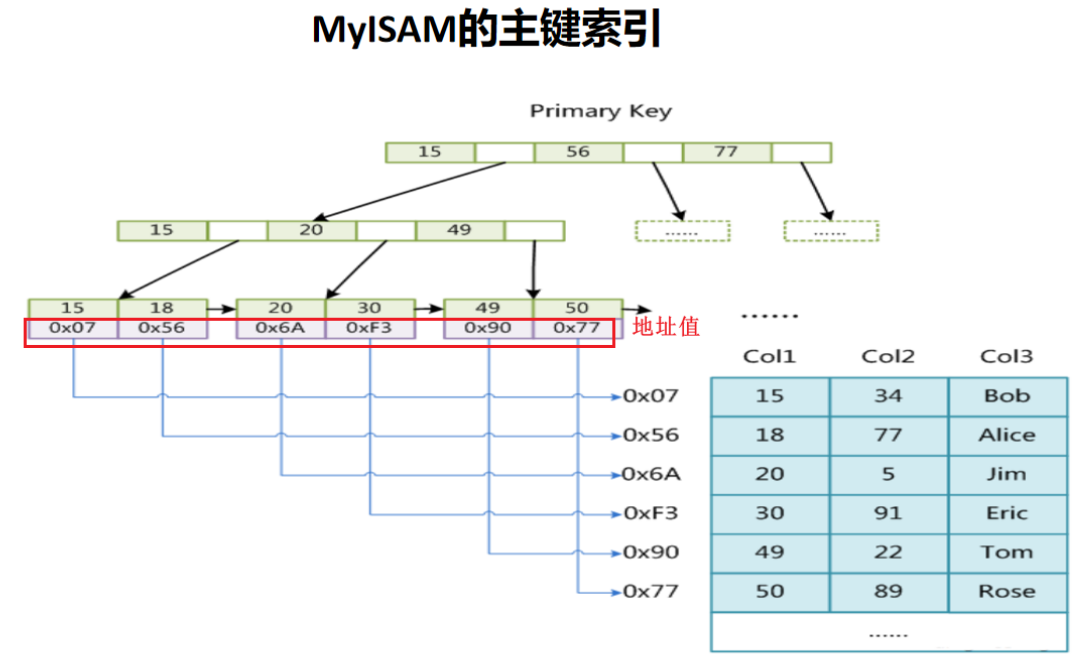
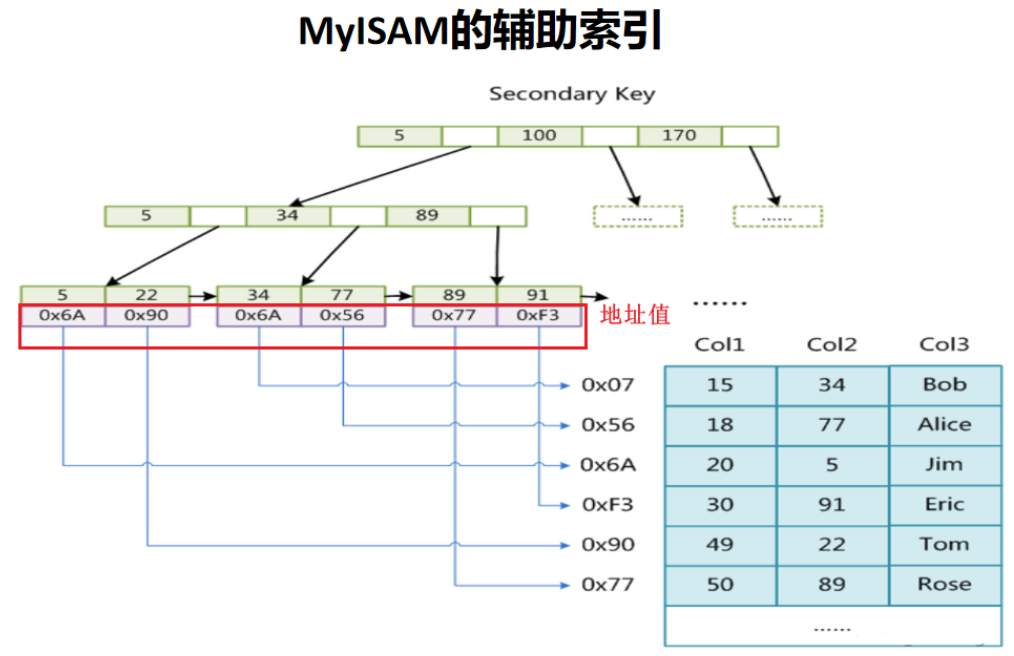
- - - - - MyISAM END - - - - -
慢查询
慢查询日志,记录了查询比较慢(执行时间长)的 SQL 语句。所有执行时间超过参数long_query_time的设定阈值的 SQL 语句,会被 mysql 记录。
优化数据库系统的性能,需要定位分析性能瓶颈。
慢查询日志有助于优化 SQL 语句。默认情况下,慢查询日志关闭,使用前须开启。若无调优需要,一般不建议启动,因为会带来性能上的影响。
查看慢查询日志是否启用:
mysql> Show variables like "%slow_query_log";
+----------------+-------+
| Variable_name  | Value |
+----------------+-------+
| slow_query_log | OFF   |
+----------------+-------+
1 row in set (0.01 sec)
或者这样查看:
mysql> Show variables like "%slow%";
+-----------------------------+-------------------------------+
| Variable_name               | Value                         |
+-----------------------------+-------------------------------+
| log_slow_admin_statements   | OFF                           |
| log_slow_extra              | OFF                           |
| log_slow_replica_statements | OFF                           |
| log_slow_slave_statements   | OFF                           |
| slow_launch_time            | 2                             |
| slow_query_log              | OFF                           |
| slow_query_log_file         | /var/lib/mysql/wanko-slow.log |
+-----------------------------+-------------------------------+
7 rows in set (0.01 sec)
上面的路径可以寻找文件位置。
启用慢查询日志(只是临时生效,如果要永久生效,必须修改配置文件):
mysql> Set global slow_query_log = on;
Query OK, 0 rows affected (0.01 sec)
查看时间阈值:
mysql> show variables like "%long_query%";
+-----------------+-----------+
| Variable_name   | Value     |
+-----------------+-----------+
| long_query_time | 10.000000 |
+-----------------+-----------+
1 row in set (0.00 sec)
调整时间阈值:
mysql> Set global long_query_time=0.1;
Query OK, 0 rows affected (0.00 sec)

mysql> show variables like "%long_query%";
+-----------------+-----------+
| Variable_name   | Value     |
+-----------------+-----------+
| long_query_time | 10.000000 |
+-----------------+-----------+
1 row in set (0.00 sec)发现long_query_time还没变,重启 mysql 再执行:
mysql> show variables like "%long_query%";
+-----------------+----------+
| Variable_name   | Value    |
+-----------------+----------+
| long_query_time | 0.100000 |
+-----------------+----------+
1 row in set (0.01 sec)

mysql> show variables like "%slow_query_log";
+----------------+-------+
| Variable_name  | Value |
+----------------+-------+
| slow_query_log | ON    |
+----------------+-------+
1 row in set (0.00 sec)
查看慢查询 SQL 记录数:
mysql> Show global status like '%slow_queries';
+---------------+-------+
| Variable_name | Value |
+---------------+-------+
| Slow_queries  | 0     |
+---------------+-------+
1 row in set (0.00 sec)
执行计划
总揽
EXPLAIN解释 SQL 语句的执行计划,即显示该 SQL 语句是怎么执行的。
DESC命令也可以查看执行计划。
官方文档: https://dev.mysql.com/doc/refman/8.0/en/explain-output.html
用法:
{explain | DESC | DESCRIBE} + SQLmysql> select * from member where id = 4;
+------+--------+------+------+---------------------+
| id | name | age | math | e_date |
+------+--------+------+------+---------------------+
| 4 | lumine | 17 | 61 | 1999-10-10 10:10:10 |
+------+--------+------+------+---------------------+
1 row in set (0.00 sec)
mysql> explain select * from member where id = 4;
+----+-------------+--------+------------+------+---------------+------+---------+------+------+----------+-------------+
| id | select_type | table | partitions | type | possible_keys | key | key_len | ref | rows | filtered | Extra |
+----+-------------+--------+------------+------+---------------+------+---------+------+------+----------+-------------+
| 1 | SIMPLE | member | NULL | ALL | NULL | NULL | NULL | NULL | 11 | 10.00 | Using where |
+----+-------------+--------+------------+------+---------------+------+---------+------+------+----------+-------------+
1 row in set, 1 warning (0.00 sec)通过EXPLAIN,可以分析出以下结果:
- 表的读取顺序
- 数据读取操作的操作类型
- 哪些索引可以使用
- 哪些索引被实际使用
- 表之间的引用
- 每张表有多少行被优化器查询
Explain执行计划的输出内容:
| 列 | 含义 |
| id | 执行计划的 id 标志 |
| select_type | SELECT 的类型 |
| table | 输出记录的表 |
| partitions | 匹配的分区 |
| type | JOIN的类型 |
| possible_keys | 优化器可能选择的索引 |
| key | 优化器实际选择的索引 |
| key_len | 使用索引的字节长度 |
| ref | 进行比较的索引列 |
| rows | 优化器预估的记录数量 |
| filtered | 根据条件过滤得到的记录的百分比 |
| extra | 额外的显示选项 |
id
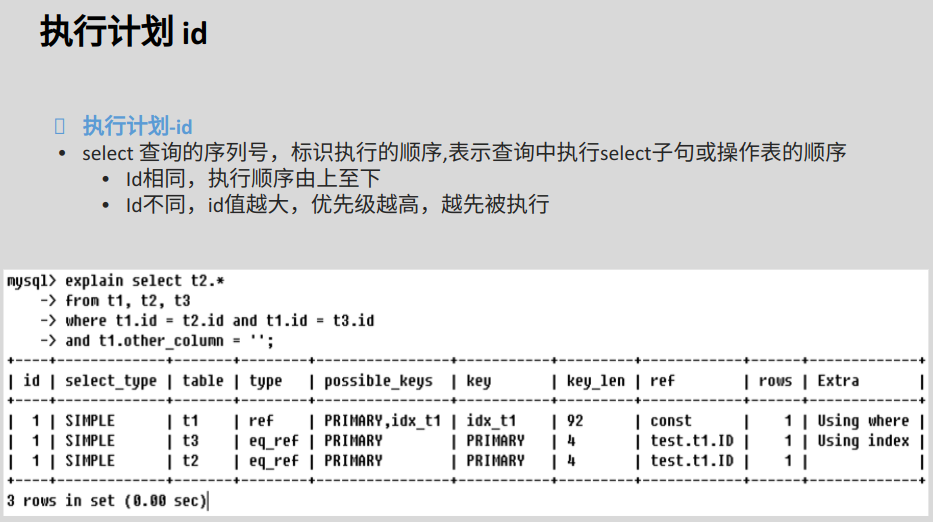
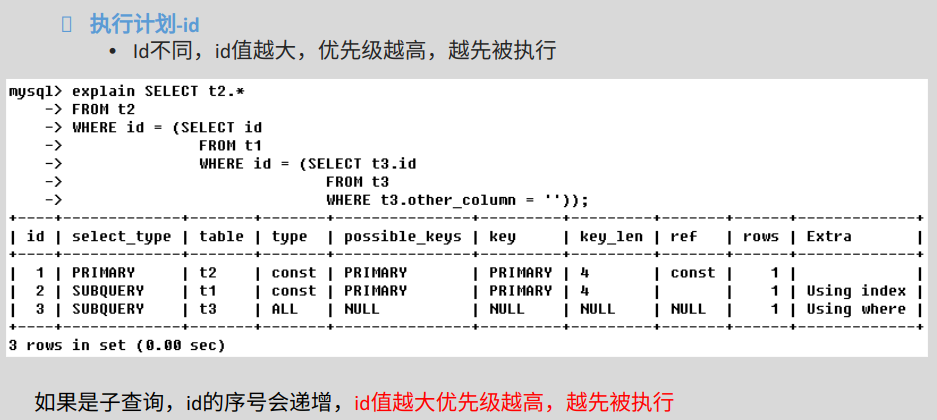
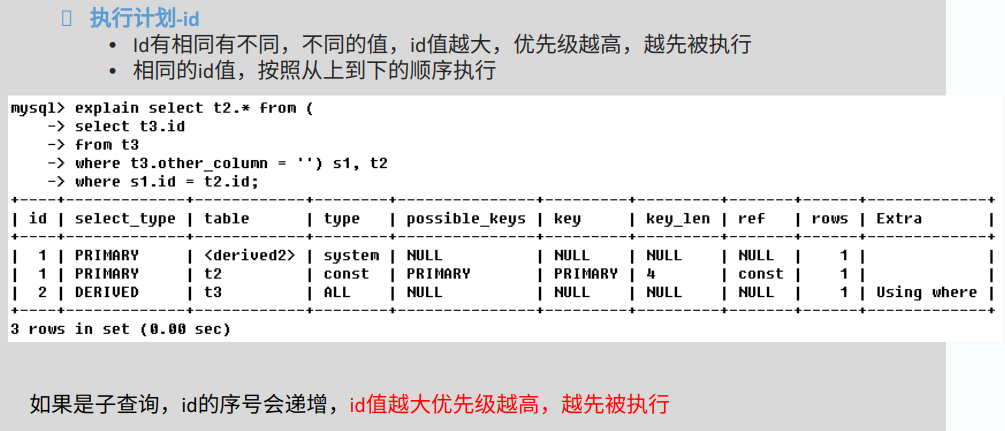
select_type
官方文档: https://dev.mysql.com/doc/refman/8.0/en/explain-output.html#explain_select_type
| 类型 | 描述 |
| SIMPLE | 简单的 select 查询,查询中不包含子查询或者 UNION |
| PRIMARY | 查询中若包含任何复杂的子部分,最外层查询则被标记为 PRIMARY |
| SUBQUERY | 在 SELECT 或 WHERE 列表中包含了子查询 |
| DERIVED | 在 FROM 列表中包含的子查询将被标记为 DERIVED,MySQL 会递归执行这些子查询,把结果放在临时表里。 |
| UNION | 若第二个 SELECT 出现在 UNION 之后,则被标记为 UNION;若 UNION 包含在 FROM 子句的子查询中,外层 SELECT 将被标记为 DERIVED |
| UNION RESULT | 从 UNION 表获取结果的 SELECT |
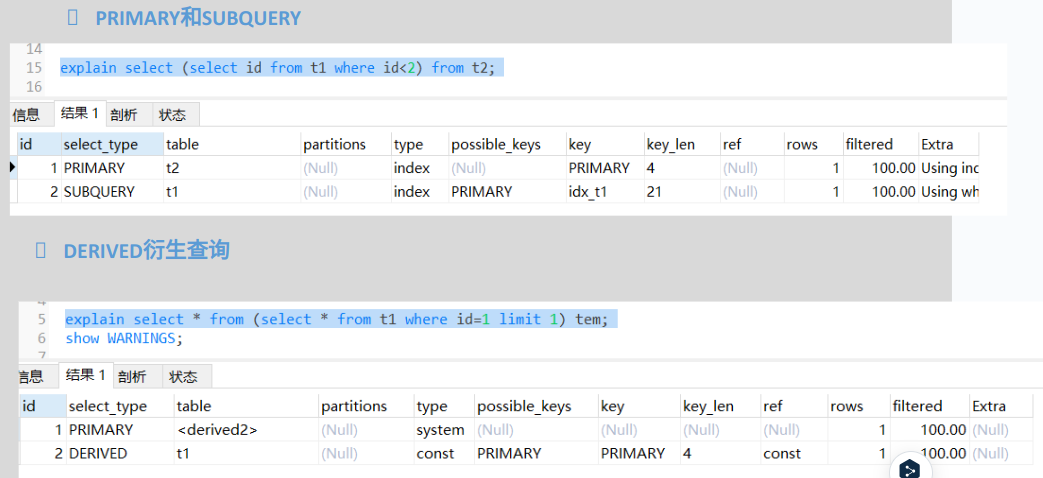
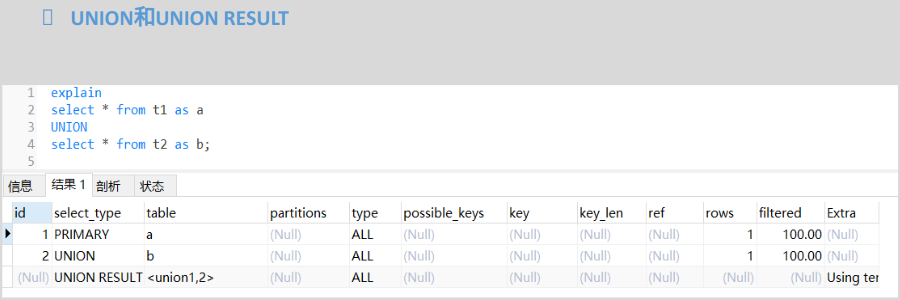
type
possible_keys、key、key_len
possible_keys:表示查询过程中有可能用到的索引。
key:实际使用的索引,如果为 NULL ,则没有使用索引。
key_len:索引字段的最大可能长度。
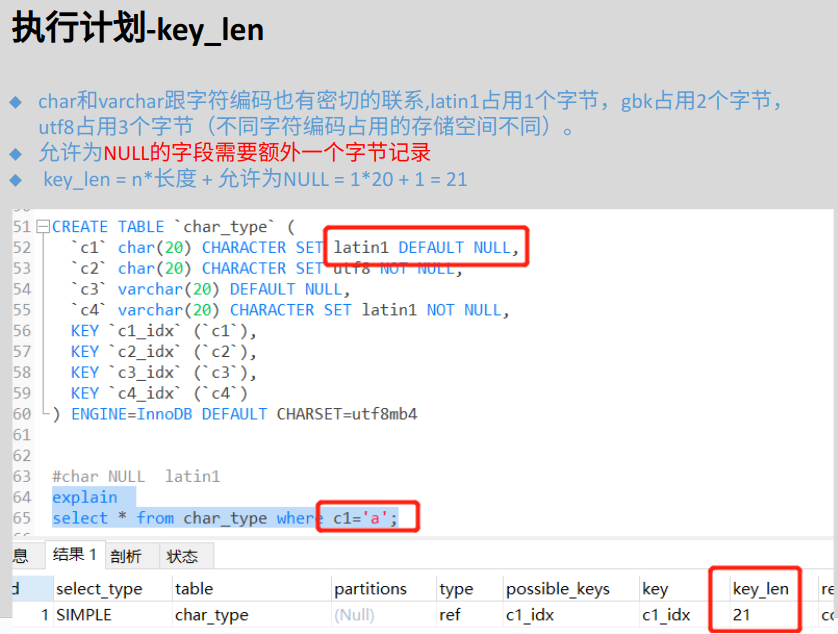
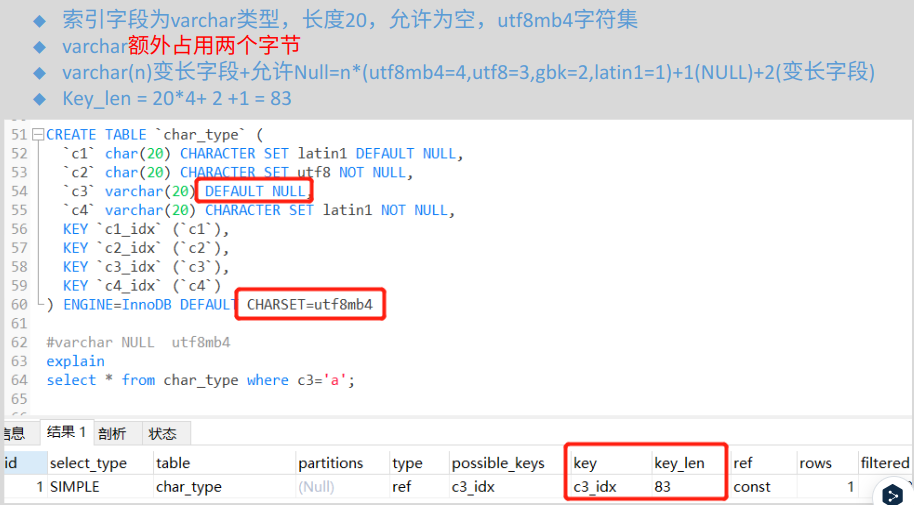
与组合索引结合的情况:
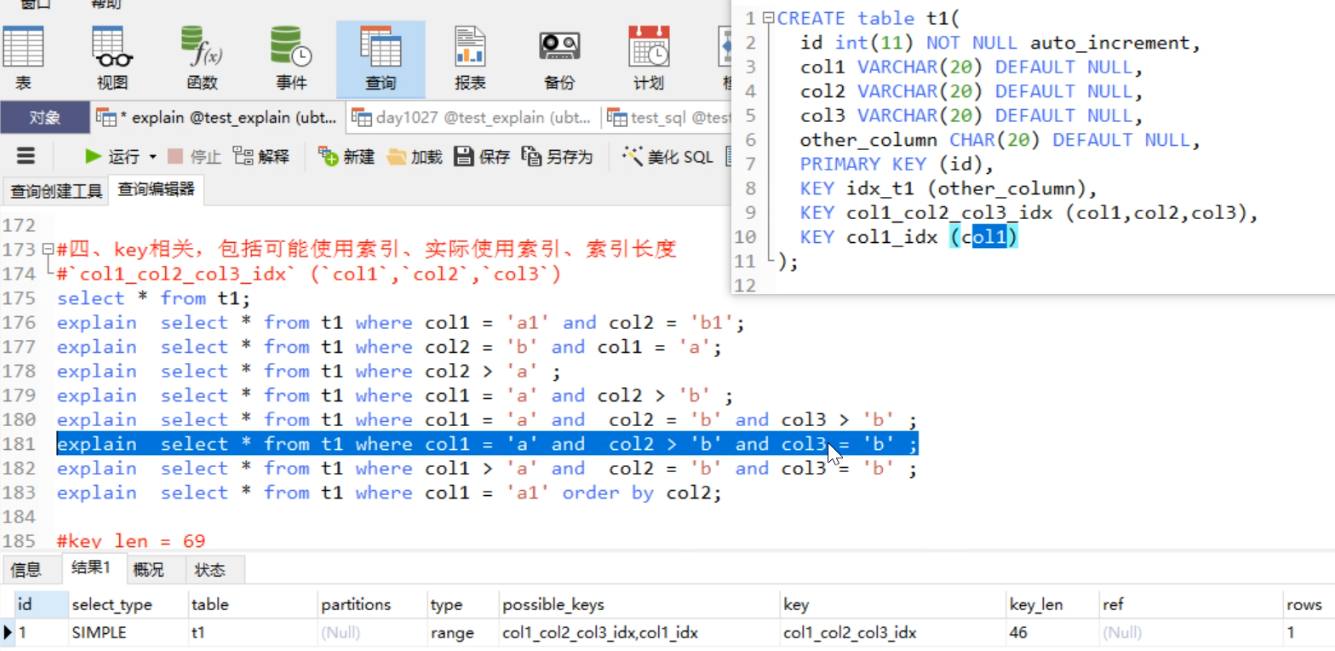
Extra
包含不适合在其他列中显示但十分重要的额外信息。
| 值 | 描述 |
| Using filesort(尽量避免) | mysql 会对数据使用一个外部的排序,而不是按照表内的索引顺序读取。MySQL 中无法利用索引完成的排序操作称为“文件排序”。 |
| Using temporary(尽量避免) | 使用临时表。常见于排序 order by 和分组查询 group by. |
| USING index(ok) | 使用覆盖索引 |
| Using where | 使用 where 过滤 |
| Using join buffer | 使用连接缓存 |
| Impossible where | where 子句的值总是 false,不能用来获取任何元组 |
索引失效
有时虽然建立了索引,但优化器并不会选择索引去查找数据,而是进行全表扫描。
一,对索引列进行运算:
select * from t where a = 1;    // ok
select * from t where a + 1 = 2; // 不 ok
二,组合索引中的情况,见上一张图。
三,使用不等号,会使索引失效:
select * from student where c1 <> 'wuhan';考虑等价写法:
select * from student where c1 > 'wuhan' UNION select * from student where c1 < 'wuhan';四,字符串类型加引号,不加导致索引失效:
select * from citizen where name = '123';
select * from citizen where name = 123;
五,其它。
实践规范
尽量使用 InnoDB 存储引擎。 解读: 支持事务、行级锁、并发性能更好、CPU及内存缓存页优化使得资源利用率更高。
禁止存储大文件或者大照片。 解读: 为何要让数据库做它不擅长的事情?大文件和照片存储在文件系统,数据库里存 URI 多好。
控制单表数据量,单表记录控制在千万级。
平衡范式与冗余,为提高效率可以牺牲范式设计,冗余数据。
表必须有主键,例如自增主键,推荐使用 UNSIGNED 整数为主键。 解读:
- 主键递增,数据行写入可以提高插入性能,可以避免 page 分裂,减少表碎片,提升空间和内存的使用;
- 主键要选择较短的数据类型,InnoDB 引擎普通索引都会保存主键的值,较短的数据类型可以有效的减少索引的磁盘空间,提高索引的缓存效率。
必须把字段定义为NOT NULL并且提供默认值。
解读:
- null 的列使索引/索引统计/值比较都更加复杂,对 MySQL 来说更难优化;
- null 这种类型 MySQL 内部需要进行特殊处理,增加数据库处理记录的复杂性;同等条件下,表中有较多空字段的时候,数据库的处理性能会降低很多;
- null 值需要更多的存储空,无论是表还是索引中每行中的 null 的列都需要额外的空间来标识;
- 对 null 的处理时候,只能采用 is null 或 is not null,而不能采用 =、in、<、<>、!=、not in 这些操作符号。如:where name != ‘shenjian’,如果存在 name 为 null 值的记录,查询结果就不会包含 name 为 null 值的记录。
禁止使用TEXT、BLOB类型。
解读:
会浪费更多的磁盘和内存空间,非必要的大量的大字段查询会淘汰掉热数据,导致内存命中率急剧降低,影响数据库性能。
根据业务区分使用char/varchar。
解读:
- 字段长度固定,或者长度近似的业务场景,适合使用 char,能够减少碎片,查询性能高;
- 字段长度相差较大,或者更新较少的业务场景,适合使用 varchar,能够减少空间。
单表索引建议控制在 5 个以内。 解读:
- 互联网高并发业务,太多索引会影响写性能;
- 生成执行计划时,如果索引太多,会降低性能,并可能导致 MySQL 选择不到最优索引;
- 异常复杂的查询需求,可以选择 ES 等更为适合的方式存储。
禁止在更新十分频繁、区分度不高的属性上建立索引。 解读:
- 更新会变更B+树,更新频繁的字段建立索引会大大降低数据库性能;
- 【性别】这种区分度不大的属性,建立索引是没有什么意义的,不能有效过滤数据,性能与全表扫描类似。
建立组合索引,必须把区分度高的字段放在前面。 解读:能够更加有效的过滤数据。
理解组合索引最左前缀原则,避免重复建设索引,如果建立了(a,b,c),相当于建立了(a), (a,b), (a,b,c) .
禁止使用SELECT *,只获取必要的字段,需要显示说明列属性。
解读:
- 读取不需要的列会增加 CPU、IO、内存、网络带宽消耗;
- 不能有效的利用覆盖索引;
- 使用 SELECT * 容易在增加或者删除字段后出现程序 BUG .
SQLWHERE条件的顺序不一定需要按照索引的顺序。
解读:比如一个联合索引是 name, age,查询的时候 WHERE 条件可以写成 age=10 and name=‘张三’。

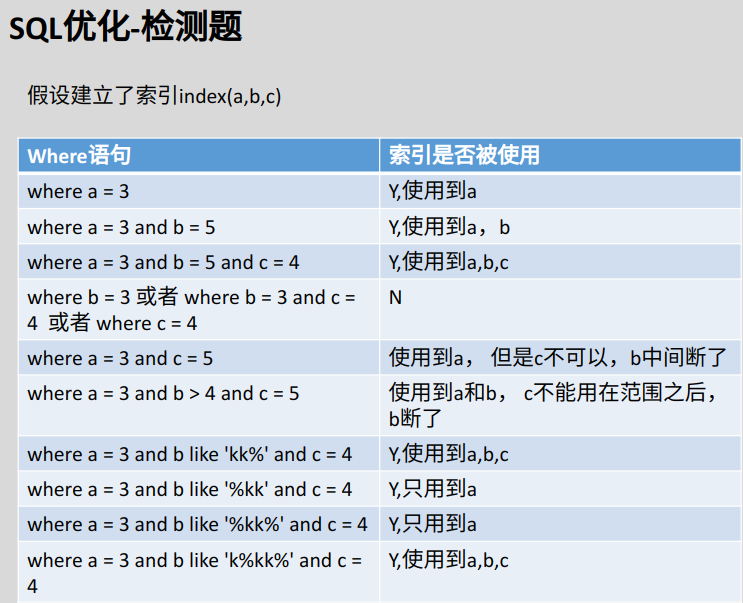
主从复制
注:上面的 PDF 中 (四)多主一从 箭头画反了。
MySQL 主从复制配置流程: